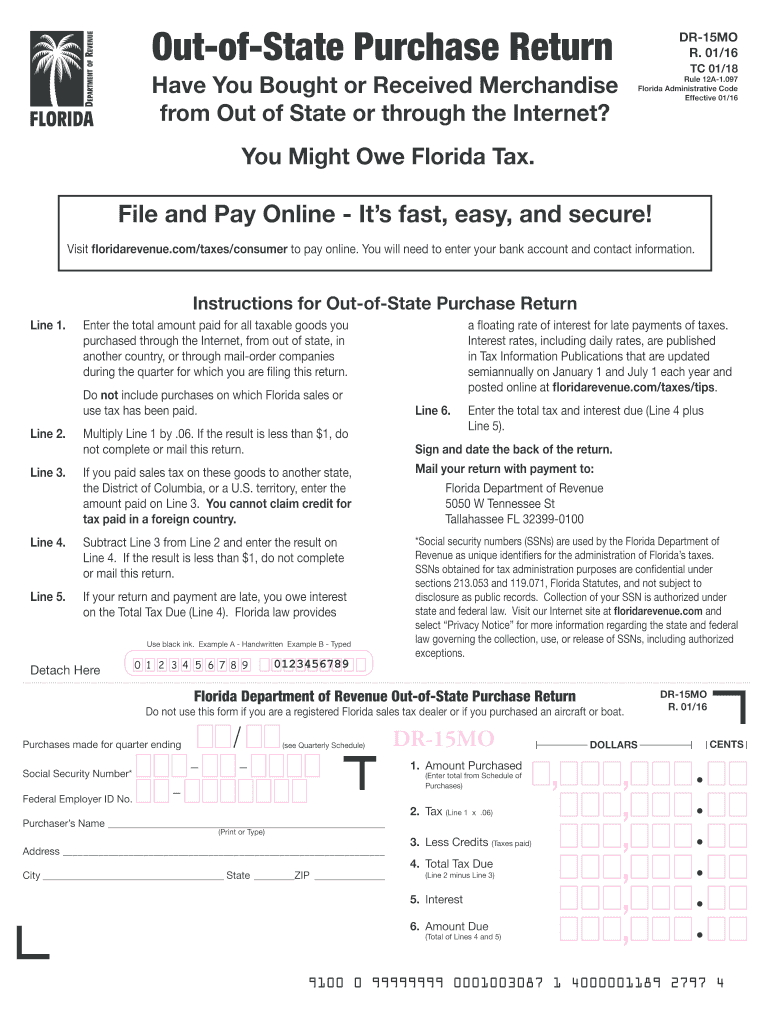
Ight Owe Florida Tax. File and Pay Online - It s fast, easy, and secure! Visit www.myflorida.com/dor and look under Current Topics for Shopping Online? Make Sure You Pay Tax. To pay online, you will need to enter your bank account and contact information. Instructions for Out-of-State Purchase Return Line 1. Enter the total amount paid for all taxable goods you purchased through the Internet, from out of state, in another country, or through mail-order companies during the quar.
Loading

Open form follow the instructions

Easily sign the form with your finger

Send filled & signed form or save
How to fill out the FL DR-15MO online
Filling out the FL DR-15MO form for out-of-state purchases is an essential step in ensuring compliance with Florida tax regulations. This guide provides a clear, step-by-step process for completing the form online, making it accessible for all users, regardless of their legal experience.
Follow the steps to complete the form accurately.
- Click ‘Get Form’ button to obtain the form and open it in your preferred editor.
- In the first section, enter the total amount paid for all taxable goods that were purchased out of state or over the Internet during the filing quarter. This should be recorded on Line 1.
- Calculate the tax amount by multiplying the Line 1 total by 0.06. This figure should be entered on Line 2. If the result is less than $1, you need not complete or submit the return.
- If applicable, enter any sales tax you paid to another state on Line 3. Note that credits for tax paid in foreign countries are not allowed.
- Subtract any tax paid (Line 3) from the calculated tax amount (Line 2) and record the difference on Line 4. If this amount is less than $1, skip submission.
- If your return and payment are late, indicate any interest owed on Line 5, according to applicable Florida laws.
- Sum the total tax due (Line 4) and any interest charges (Line 5), and enter this final amount on Line 6. This is the total amount due.
- Sign and date the form on the back to certify accuracy and compliance.
- Finally, ensure that you save your changes and choose to download, print, or share the completed form as needed.
Complete your FL DR-15MO form online today to ensure your compliance with Florida tax regulations.
Experience a faster way to fill out and sign forms on the web. Access the most extensive library of templates available.
Related content
Mar 29, 2010 — Return (Form DR-15MO)1 that remits the use tax directly to the...
A collection allowance is not authorized for use tax reported on Form DR-15MO, Florida Tax...
"Experimental Evaluation of In Situ Chemical Oxidation Activities at the Naval Training...
Get answers to your most pressing questions about US Legal Forms API.
What is the surtax for over $5000 in Florida?
The surtax rate in Florida depends on the county, with rates ranging from 0.5% to 2.5%. If your taxable sales exceed $5000, you will need to apply the applicable surtax rate to the total sales amount. Paying close attention to these rates ensures that you meet your tax obligations. Reviewing your local regulations regularly can help you stay informed.
Is Florida sales tax 6% or 7%?
Florida's base sales tax rate is 6%, but many counties impose a surtax that raises the effective rate to 7% or higher. Therefore, the total sales tax rate can vary by location. It is crucial to be aware of the local sales tax rates where you operate your business. Periodic checks of updated rates will keep your business compliant.
Can you amend Florida sales tax return?
Yes, you can amend a Florida sales tax return by filing a new return that reflects the correct information. When amending, indicate that it is an amended return and provide any explanations necessary for the changes. Timely submission is important to avoid potential penalties associated with unfiled or incorrect returns. Keeping organized records can facilitate this process.
How to apply for a Florida sales tax number?
To apply for a Florida sales tax number, you must complete the appropriate application form and submit it to the Florida Department of Revenue. You can do this online for convenience, which speeds up the process. Make sure to have all necessary information, including business details and identification. This sales tax number is crucial for conducting business legally in Florida.
How to calculate collection allowance in Florida sales tax?
In Florida, the collection allowance is determined by taking a percentage of the sales tax you collect. The allowance typically allows you to retain a certain portion of the collected tax to cover administrative costs. You must verify the current percentage with the Florida Department of Revenue to ensure compliance. Using tools designed for tax calculations can simplify this process.
How do you calculate Florida sales tax and surtax?
To calculate Florida sales tax, apply the state's base rate of 6% to your taxable sales. Then, add any applicable surtax based on your county’s rate to determine the total tax due. It is important to continuously verify the current rates as they can change. Using reliable resources like uslegalforms can help you navigate these calculations more effectively.
How do I amend a Dr. 15 in Florida?
To amend the FL DR-15MO, you must complete a new version of the form, indicating changes clearly. Include any additional documentation or explanations necessary to justify your amendments. It is also wise to check the Florida Department of Revenue's guidelines to ensure you comply with all rules. Always keep a copy of your amended form for your records.
How is surtax calculated in Florida?
Surtax in Florida is calculated based on the total taxable sales amount. Generally, the rate varies by county, and you must apply the appropriate rate to your taxable sales to determine your surtax obligation. Ensure you check the local surtax rate where your business operates, as this can impact your overall tax calculations. Adequate record-keeping will help streamline this process.
What is the penalty for dr15 in Florida?
The penalty for failing to file a FL DR-15MO or for inaccuracies can result in fines and interest on unpaid taxes. It is essential to submit this form on time to avoid any penalties. A proactive approach can help mitigate potential issues with the state's tax authorities. Keep your submissions accurate to ensure compliance with Florida law.
How do I amend a will in Florida?
To amend a will in Florida, you should draft a new document called a codicil that outlines the specific changes you want to make. Ensure you comply with Florida's legal requirements, including signing and witnessing the codicil. If the changes are significant, it may be simpler to create a new will entirely. Consider using the FL DR-15MO form for clarity in your documentation.
Use professional pre-built templates to fill in and sign documents online faster. Get access to thousands of forms.
If you believe that this page should be taken down, please follow our DMCA take down process here.