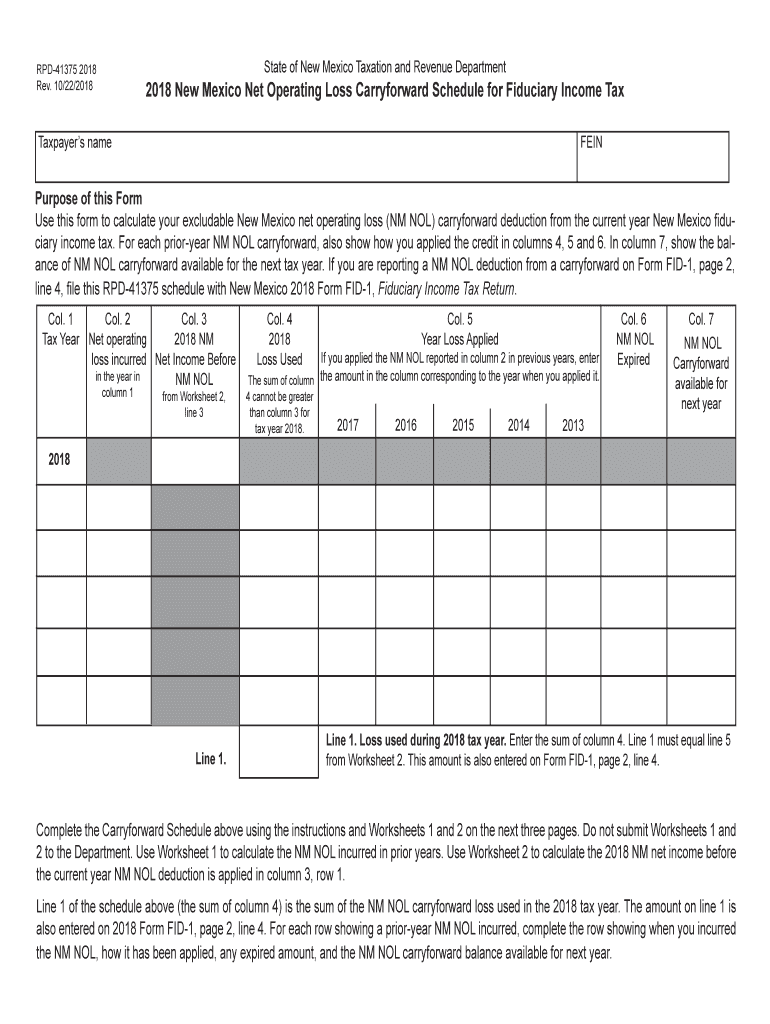
This Form Use this form to calculate your excludable New Mexico net operating loss (NM NOL) carryforward deduction from the current year New Mexico iduciary income tax. For each prior-year NM NOL carryforward, also show how you applied the credit in columns 4, 5 and 6. In column 7, show the balance of NM NOL carryforward available for the next tax year. If you are reporting a NM NOL deduction from a carryforward on Form FID-1, page 2, line 4, ile this RPD-41375 schedule with New Mexico 2016 For.
Loading

Open form follow the instructions

Easily sign the form with your finger

Send filled & signed form or save
How to fill out the NM RPD-41375 online
This guide provides clear instructions for filling out the NM RPD-41375 form, which is essential for calculating your excludable New Mexico net operating loss carryforward deduction for fiduciary income tax. Completing this form correctly ensures that you make the most of your available deductions.
Follow the steps to successfully complete the NM RPD-41375 online.
- Click ‘Get Form’ button to obtain the form and open it in the online editor.
- In Column 1, enter the tax year when you incurred a New Mexico net operating loss (NM NOL). The first row is for the 2018 tax year. Use subsequent rows for prior-year NOLs.
- In Column 2, input the amount of NM NOL incurred during the year stated in Column 1. This can be determined using Worksheet 1, which references the data from the FID-1 tax return for the respective year.
- In Column 3, enter the 2018 New Mexico net income before applying any NM NOL deductions. This value should be derived from Worksheet 2, specifically line 3, of your 2018 FID-1 return.
- For Column 4, indicate the part of the NM NOL incurred (as shown in Column 2) that was utilized during the 2018 tax year. Ensure that the total in this column does not exceed the income stated in Column 3.
- In Column 5, list the years in which the prior-year NM NOLs were applied. Record the respective amounts used in the corresponding year columns.
- In Column 6, specify any NM NOL amounts that expired during the current year, which cannot be carried forward due to time limits.
- Finally, in Column 7, calculate and enter the remaining NM NOL that will be available for carryforward to the next year by subtracting the values from Columns 4, 5, and 6 from Column 2.
- After completing all fields, you can save your changes and choose to download, print, or share the form.
Complete your NM RPD-41375 online today and ensure you accurately claim your deductions!
Experience a faster way to fill out and sign forms on the web. Access the most extensive library of templates available.
Related content
Jul 22, 2021 — This is the NM NOL loss incurred in the year of the loss to be reported...
Particulate As might be associated with either iron particles intercepted by the media...
Get answers to your most pressing questions about US Legal Forms API.
How to register for withholding tax in New Mexico?
To register for withholding tax in New Mexico, complete the required registration forms, typically found on the state tax website. You’ll also want to review the NM RPD-41375 for any specific instructions related to the withholding registration process. Once registered, you can begin withholding taxes from employee wages.
How do I fill out a tax withholding form for a new job?
When starting a new job, you will need to fill out a W-4 form. Be sure to indicate your desired allowances based on your income and family situation. For guidance on completing this form accurately, refer to the NM RPD-41375, as it outlines what information is necessary.
Does New Mexico have state withholding tax?
Yes, New Mexico has a state withholding tax that employers must deduct from employees' wages. The tax rates depend on income levels and filing status. The NM RPD-41375 document provides detailed information regarding these rates and how to implement withholding practices.
How do I file employer withholding tax?
To file employer withholding tax, start by calculating the total amount withheld from employee wages. You will need to complete the relevant forms and submit them along with your payment to the state. Following the guidelines set out in the NM RPD-41375 can help ensure compliance and accuracy.
How do I set up tax withholding?
Setting up tax withholding begins with filling out a W-4 form, where you’ll indicate your filing status and personal allowances. Ensure you reference the NM RPD-41375, which provides helpful insights on how much tax to withhold. Your employer will then use this information to adjust your paycheck accordingly.
At what age do seniors stop paying property taxes in New Mexico?
In New Mexico, seniors aged 65 and older may qualify for property tax benefits. Under certain conditions, they can receive exemptions that significantly reduce their tax liability. It's essential to consult the NM RPD-41375 documentation for specific eligibility criteria and application procedures.
How to fill out the EZ tax form?
Filling out the EZ tax form is straightforward. First, gather your income documents, like W-2s or 1099s. Next, use the NM RPD-41375 guidelines to ensure you complete all sections accurately. Finally, review your form before submitting it to avoid any mistakes.
What is the NM tax form RPD 41083?
The NM tax form RPD 41083 is used to report certain tax transactions in New Mexico. It is essential for businesses to fill out this form accurately to avoid potential complications. Familiarizing yourself with forms like NM RPD-41375 can ease the burden of tax preparation. Explore UsLegalForms to discover templates and guides for all your form needs.
Where do I mail my New Mexico state tax return?
To mail your New Mexico state tax return, send it to the New Mexico Taxation and Revenue Department. Ensure that you check your form for the proper address listed for the NM RPD-41375. Additionally, if you owe taxes, using certified mail is advisable to keep records of your submission. Remember to allow sufficient time for your return to be processed.
How do I file my New Mexico state taxes online?
You can file your New Mexico state taxes online using the New Mexico Taxation and Revenue Department's website. They provide an online filing system that guides you through the tax return process step by step. Make sure to have your CRS number ready, as it's often required for proper online filing, especially when dealing with NM RPD-41375.
Use professional pre-built templates to fill in and sign documents online faster. Get access to thousands of forms.
If you believe that this page should be taken down, please follow our DMCA take down process here.
This form is available in several versions. Select the version you need from the drop-down list below.