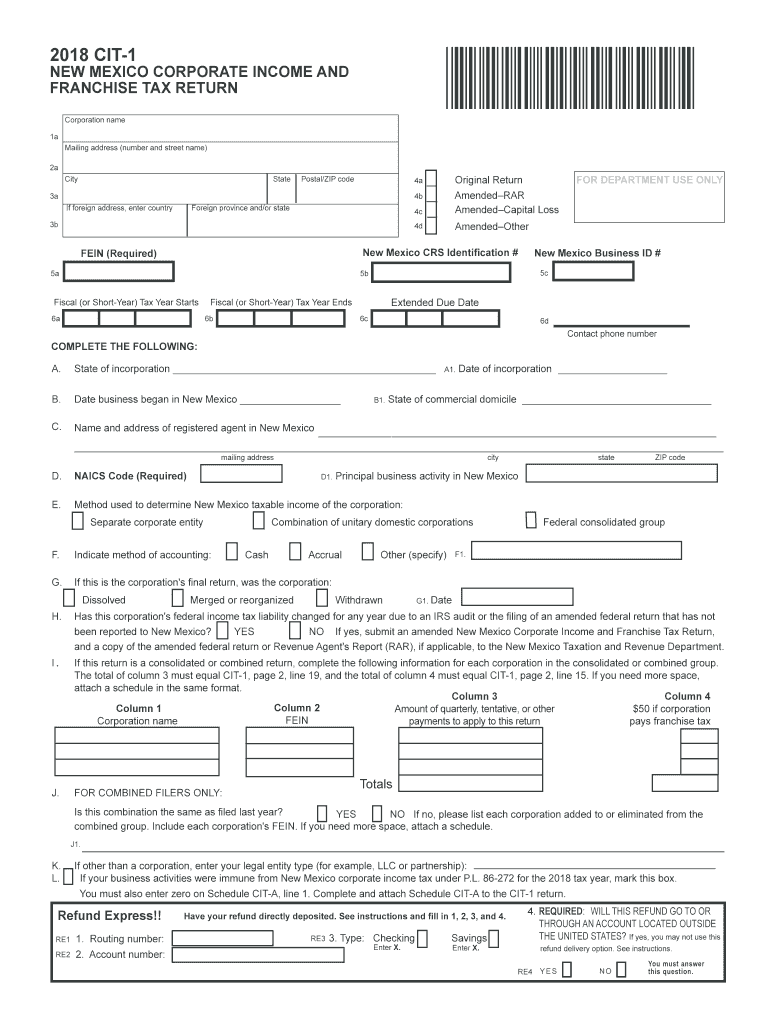
Party tax preparation software developers to develop online filing for business income tax returns through the Federal/State filing program. You may now file the following New Mexico business income tax forms online using software: Corporate Income and Franchise Tax, Sub-Chapter S Corporate Income and Franchise Tax, Pass-Through Entity Information Report, and Form RPD-41367, PTW Detail Report For Annual Withholding of Net Income From a Pass-Through Entity. New M.
Loading

Open form follow the instructions

Easily sign the form with your finger

Send filled & signed form or save
How to fill out the NM TRD CIT-1 online
Filling out the NM TRD CIT-1 form online is essential for businesses operating in New Mexico to report their corporate income and franchise taxes accurately. This guide provides clear, step-by-step instructions to assist you in completing the form effectively.
Follow the steps to complete the NM TRD CIT-1 form online.
- Click the ‘Get Form’ button to acquire the NM TRD CIT-1 form and access it in your document editor.
- Begin by entering the corporation name in the designated field. Ensure you provide the full legal name as registered.
- Fill out the mailing address, including the number and street name, city, state, and postal/ZIP code.
- Indicate whether this is an original return or an amended return by checking the appropriate box.
- Enter your New Mexico CRS Identification number and Federal Employer Identification Number (FEIN) in the required fields.
- Complete the fiscal tax year information, including the start and end dates, by entering the appropriate months and years.
- Provide details regarding the state of incorporation, date the business began in New Mexico, and the date of incorporation.
- Identify the method used to determine New Mexico taxable income, selecting one from the options listed.
- Indicate the accounting method (cash, accrual, combination, or other) your corporation employs.
- If applicable, denote whether this return is your corporation's final return and provide relevant dates.
- Address any federal income tax liability changes, responding appropriately to the yes/no question.
- If filing a combined return, complete the required fields for each corporation in the group.
- Complete sections for non-business income, if applicable, and fill out relevant schedules.
- After filling out all required fields, review your entries for accuracy.
- Once you are satisfied with the completion of the NM TRD CIT-1 form, save your changes, and choose whether to download, print, or share the document.
Start filling out your NM TRD CIT-1 form online today to ensure compliance and accuracy.
Experience a faster way to fill out and sign forms on the web. Access the most extensive library of templates available.
Related content
Taxpayers must use form CIT-1, Corporate Income and Franchise Tax Return to report the $50...
by H Iwai · 2009 · Cited by 459 — A roadmap for high-performance logic CMOS technology...
2. General information. 2.1. About this documentation. This documentation is an integral...
Get answers to your most pressing questions about US Legal Forms API.
How to calculate New Mexico gross receipts tax?
To calculate New Mexico gross receipts tax, first determine your total receipts from taxable sales. Then, apply the appropriate gross receipts tax rate, which varies by location. You can find the relevant rates on the New Mexico Taxation and Revenue Department's website. If you require assistance, the uslegalforms platform can provide convenient resources to help you navigate the tax calculation process.
Do I have to file a state tax return in New Mexico?
Yes, if you reside in New Mexico and earn taxable income, you must file a state tax return using the NM TRD CIT-1 form. Even if you owe no taxes, filing is often necessary to claim potential refunds or credits. Not filing a return can lead to penalties, so it’s essential to understand your obligations. Consider consulting uslegalforms for support in completing your tax return.
Where do I send my New Mexico state tax return?
You should send your New Mexico state tax return to the address specified on the NM TRD CIT-1 form instructions. Typically, this is the New Mexico Taxation and Revenue Department's mailing address. If filing online, ensure that you use the e-file system to submit your return electronically. For extra guidance, uslegalforms can provide detailed information on the submission process.
Can I just file federal and not state taxes?
Filing only federal taxes without state taxes is generally not advisable. In New Mexico, residents are required to file state taxes using the NM TRD CIT-1 form if they have taxable income. Failing to file state taxes can lead to penalties, so it's best to take care of both federal and state filings. For clarity on your obligations, consider resources like uslegalforms for assistance.
How to file New Mexico state taxes online?
Filing New Mexico state taxes online is straightforward. You can use the NM TRD CIT-1 form on the New Mexico Taxation and Revenue Department's e-file portal. Make sure you have all your tax documents ready, such as W-2s and 1099s, to enter your information accurately. If you're unsure about any step, uslegalforms can help guide you through the process.
How to file franchise tax in New Mexico?
To file franchise tax in New Mexico, you must first complete the NM TRD CIT-1 form. You can file this form online through the New Mexico Taxation and Revenue Department's website or by mailing it to the appropriate office. Ensure that you follow the instructions carefully, providing all required information to avoid delays. If you need assistance, consider using platforms like uslegalforms, which can simplify the filing process for you.
What is the gross receipts threshold in New Mexico?
In New Mexico, the gross receipts threshold refers to the dollar amount at which businesses become liable for gross receipts tax. This threshold can vary depending on the type of business and updates in tax laws. For up-to-date information and specific thresholds, refer to resources in the NM TRD CIT-1. Staying informed ensures your business remains compliant.
How to calculate GRT in nm?
Calculating the Gross Receipts Tax (GRT) in New Mexico involves taking the total gross receipts from your sales and applying the local tax rate. Make sure to differentiate between taxable and non-taxable receipts to ensure accuracy. The NM TRD CIT-1 provides all necessary regulations and guidelines for proper calculation. If you are uncertain, consider consulting a tax professional.
How do I find my New Mexico CRS number?
To find your New Mexico CRS (Combined Reporting System) number, check your business records or any prior tax documents issued by the New Mexico Taxation and Revenue Department. You can also access your CRS information through the online portal. Keeping all your tax-related documents organized will assist you in identifying your CRS number, important for referencing in the NM TRD CIT-1.
How do you calculate gross receipts for taxes?
You calculate gross receipts for taxes by totaling all income received from selling goods or providing services, excluding any discounts and returns. Keeping detailed records will help you maintain accuracy. The gross receipts amount is critical in determining your tax obligations, as detailed in the NM TRD CIT-1 documentation. Consult with a professional if needed for precise calculation.
Use professional pre-built templates to fill in and sign documents online faster. Get access to thousands of forms.
If you believe that this page should be taken down, please follow our DMCA take down process here.
This form is available in several versions. Select the version you need from the drop-down list below.