Loading
Get In Dor Np-20 2019
How it works
-

Open form follow the instructions
-

Easily sign the form with your finger
-

Send filled & signed form or save
How to fill out the IN DoR NP-20 online
Filling out the Indiana Department of Revenue Nonprofit Organization's Annual Report (Form NP-20) online can streamline your reporting process. This guide offers you clear, step-by-step instructions to ensure that your form is completed accurately and efficiently.
Follow the steps to successfully complete the IN DoR NP-20 online.
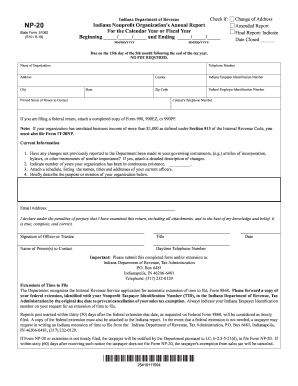
- Press the ‘Get Form’ button to access the NP-20 form and open it in your online editor.
- Enter the starting and ending dates for the report period in the format mm/dd/yyyy. This indicates the calendar year or fiscal year you are reporting for.
- Indicate if this is a change of address, amended report, or final report by checking the appropriate box. If it's a final report, provide the date when the organization closed.
- Fill in the organization's name, telephone number, address, county, Indiana taxpayer identification number, federal employer identification number, city, state, and zip code.
- Provide the printed name and contact number of a person who can be reached regarding the report.
- If a federal return is being filed, ensure to attach a completed copy of Form 990, 990EZ, or 990PF.
- Address current information by checking if there have been any changes to your governing documents. If there have been changes, attach a detailed description.
- Indicate the number of years your organization has been continuously active, and attach a schedule that lists the names, titles, and addresses of your current officers.
- Provide a brief description of your organization's mission or purpose.
- Enter the email address of the primary contact, then declare the accuracy of the information provided by obtaining the signature of an officer or trustee, including their title and daytime telephone number.
- Submit the completed form and/or any required extensions to the Indiana Department of Revenue, Tax Administration, at the specified address.
- Finally, save your changes, and if needed, download, print, or share the completed form.
Take the steps today to ensure your nonprofit complies with reporting requirements by completing the IN DoR NP-20 form online.
Get form
Experience a faster way to fill out and sign forms on the web. Access the most extensive library of templates available.
Related links form
To properly submit the Indiana form NP 20, it should be mailed to the Indiana Department of Revenue at the appropriate address listed on their official website. Ensure to attach any required documentation for a complete submission. For clarity on the process, resources in the IN DoR NP-20 guide can assist in understanding mailing procedures.
Get This Form Now!
Use professional pre-built templates to fill in and sign documents online faster. Get access to thousands of forms.