Loading
Get Ca Cdtfa-501-dg (formerly Boe-501-dg) 2019
How it works
-

Open form follow the instructions
-

Easily sign the form with your finger
-

Send filled & signed form or save
How to fill out the CA CDTFA-501-DG (formerly BOE-501-DG) online
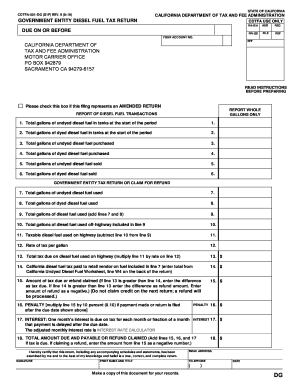
This guide provides clear and step-by-step instructions on how to fill out the CA CDTFA-501-DG form online. It ensures that users, regardless of their experience level, can complete the form accurately and efficiently.
Follow the steps to complete the CA CDTFA-501-DG online.
- Click ‘Get Form’ button to access the CA CDTFA-501-DG form and open it for online completion.
- Review the form header and ensure all information is current, including your account number and the due date for submission.
- If applicable, check the box indicating that this filing represents an amended return.
- For lines 1 and 2, enter the total gallons of undyed and dyed diesel fuel present in your tanks at the start of the reporting period.
- Complete lines 3 and 4 with the total gallons of undyed and dyed diesel fuel purchased during the reporting period.
- On lines 5 and 6, record the total gallons of undyed and dyed diesel fuel sold.
- Enter the total gallons of undyed and dyed diesel fuel used on lines 7 and 8, respectively.
- Calculate the total gallons of diesel fuel used by adding line 7 and line 8, and enter the result on line 9.
- Complete lines 10 and 11 with the gallons of fuel used off-highway and taxable fuel used on the highway.
- Input the current tax rate per gallon on line 12 and calculate the total tax due on line 13.
- Report the tax paid to retail vendors related to line 7 on line 14.
- On line 15, determine the amount of tax due or refund claimed. Enter the difference as required.
- If applicable, calculate any penalties for late payment on line 16 and any interest due on line 17.
- Finally, sum lines 15, 16, and 17 to determine the total amount due or refund claimed on line 18.
- Ensure to provide your signature, print your name and title, and include your contact information. Save your changes and download, print, or share the completed form as needed.
Start filling out the CA CDTFA-501-DG online today to ensure timely and accurate submission.
Get form
Experience a faster way to fill out and sign forms on the web. Access the most extensive library of templates available.
Filing a power of attorney in California involves filling out the proper forms, including the one that best fits the situation, such as those for taxation matters. After completing the forms, submit them as instructed by the relevant authority, like the CDTFA. Using resources like USLegalForms can simplify this process and provide you with the specific forms needed, including the CA CDTFA-501-DG (formerly BOE-501-DG).
Get This Form Now!
Use professional pre-built templates to fill in and sign documents online faster. Get access to thousands of forms.