Loading
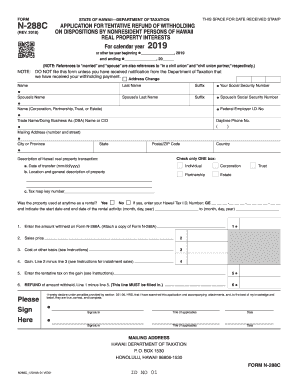
Get Hi Dot N-288c 2018
How it works
-

Open form follow the instructions
-

Easily sign the form with your finger
-

Send filled & signed form or save
How to fill out the HI DoT N-288C online
This guide provides clear instructions for filling out the HI DoT N-288C application for a tentative refund of withholding taxes. Whether you are familiar with tax forms or new to the process, this guide will assist you in completing the form accurately.
Follow the steps to successfully complete the form online.
- Press 'Get Form' button to access the HI DoT N-288C and open it in the editor.
- At the top of the form, indicate the calendar year or other tax year related to your transaction.
- Provide your name and your spouse's name if applicable, along with your Social Security Number and that of your spouse.
- Enter the name of the corporation, partnership, trust, or estate, and provide the Trade Name or Doing Business As (DBA) if applicable.
- Fill out your mailing address, including the city, state, postal/ZIP code, and country. Ensure any address changes are noted by checking the 'Address Change' box.
- Select the correct box for the description of your Hawaii real property transaction (individual, corporation, trust, partnership, or estate).
- Input the date of transfer, location, general description of the property, and the tax map key number.
- Indicate if the property was used as a rental and provide your Hawaii Tax I.D. Number if applicable.
- Follow the instructions to fill in the lines on the form: line 1 (amount withheld), line 2 (sales price), line 3 (cost/basis), line 4 (gain), line 5 (tentative tax), and line 6 (refund amount).
- Sign and date the form where indicated. If applicable, include the title of the signer.
- Once completed, save your changes. You can download, print, or share the form as needed.
Complete your HI DoT N-288C and other documents online with ease!
Get form
Experience a faster way to fill out and sign forms on the web. Access the most extensive library of templates available.
Related links form
Filling out an EZ tax form is straightforward; simply gather your income statements and personal information. Follow the step-by-step instructions, ensuring all figures are accurate for quick processing. For residents with less complex situations, the HI DoT N-288C provides relevant guidance and resources to facilitate this task comfortably.
Get This Form Now!
Use professional pre-built templates to fill in and sign documents online faster. Get access to thousands of forms.