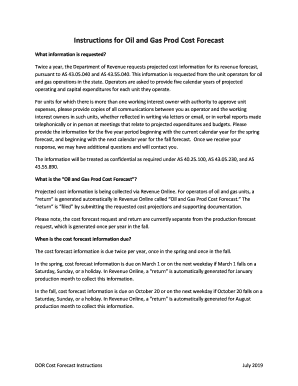
Ts revenue forecast, pursuant to AS 43.05.040 and AS 43.55.040. This information is requested from the unit operators for oil and gas operations in the state. Operators are asked to provide five calendar years of projected operating and capital expenditures for each unit they operate. For units for which there is more than one working interest owner with authority to approve unit expenses, please provide copies of all commu.

How it works
  • Open form

    Open form follow the instructions

  • Easily sign form

    Easily sign the form with your finger

  • Share form

    Send filled & signed form or save

How to fill out the AK DOR Cost Forecast Instructions online

The AK DOR Cost Forecast Instructions provide a structured approach for users to submit their projected cost information to the Department of Revenue. This guide will walk you through the essential steps to accurately complete the form online.

Follow the steps to successfully complete the Cost Forecast Instructions.

  1. Press the ‘Get Form’ button to retrieve the form and open it in your online document editor. This will enable you to start entering the required information.
  2. Navigate to the appropriate account in the online system and select the ‘O&G Prod Mth’ account. Within the ‘Returns’ tab, locate and select the ‘Oil and Gas Prod Cost Forecast’ return.
  3. Fill out the taxpayer information section. Enter the name and contact details of the person designated to receive inquiries regarding the cost forecast information. Company name, ID, and address should automatically populate.
  4. Input projected operating expenditures for each unit you manage. Click ‘Add an operating unit’ and select the relevant region and unit name. If the unit does not appear automatically, enter it under ‘Non-Unitized Production’ in the appropriate geographic area (North Slope, Cook Inlet, or Middle Earth). Provide projected operating expenditures in whole dollars, excluding inflation.
  5. Next, enter projected capital expenditures for each unit. Again, select ‘Add an operating unit’ to choose the region and unit. For non-automatically populated units, use the ‘Non-Unitized Production’ option. Input these expenditures in whole dollars and real terms, similar to the operating expenditures.
  6. Upload supporting documentation as attachments if applicable. For units with multiple interested owners, provide copies of all communications regarding expenses and budgets, whether written or verbal.
  7. Before finalizing your submission, verify all entered information for accuracy. Once confirmed, click ‘Submit’ and electronically sign the submission with your Revenue Online password.
  8. If additional information or attachments are needed after submission, select the ‘Amend a return’ option from your Oil and Gas production tax account.

Complete your documents online today for a smoother submission experience.

Get form

Experience a faster way to fill out and sign forms on the web. Access the most extensive library of templates available.

Related content

Department Of Revenue - State of Alaska

Department of Revenue releases Spring 2023 Revenue Forecast · DOR Response to IRS...

Learn more
A Cloudy Crystal Ball - Cloudfront.net

by P DEAN · 2022 — DOR's oil price forecasting methodology is sound, but that does not...

Learn more
Prediction of Acute Kidney Injury With a Machine...

by H Mohamadlou · 2018 · Cited by 179 — Acute kidney injury (AKI) is common, affecting...

Learn more
Questions & Answers

Get answers to your most pressing questions about US Legal Forms API.

Contact support

Do I need to attach federal return to Illinois?

You must attach a letter of explanation from your employer. If you are a nonresident and your only income in Illinois is from one or more partnerships, S corporations, or trusts that withheld enough Illinois Income Tax to pay your liability, you are not required to file a Form IL-1040.

Spending the Alaska residency check The funds are not taxed by the state (because there's no statewide income tax), but residents do have to pay federal income tax on the payments. It gets claimed as regular income for children and adults.

The Alaska Permanent Fund is a state-owned investment fund established using oil revenues. It has, since 1982, paid out an annual dividend to every man, woman, and child living in Alaska. In 2015, with oil prices high, the dividend totaled $2,072 per person, or $8,288 for a family of four.

Investment earnings on Alaskan mineral royalties are paid out to Alaska residents. It is an annual payment. The amount varies every year but in 2015, 637,014 residents got $2,072 each. Since 1988, the payment has been higher than $800.

The Alaska Permanent Fund is a state-owned investment fund established using oil revenues. It has, since 1982, paid out an annual dividend to every man, woman, and child living in Alaska. In 2015, with oil prices high, the dividend totaled $2,072 per person, or $8,288 for a family of four.

The State of Alaska does not have a tax exemption certificate, as it is not necessary to have one. The Alaska Constitution provides that the State of Alaska is exempt from all taxes emanating from within Alaska.

There are no statewide income or sales taxes in Alaska in fact, residents receive annual checks from the state just for living there (the Permanent Fund Dividend). That doesn't mean Alaskans pay no taxes at all, however. There are still local sales taxes, which range from 0% to 7.5%, as well as property taxes.

Alaska is the only state that does not collect state sales tax or levy an individual income tax. To finance state operations, Alaska depends primarily on petroleum revenues. Some of its cities and other local jurisdictions, however, do collect sales tax revenue.

Residents of Alabama, the District of Columbia, Delaware, Florida, Georgia, Hawaii, Idaho, Illinois, Louisiana, Maryland, North Dakota, New Jersey, New Mexico, New York, Ohio, Oklahoma, Oregon, Pennsylvania, South Dakota, Tennessee, Texas, Vermont, Washington, and Wisconsin pay nothing at all in state vehicle property ...

Many cities, towns and boroughs in Alaska do not levy any property tax. However, the largest cities, including Anchorage, do. Average property taxes in the state are on par with the national average property tax. The average effective property tax rate in both Alaska and the U.S. as a whole is 1.19%.

Get This Form Now!

Use professional pre-built templates to fill in and sign documents online faster. Get access to thousands of forms.

If you believe that this page should be taken down, please follow our DMCA take down process here.

Get AK DOR Cost Forecast Instructions