Loading
Get Pa Psrs-1326 2019-2026
How it works
-

Open form follow the instructions
-

Easily sign the form with your finger
-

Send filled & signed form or save
How to fill out the PA PSRS-1326 online
Filling out the PA PSRS-1326 form online can be a straightforward process if you follow the outlined steps carefully. This guide will provide you with detailed instructions and important information needed to successfully complete the form.
Follow the steps to fill out the PA PSRS-1326 form online.
- Click ‘Get Form’ button to obtain the form and open it in the editor.
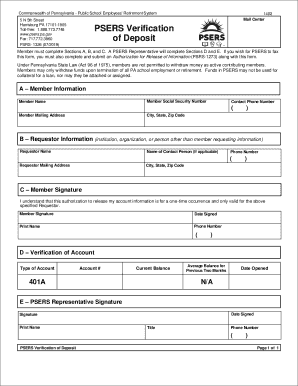
- In Section A, fill out your personal information, including your full name, social security number, mailing address, and contact phone number.
- In Section B, provide the requestor's information, which could be an institution, organization, or person other than yourself. Include the requestor’s name, contact person’s name (if applicable), mailing address, and phone number.
- Section C requires your signature indicating your authorization to release your account information for a one-time occurrence. Be sure to sign and date the form, and print your name along with your phone number.
- Sections D and E will be completed by a PSERS representative and include verification details such as account type, account number, current balance, average balance for the previous two months, and the representative's signature.
- After filling out the necessary sections, review all information for accuracy. Once you are satisfied, you can save changes, download the completed form, print it, or share it as needed.
Start completing your PA PSRS-1326 form online today!
The formula for teacher retirement in Pennsylvania is determined by the PA PSRS-1326 system and includes the retirement multiplier and the average salary. Specifically, the formula is: (Years of Service) x (Final Average Salary) x (Retirement Multiplier). This formula is essential for educators to understand, as it plays a significant role in their financial preparation for retirement.