Ure: Phone: ( Printed: ) Please complete the reverse side. Date: HC 573 (08/2011) (BACK) HENNEPIN COUNTY CONTRACTOR AFFIRMATIVE ACTION (AA) CLASSIFICATION The information requested below is used internally by Hennepin County to monitor and report on participation in county contracting. Your cooperation in completing this form is greatly appreciated. Vendors who do not complete this information may be contacted by Hennepin County to provide the information requested. If you have questions.
Loading

Open form follow the instructions

Easily sign the form with your finger

Send filled & signed form or save
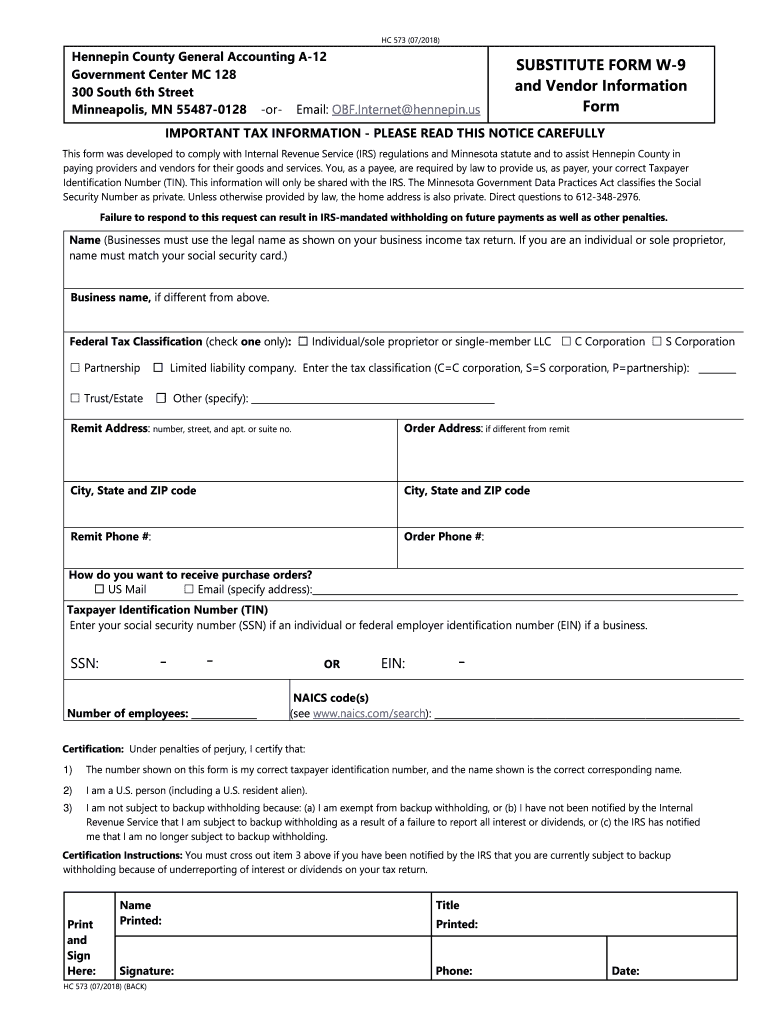
How to fill out the MN HC 573 online
Completing the MN HC 573 form online is a straightforward process that helps ensure compliance with IRS regulations and Minnesota statute. This guide provides clear, step-by-step instructions to assist you in accurately filling out the form and submitting it effectively.
Follow the steps to complete the MN HC 573 online.
- Click ‘Get Form’ button to access the MN HC 573 form and open it in your chosen editor.
- Enter your name in the designated field. If you are registering as a business, ensure that the name matches what is shown on your business income tax return.
- If your business name differs from the name provided, enter the legal business name in the specified field.
- Select the appropriate federal tax classification by checking only one box. Options include individual/sole proprietor, C corporation, S corporation, partnership, limited liability company, trust/estate, or other.
- Fill in your remit address, specifying the number, street, apartment or suite number, city, state, and ZIP code.
- If your order address is different from the remit address, complete the order address fields with the same details.
- Provide your remit phone number and order phone number in the relevant fields.
- Indicate your preferred method of receiving purchase orders by checking the appropriate box for email or US mail, and if applicable, specify the email address.
- Enter your taxpayer identification number (TIN). If you are an individual, use your social security number (SSN). If you are a business, provide your federal employer identification number (EIN).
- Complete the field for the number of employees, entering the total number as accurately as possible.
- Fill in your NAICS code(s) by consulting the appropriate resources to ensure accuracy.
- Review and certify the information provided by acknowledging that your TIN is correct. Cross out any incorrect items regarding backup withholding if necessary.
- Print and sign the document where indicated. Enter your printed name, title, phone number, and date.
- After completing the form, you can save your changes, download the document, print a hard copy, or share it as necessary.
Complete your MN HC 573 form online today to ensure prompt processing of your vendor information.
Experience a faster way to fill out and sign forms on the web. Access the most extensive library of templates available.
Related content
573. BONDS, FINES, FORFEITURES. 574. PROCEEDINGS SUPPLEMENTARY TO EXECUTION. 575...
Assurez-vous que la fiche reste fixée à l'adaptateur secteur. L'utilisation de la fiche...
Get answers to your most pressing questions about US Legal Forms API.
How do you get convicted for the crime of no proof of insurance in MN?
In Minnesota, driving without proof of insurance can lead to misdemeanor charges, fines, and possible license suspension. It's essential to always carry proof of insurance to avoid legal complications. For clarity on the legal implications related to MN HC 573, consulting a legal expert is advisable to navigate these matters.
Where can I get physical copies of tax forms?
You can get physical copies of tax forms at local libraries, community centers, and government offices. Many tax preparation services also have these forms available for pickup. If you prefer an easier option, uslegalforms lets you download and print tax forms right at home, including those relevant to MN HC 573.
Where do I get Minnesota state tax forms?
Minnesota state tax forms can be accessed through the Department of Revenue's official website or at local tax offices. They also may be available at libraries or community centers during tax season. Alternatively, uslegalforms offers an extensive collection of Minnesota tax forms easily downloadable, including those related to MN HC 573.
What is the statute of limitations for wrongful death in Minnesota?
In Minnesota, the statute of limitations for wrongful death claims is typically three years from the date of the person's death. It's critical to act promptly if you believe this applies, as time limits vary based on specific circumstances. For legal advice regarding such cases, consider consulting a professional familiar with MN HC 573.
How do I get MN state tax forms?
You can obtain MN state tax forms from the Minnesota Department of Revenue website or visit local government offices. Additionally, many tax services provide access to these forms. For ease of access, check out uslegalforms, where you can find MN state tax forms tailored for your needs, including those relevant to MN HC 573.
Does the post office have tax forms?
Yes, many post offices do carry basic federal tax forms during tax season. However, the availability may vary, and they may not have all the state-specific forms. For a comprehensive selection, consider visiting uslegalforms, where you can easily access various tax forms, including those applicable to MN HC 573.
What is the rule 69 in Minnesota?
Rule 69 in Minnesota addresses the discovery process in civil litigation, outlining how parties can obtain information from each other. This rule is fundamental in shaping how evidence is shared and assessed in legal proceedings. By being aware of MN HC 573, you can better comprehend your rights and obligations concerning this discovery process. Having a knowledgeable attorney can further assist you in navigating these legal waters.
What is the 72 hour rule in Minnesota?
The 72-hour rule in Minnesota refers to the legal provision that allows individuals experiencing a mental health crisis to be held for up to 72 hours for evaluation and treatment. This rule aims to provide immediate care while ensuring that individuals receive the support they need. Familiarity with MN HC 573 helps clarify the rights and procedures involved in such situations, emphasizing both safety and care. Engaging with legal resources can support understanding and navigation of the rule.
What is the rule 5 in Minnesota?
Rule 5 in Minnesota's legal system relates to the electronic filing and service of court documents. This rule streamlines the processes of submitting and receiving legal paperwork, enhancing efficiency and accessibility in the judicial system. For those navigating the legal landscape, understanding MN HC 573’s implications can be beneficial, as it helps ensure compliance with these electronic procedures. Stay informed to optimize your legal endeavors.
How does a 72 hour hold work in MN?
In Minnesota, a 72-hour hold allows mental health professionals to detain an individual for assessment and treatment if they pose a danger to themselves or others. This hold must be initiated by law enforcement or a psychiatrist and gives healthcare providers time to evaluate the individual's mental health. During this period, the individual may receive necessary care and support. It's important to understand how MN HC 573 outlines the procedures and protections involved.
Use professional pre-built templates to fill in and sign documents online faster. Get access to thousands of forms.
If you believe that this page should be taken down, please follow our DMCA take down process here.