Loading
Get Mn Dor Ig260 2019
How it works
-

Open form follow the instructions
-

Easily sign the form with your finger
-

Send filled & signed form or save
How to fill out the MN DoR IG260 online
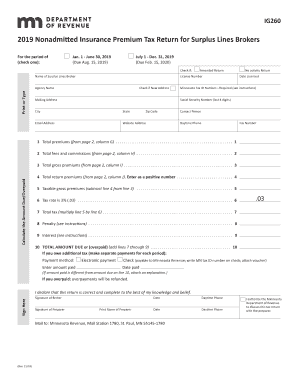
The MN DoR IG260 is a vital document for surplus lines brokers filing their nonadmitted insurance premium tax return. This guide provides step-by-step instructions to help you complete the form online accurately and efficiently.
Follow the steps to complete the MN DoR IG260 online
- Click 'Get Form' button to retrieve the form and open it in your selected editor.
- In the first section, check the applicable box to indicate the reporting period, either Jan. 1 - June 30, 2019, or July 1 - Dec. 31, 2019. Remember, the deadline for submission varies based on the period selected.
- Provide your name as the surplus lines broker and enter your license number. Ensure to print or type this information to maintain clarity.
- Fill in your agency name, marking the box if there is a new address. Include your mailing address, Minnesota tax ID number, and the last four digits of your Social Security number.
- Specify the date you were licensed, and include your email address and website address if applicable.
- Provide the contact person's name, along with the daytime phone number and fax number.
- In the next area, list the total premiums, fees, and commissions as specified. Refer to page 2 of the form for detailed inputs.
- Calculate the total gross premiums by adding the total premiums and fees. Enter the return premiums, ensuring they are noted as a positive number.
- Compute the taxable gross premiums by subtracting total return premiums from total gross premiums, applying the tax rate of 3% to find the total tax owed.
- Add any penalties and interest due to determine the total amount either owed or overpaid.
- Select your preferred payment method, filling in the amount and date paid if applicable. If you overpaid, note that refunds will be issued.
- Sign the form declaring it is correct and complete, providing the date of signature. Ensure that the preparer's information is also filled in when applicable.
- Once completed, save all changes, and then download or print the finalized form as needed for submission.
Complete the MN DoR IG260 online today to ensure compliance and accuracy in your reporting.
Get form
Experience a faster way to fill out and sign forms on the web. Access the most extensive library of templates available.
To obtain physical copies of tax forms, you can visit local libraries or government offices in Minnesota. The Minnesota Department of Revenue also offers the option to request forms through their site, including the MN DoR IG260. If you prefer mail delivery, it’s a good idea to use this method for convenience. This will ensure that you have the proper forms on hand when needed.
Get This Form Now!
Use professional pre-built templates to fill in and sign documents online faster. Get access to thousands of forms.