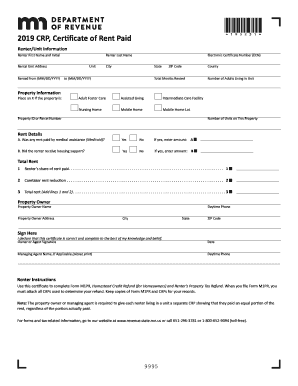
Get Mn Dor Crp 2019
How it works
-

Open form follow the instructions
-

Easily sign the form with your finger
-

Send filled & signed form or save
How to fill out the MN DoR CRP online
This guide provides clear, step-by-step instructions on how to complete the Minnesota Department of Revenue Certificate of Rent Paid (CRP) online. Whether you are a renter or a property owner, this guide is designed to help you accurately fill out the form for your tax credits.
Follow the steps to complete the MN DoR CRP online.
- Click 'Get Form' button to obtain the form and open it in the editor.
- In the 'Renter/Unit Information' section, input the renter's first name and initial, last name, and rental unit address. Provide the start date of the rental period in the format MM/DD/YYYY, along with the end date.
- In the 'Property Information' area, indicate whether the property is a unit by placing an X in the corresponding box. Fill in the electronic certificate number (ECN), city, state, ZIP code, and county.
- Complete the rental duration details by stating the total months rented. If applicable, mark any type of care provided (adult foster care, assisted living, nursing home, etc.).
- In the 'Rent Details' section, enter the number of adults living in the unit and the number of rental units on the property. Specify if any rent was paid by medical assistance (Medicaid) and record the amount if applicable.
- Indicate whether the renter received housing support. If so, enter the amount received. Proceed to calculate total rent and fill in the renter’s share of rent paid, caretaker rent reduction, and the total rent.
- For the 'Property Owner' section, provide the owner's name, address, daytime phone number, city, state, and ZIP code.
- Sign and date the form where indicated to declare that the certificate is correct and complete to the best of your knowledge. Include the managing agent's name and daytime phone number if applicable.
- Once all sections are complete, ensure to save your changes and choose to download, print, or share the completed form.
Start filling out your MN DoR CRP online today to ensure you receive the tax benefits you deserve.
Get form
The income limit for the MN DoR CRP varies each year and is based on your total household income. Generally, if your income falls below a certain threshold, you may qualify for financial assistance programs linked to the CRP. Specific limits are defined annually, so it's essential to check the latest information. This knowledge can help you navigate your application process effectively.