Loading
Get Nj Dot C-9021 2019-2026
How it works
-

Open form follow the instructions
-

Easily sign the form with your finger
-

Send filled & signed form or save
How to fill out the NJ DoT C-9021 online
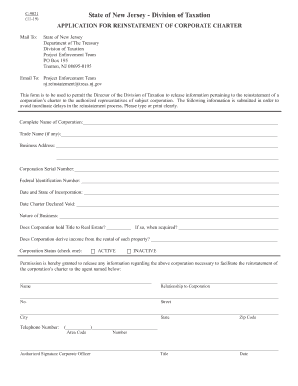
The NJ DoT C-9021 form is essential for requesting the reinstatement of a corporate charter in New Jersey. This guide provides clear, step-by-step instructions to assist you in completing the form accurately and efficiently.
Follow the steps to complete the NJ DoT C-9021 form online.
- Click ‘Get Form’ button to obtain the form and open it in the editor.
- Begin by entering the complete name of the corporation in the designated field. Ensure that this matches exactly with your official registration documents.
- If applicable, input the trade name of your corporation in the appropriate space. This is the name under which your business operates, if it differs from the legal name.
- Provide the business address, including street, city, state, and zip code. Make sure the information is current and reflects where the business is physically located.
- Enter the Corporation Serial Number. This unique identifier is assigned to your corporation and can typically be found on previous tax documents or communications from the Division of Taxation.
- Input your Federal Identification Number (EIN). This number is crucial for federal tax purposes and should be included as it appears on your IRS documentation.
- Specify the date and state of incorporation in the provided fields. This information is key to confirming your corporation's establishment.
- State the date the corporation's charter was declared void. This will assist in clarifying the nature of the reassessment.
- Describe the nature of your business succinctly in the designated area to contextualize the type of activities carried out by the corporation.
- Indicate whether the corporation holds title to any real estate. If yes, provide the date the property was acquired.
- If the corporation derives income from rental property, indicate this by responding accordingly in the relevant field.
- Select the current status of the corporation by checking either 'ACTIVE' or 'INACTIVE'. This will inform the Division of Taxation of your corporation's operational status.
- Fill in the name and relationship to the corporation of the agent authorized to receive information about the reinstatement process.
- Provide the street address, city, state, and zip code of the authorized agent for contact purposes.
- Enter the authorized agent's telephone number, including area code, for any follow-up communication.
- Lastly, ensure the authorized corporate officer signs the form, includes their title, and dates the document to finalize the submission.
- After completing the form, review all entered information for accuracy. You can then save your changes, download the completed document, print it, or share it as needed.
Complete your NJ DoT C-9021 form online to facilitate the reinstatement of your corporate charter.
Related links form
To contact NJDOT, visit their official website where you can find various contact options including phone numbers and email. The NJ DoT C-9021 is a valuable resource that streamlines your communication with them. Be prepared with your inquiries to ensure a smooth interaction and prompt assistance.