Loading
Get Irs 1040 - Schedule Se 2019
This website is not affiliated with IRS
How it works
-

Open form follow the instructions
-

Easily sign the form with your finger
-

Send filled & signed form or save
How to fill out the IRS 1040 - Schedule SE online
Filling out the IRS 1040 - Schedule SE is essential for individuals with self-employment income to calculate their self-employment tax accurately. This guide provides step-by-step instructions to help you navigate the form with ease and confidence.
Follow the steps to effectively complete Schedule SE online.
- Click ‘Get Form’ button to obtain the form and open it in the editor.
- Enter the name of the person with self-employment income as shown on Form 1040, 1040-SR, or 1040-NR in the designated field.
- Provide the social security number of the person with self-employment income in the appropriate field.
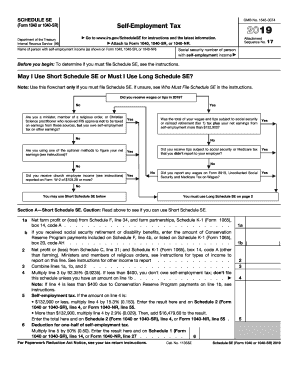
- Determine if you will use the Short Schedule SE or Long Schedule SE by following the flowchart provided in the form to clarify your eligibility.
- For Short Schedule SE, report net farm profit or loss from Schedule F or applicable sources in Section A. Fill in lines 1a and 1b accurately.
- In Section A, line 2, report the net profit or loss from Schedule C or other specified sources.
- Combine the amounts from lines 1a, 1b, and 2 in line 3, then multiply the result on line 3 by 92.35% to complete line 4.
- Calculate the self-employment tax in line 5 based on the amount on line 4, with specified rates depending on whether the limit of $132,900 is exceeded.
- For deductions, multiply line 5 by 50% to derive your deduction for half of the self-employment tax and enter it in line 6.
- If using Long Schedule SE, proceed to input detailed income and calculate tax as instructed in Part I and II of Section B.
- Once all data is entered and calculations are completed, save your changes, and choose the option to download, print, or share the form as needed.
Complete your tax documentation online today by following these detailed steps.
Get form
Experience a faster way to fill out and sign forms on the web. Access the most extensive library of templates available.
If your notary income is exempt from self-employment tax, you would report it on your IRS 1040 - Schedule C, but it won’t affect your self-employment tax calculation on Schedule SE. Ensure you keep clear documentation of your exempt income and any related expenses. You can benefit from using platforms like US Legal Forms to streamline the process of reporting income and maintaining compliance with tax regulations.
Get This Form Now!
Use professional pre-built templates to fill in and sign documents online faster. Get access to thousands of forms.