Loading
Get Irs 941-pr 2019
This website is not affiliated with IRS
How it works
-

Open form follow the instructions
-

Easily sign the form with your finger
-

Send filled & signed form or save
How to fill out the IRS 941-PR online
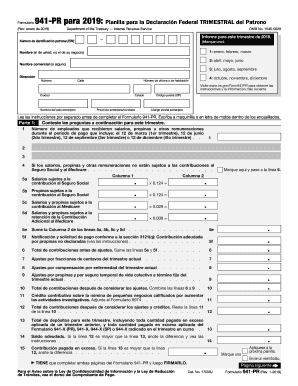
The IRS 941-PR is the federal quarterly payroll tax return form for employers in Puerto Rico. This guide provides a step-by-step approach to help users complete the form online efficiently and accurately.
Follow the steps to complete the IRS 941-PR online.
- Click ‘Get Form’ button to obtain the form and open it in the editor.
- Enter your employer identification number (EIN) in the designated box at the top of the form.
- Indicate the applicable quarter of the year you are reporting for by marking the appropriate box (1st, 2nd, 3rd, or 4th quarter).
- Provide your name, which should be your personal name and not your business name, in the specified field.
- If applicable, enter your trade name in the corresponding field.
- Fill in your address details: number, street, city, state, and zip code.
- In Part 1, report the number of employees that received wages, tips, or other compensation during the quarter.
- Complete lines 5a through 5f, calculating the taxable amounts for Social Security, Medicare, and any additional Medicare contributions.
- Add up the contributions before adjustments on line 6.
- List any necessary adjustments on lines 7, 8, and 9 as applicable.
- On line 10, calculate the total contributions after adjustments.
- If applicable, complete line 11 for credit contributions related to specific business activities.
- Calculate the net contributions after credits on line 12.
- Report the total deposits made during the quarter on line 13.
- Determine if there is a balance owed or an overpayment by comparing lines 12 and 13.
- In Part 2, provide information on your deposit schedule and obligations.
- Fill out Part 3 regarding your business operations and mark if applicable.
- Designate any third party authorized to discuss the form with the IRS if necessary.
- Complete Part 5 by signing and dating the form, ensuring it is signed by the individual responsible.
- After reviewing all entries, save your changes, and consider downloading, printing, or sharing the completed form.
Complete your IRS 941-PR online today to ensure accurate and timely tax reporting.
Get form
Experience a faster way to fill out and sign forms on the web. Access the most extensive library of templates available.
Yes, quarterly IRS Form 941 can be filed electronically, which simplifies the process and saves time. By e-filing, you can ensure that your submission is processed faster and with fewer potential errors. It’s advisable to check with trusted platforms like US Legal Forms for assistance and functionalities related to filing IRS 941-PR electronically.
Get This Form Now!
Use professional pre-built templates to fill in and sign documents online faster. Get access to thousands of forms.