Get Irs 941-ss 2019
How it works
-

Open form follow the instructions
-

Easily sign the form with your finger
-

Send filled & signed form or save
How to fill out the IRS 941-SS online
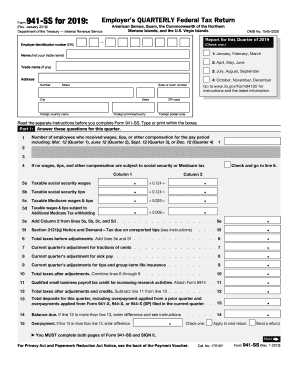
Filling out the IRS 941-SS can seem daunting, but with clear guidance, you can navigate it easily. This form is used to report employment taxes, including wages paid and taxes withheld, for employers in specific territories including American Samoa, Guam, the Commonwealth of the Northern Mariana Islands, and the U.S. Virgin Islands.
Follow the steps to confidently complete your IRS 941-SS online.
- Press the 'Get Form' button to access the IRS 941-SS form and open it for completion.
- Provide your employer identification number (EIN) at the top of the form, ensuring accuracy as this identifies your business with the IRS.
- Select the quarter for which you are reporting by checking the appropriate box; options include January to March, April to June, July to September, or October to December.
- Enter your name (not your trade name) and trade name (if applicable), followed by your address including number, street, city, state, and ZIP code.
- In Part 1, answer the questions regarding the number of employees who received wages, and provide the total amounts for taxable social security and Medicare wages in the designated columns.
- Calculate the total taxes before adjustments by combining the relevant lines. Then, make the necessary adjustments for any fractions of cents, sick pay, or group-term life insurance in lines 7-9.
- After adjustments, summarize the total taxes owed on line 10.
- Enter any applicable payroll tax credits for research activities on line 11 and calculate the final taxes due after credits on line 12.
- Indicate total deposits made for the quarter on line 13; determine if there is a balance due or an overpayment on lines 14 and 15.
- Complete Part 2 by indicating your deposit schedule and tax liability for the quarter.
- Fill out Part 3 regarding your business status, marking applicable boxes if your business has closed or if you are a seasonal employer.
- If you choose to allow a third-party designee to communicate with the IRS, complete Part 4 with the designee’s details.
- Sign and date the form in Part 5, acknowledging the truthfulness of your entries.
- Review the completed form for accuracy, then save a copy of your changes before proceeding to download, print, or share the form as necessary.
Complete your IRS 941-SS online accurately and efficiently to ensure compliance.
Get form
Related links form
To mail your IRS 941-SS form without a payment for the year 2025, send it to the address indicated in the IRS instructions for that form. Ensure you use the appropriate mailing address based on your organization's location and the specific form instructions. If you need assistance, platforms like USLegalForms offer guidance on how to complete and send your forms correctly.