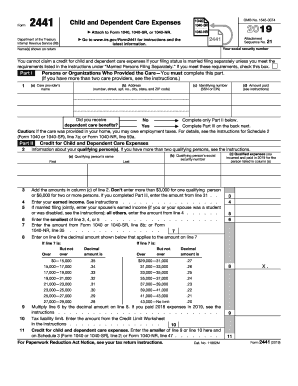
R child and dependent care expenses. Enter the smaller of line 9 or line 10 here and on Schedule 3 (Form 1040), line 49; or Form 1040NR, line 47 . . . . . . . For Paperwork Reduction Act Notice, see your tax return instructions. X. 9 11 Cat. No. 11862M Form 2441 (2018) Page 2 Form 2441 (2018) Part III Dependent Care Benefits 12 Enter the total amount of dependent care benefits you received in 2018. Amounts you received as an employee should be shown in box 10 of your Form(s) W-2. Don.

How it works
  • Open form

    Open form follow the instructions

  • Easily sign form

    Easily sign the form with your finger

  • Share form

    Send filled & signed form or save

How to fill out the IRS 2441 online

The IRS 2441 form is used to claim the child and dependent care credit, which can help reduce your tax liability for eligible care expenses. Understanding how to fill out this form online can ease your tax filing process.

Follow the steps to fill out the IRS 2441 form online.

  1. Click the ‘Get Form’ button to obtain the IRS 2441 form and open it in your preferred online editor.
  2. Begin with Part I, where you will provide information about the persons or organizations who provided the care. List the care provider’s name, address, identifying number (SSN or EIN), and amount paid in the corresponding fields.
  3. Next, indicate whether you received any dependent care benefits by answering the question at the bottom of Part I.
  4. Proceed to Part II to detail information about your qualifying persons. You will need to enter each person's name, social security number, and the qualifying expenses incurred for their care.
  5. After filling in the information, sum the amounts in the qualified expenses column. Remember, the maximum is $3,000 for one qualifying person or $6,000 for two or more.
  6. Enter your earned income and any required spouse income for married filing jointly. Follow the instructions for the amounts to input.
  7. Complete line calculations for determining the credit amount, following through lines six to eleven, ensuring to calculate correctly according to the guidance provided in the form.
  8. If applicable, move to Part III to report any dependent care benefits received. Fill in the amounts from your W-2 forms or other supporting documents as necessary.
  9. Complete the remaining calculations in Part III, making sure to follow the instructions for each line to determine tax liabilities and benefits properly.
  10. Finally, review all entered information for accuracy and completeness. You can now save changes, download, print, or share the completed form as needed.

Complete your IRS 2441 form online to benefit from the child and dependent care credit and simplify your tax filing today.

Get form

Experience a faster way to fill out and sign forms on the web. Access the most extensive library of templates available.

Related content

About Form 2441, Child and Dependent Care Expenses

Dec 4, 2024 — Information about Form 2441, Child and Dependent Care Expenses, including...

Learn more
2441 Tax Form - Eastern Washington Cyber Scholars

The 2441 tax form is an essential document for taxpayers in the United States...

Learn more
f2441--2017.pdf

3. Add the amounts in column (c) of line 2. Don't enter more than $3,000 for one...

Learn more
Questions & Answers

Get answers to your most pressing questions about US Legal Forms API.

Contact support

How do I report child care income on my taxes?

Reporting child care income on your taxes is similar to reporting other self-employment income. You’ll need to declare your earnings, file a Schedule C, and appropriately track your expenses. Using IRS 2441 can help you understand how to report such income, ensuring you comply with tax laws while maximizing your deductions.

To report babysitting income to the IRS, you must report it as self-employment income on your tax return. If your babysitting income exceeds a certain threshold, you'll also need to fill out a Schedule C to detail your earnings. Keeping good records and using resources like US Legal Forms can simplify the process and help you stay compliant with IRS regulations.

You may be unable to claim daycare expenses if they do not meet IRS 2441 qualifications. Common limitations include expenses for care provided by a relative or costs that exceed your earned income. Additionally, you must file your taxes correctly and report all necessary information to access the dependent care credit.

The IRS 2441 form for tax year 2022 is used to calculate and claim the Child and Dependent Care Expense Credit. By filling out this form, you can report your qualifying childcare expenses and determine your credit amount. To ensure accuracy, gather your receipts and use clear instructions provided by the IRS or platforms like US Legal Forms for guidance.

Expenses that qualify under IRS 2441 include costs for childcare services provided while you work or look for work. This can include daycare, preschool, or even after-school care for children under the age of 13. However, expenses for care provided by someone related to you may not qualify, so check your situation thoroughly.

The amount you receive for the dependent care credit is based on your qualifying expenses and income levels, according to IRS 2441 guidelines. As of recent tax laws, if your qualifying childcare expenses do not exceed the maximum limit, your credit may be capped at $1200. It’s essential to carefully review your expenses and ensure you meet the qualifications set by the IRS.

Yes, you need receipts for childcare expenses to claim the credit using IRS 2441. These receipts serve as proof of the amount you spent on childcare services. Additionally, having organized receipts can help you during tax time, ensuring you maximize your dependent care credit. Consider using reliable platforms like US Legal Forms to keep your records in order.

To calculate your Child Tax Credit refund, start with your total tax liability and subtract the amount of the Child Tax Credit for which you are eligible. IRS 2441 includes important formulas and guidance for determining the credit based on your qualifying children and income. For a more straightforward calculation, platforms like USLegalForms can provide user-friendly tools to assist in understanding your tax position.

You may not receive the full amount of the Child Tax Credit due to income limitations or failure to meet eligibility guidelines set by the IRS. The IRS 2441 lays out specific parameters, including the income phaseout ranges, that determine your credit amount. Review these requirements carefully to identify potential reasons for the reduction. Utilizing services from USLegalForms can help clarify your eligibility and maximize your claim.

The IRS does not specifically offer an $8,000 tax credit; however, the Child Tax Credit provides a significant reduction in tax liability for families. IRS 2441 allows for the potential claim of various child-related credits and deductions that may total significant sums. Understanding these credits can lead to substantial savings, making accurate reporting even more important. For assistance, consider using USLegalForms.

Get This Form Now!

Use professional pre-built templates to fill in and sign documents online faster. Get access to thousands of forms.

If you believe that this page should be taken down, please follow our DMCA take down process here.

IRS 2441 Form

This form is available in several versions. Select the version you need from the drop-down list below.

Get IRS 2441