Loading
Form preview
  • US Legal Forms
  • Form Library
  • Tax Forms
  • Executive Department Treasury IRS Forms
  • Irs 1040 - Schedule E 2019

Get Irs 1040 - Schedule E 2019

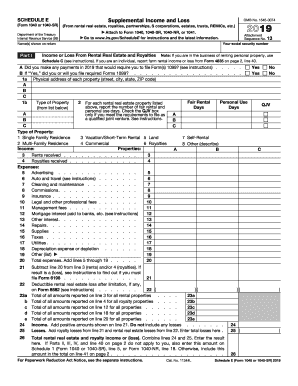
Losses here . 21 26 Total rental real estate and royalty income or (loss). Combine lines 24 and 25. Enter the result here. If Parts II, III, IV, and line 40 on page 2 do not apply to you, also enter this amount on Schedule 1 (Form 1040), line 17, or Form 1040NR, line 18. Otherwise, include this amount in the total on line 41 on page 2 . . . . . . . . . . . . . . . . . . . . . . . . . For Paperwork Reduction Act Notice, see the separate instructions. Cat. No. 11344L )( ) 24 25 ( ) 26 Sc.

This website is not affiliated with IRS

How it works

  1. Open form

    Open form follow the instructions

  2. Easily sign form

    Easily sign the form with your finger

  3. Share form

    Send filled & signed form or save

How to fill out the IRS 1040 - Schedule E online

Filling out the IRS 1040 - Schedule E is essential for reporting supplemental income such as rental real estate, royalties, and partnerships. This guide provides a structured approach to help you complete the form online with ease and accuracy.

Follow the steps to effectively complete the IRS 1040 - Schedule E online.

  1. Press the ‘Get Form’ button to access the IRS 1040 - Schedule E form, ensuring you have the correct document open in your editor.
  2. Complete the name(s) section at the top of the form, entering the names as shown on your return, followed by your social security number.
  3. In Part I, indicate whether you made any payments in the prior year that require filing Form(s) 1099 by selecting 'Yes' or 'No.' If 'Yes,' state whether you will file the required Forms 1099.
  4. List the physical addresses of each property you report, including the street, city, state, and ZIP code under section 1a.
  5. In section 1b, for each property, select the type of property from the provided list (e.g., single-family residence, commercial) and report the fair rental days and personal use days.
  6. For income, report rents received and royalties received in lines 3 and 4, respectively.
  7. In the expenses section, accurately report all relevant expenses such as advertising, auto and travel, cleaning and maintenance, insurance, and others, from lines 5 to 19.
  8. Sum the total expenses from lines 5 to 19 and enter the total on line 20.
  9. Calculate your rental real estate or royalty loss by subtracting line 20 from the income reported on lines 3 and 4.
  10. Enter the deductible rental real estate loss after limitations on line 22, if applicable.
  11. Complete the summaries in Part II by reporting income or loss from partnerships, checking the boxes as required, and attaching necessary documentation.
  12. Combine all total amounts as instructed in the summary section and report the total income or loss on the appropriate line.
  13. Once completed, save your changes to the form, and proceed to download, print, or share the completed IRS 1040 - Schedule E as needed.

Take the next step in managing your tax documents efficiently by completing your IRS 1040 - Schedule E online today.

Get form

Experience a faster way to fill out and sign forms on the web. Access the most extensive library of templates available.

Related content

About Schedule E (Form 1040), Supplemental Income...
Jan 21, 2025 — Use Schedule E (Form 1040) to report income or loss from rental real...
Learn more
2023 Schedule E (Form 1040)
Schedule E reports supplemental income and loss from rental real estate, royalties...
Learn more
1994 Form 1040 (Schedule C)
Complete this part ONLY if you are claiming car or truck expenses on line 10 and are not...
Learn more

Related links form

BLM 3160-5 2007 FWS 3-200-15A 2010 FWS 3-202-12 2007 OAS-64B 2012

Questions & Answers

Get answers to your most pressing questions about US Legal Forms API.

Contact support

To obtain an electronic copy of your tax return, visit the IRS website and use their transcript request tool. You will need to verify your identity to download your return electronically. For documents like the IRS 1040 - Schedule E, using a tax service can streamline this process and ensure you have all forms at your fingertips.

TurboTax Deluxe and higher editions include the ability to file Schedule E. If you have rental properties or need to report supplemental income, these versions will guide you through filling out the IRS 1040 - Schedule E. Make sure to choose the right edition that suits your tax needs.

Not all tax returns require a Schedule E. The IRS 1040 - Schedule E is specifically used to report rental income, royalties, partnerships, S corporations, and estates. If you're not engaging in these activities, you may not need to file this schedule with your return.

An electronic copy of your 1040 can be obtained through the IRS website using their Get Transcript tool. After you verify your identity, you can download your transcript, which includes your 1040 information. Alternatively, tax software platforms can provide electronic versions of your IRS 1040 - Schedule E and related forms.

To get a digital 1040 form, head over to the IRS website where you can download it as a PDF file. Additionally, if you use tax preparation services, you might find the IRS 1040 - Schedule E included in their digital filing options, making your tax process smoother and more efficient.

Typically, receiving a copy of your 1040 form can take about five to ten business days when requested through the IRS. If you submit your request online, the process may be quicker. For immediate access to documents like the IRS 1040 - Schedule E, platforms like USLegalForms can expedite the process.

You can request your tax transcript online by visiting the IRS website and using their Get Transcript tool. Once there, you will need to verify your identity, which may include providing personal information such as your Social Security number and filing status. This is a straightforward way to access your IRS 1040 - Schedule E information without delay.

To obtain a Schedule E form, you can visit the IRS website and download it directly from their forms section. Additionally, many tax preparation software platforms, like USLegalForms, provide easy access to this form. Simply navigate to the relevant section, and you’ll find the IRS 1040 - Schedule E ready for download.

On IRS 1040 - Schedule E, you should report all rental income as well as any associated expenses like repairs, taxes, and mortgage interest. It's important to keep accurate records of your financial transactions throughout the year. This attention to detail will not only help you comply with tax laws but also maximize your allowable deductions. Utilizing professional resources or tools provided by US Legal Forms can enhance your reporting accuracy.

Self-employment tax does not directly reduce your taxable income; rather, it is an additional tax obligation that applies to net earnings from self-employment. However, you can deduct half of your self-employment tax from your income when completing your IRS 1040 - Schedule E. This is an important step to consider to ensure you accurately report your financial situation. Engaging with tax professionals can help you better navigate these calculations.

Get This Form Now!

Use professional pre-built templates to fill in and sign documents online faster. Get access to thousands of forms.
If you believe that this page should be taken down, please follow our DMCA take down processhere.

Industry-leading security and compliance

US Legal Forms protects your data by complying with industry-specific security standards.
  • In businnes since 1997
    25+ years providing professional legal documents.
  • Accredited business
    Guarantees that a business meets BBB accreditation standards in the US and Canada.
  • Secured by Braintree
    Validated Level 1 PCI DSS compliant payment gateway that accepts most major credit and debit card brands from across the globe.
Get IRS 1040 - Schedule E
  • Adoption
  • Bankruptcy
  • Contractors
  • Divorce
  • Home Sales
  • Employment
  • Identity Theft
  • Incorporation
  • Landlord Tenant
  • Living Trust
  • Name Change
  • Personal Planning
  • Small Business
  • Wills & Estates
  • Packages A-Z
  • Affidavits
  • Bankruptcy
  • Bill of Sale
  • Corporate - LLC
  • Divorce
  • Employment
  • Identity Theft
  • Internet Technology
  • Landlord Tenant
  • Living Wills
  • Name Change
  • Power of Attorney
  • Real Estate
  • Small Estates
  • Wills
  • All Forms
  • Forms A-Z
  • Form Library
  • Legal Hub
  • About Us
  • Help Portal
  • Legal Resources
  • Blog
  • Affiliates
  • Contact Us
  • Delete My Account
  • Site Map
  • Industries
  • Forms in Spanish
  • Localized Forms
  • State-specific Forms
  • Forms Kit
  • Real Estate Handbook
  • All Guides
  • Notarize
  • Incorporation services
  • For Consumers
  • For Small Business
  • For Attorneys
  • USLegal
  • FormsPass
  • pdfFiller
  • signNow
  • altaFlow
  • DocHub
  • Instapage
Form Packages
  • Adoption
  • Bankruptcy
  • Contractors
  • Divorce
  • Home Sales
  • Employment
  • Identity Theft
  • Incorporation
  • Landlord Tenant
  • Living Trust
  • Name Change
  • Personal Planning
  • Small Business
  • Wills & Estates
  • Packages A-Z
Form Categories
  • Affidavits
  • Bankruptcy
  • Bill of Sale
  • Corporate - LLC
  • Divorce
  • Employment
  • Identity Theft
  • Internet Technology
  • Landlord Tenant
  • Living Wills
  • Name Change
  • Power of Attorney
  • Real Estate
  • Small Estates
  • Wills
  • All Forms
  • Forms A-Z
  • Form Library
Customer Service
  • Legal Hub
  • About Us
  • Help Portal
  • Legal Resources
  • Blog
  • Affiliates
  • Contact Us
  • Delete My Account
  • Site Map
  • Industries
  • Forms in Spanish
  • Localized Forms
  • State-specific Forms
  • Forms Kit
Legal Guides
  • Real Estate Handbook
  • All Guides
Prepared for you
  • Notarize
  • Incorporation services
Our Customers
  • For Consumers
  • For Small Business
  • For Attorneys
Our Sites
  • USLegal
  • FormsPass
  • pdfFiller
  • signNow
  • altaFlow
  • DocHub
  • Instapage
Social Media
Call us now toll free:
+1 833 426 79 33
As seen in:
© Copyright 1999-2026 airSlate Legal Forms, Inc. 3720 Flowood Dr, Flowood, Mississippi 39232
  • Your Privacy Choices
  • Terms of Service
  • Privacy Notice
  • Content Takedown Policy
  • Bug Bounty Program
IRS 1040 - Schedule E
This form is available in several versions.
Select the version you need from the drop-down list below.
2021 IRS 1040 - Schedule E
Select form
  • 2021 IRS 1040 - Schedule E
  • 2020 IRS 1040 - Schedule E
  • 2019 IRS 1040 - Schedule E
  • 2018 IRS 1040 - Schedule E
  • 2017 IRS 1040 - Schedule E
  • 2016 IRS 1040 - Schedule E
  • 2015 IRS 1040 - Schedule E
  • 2014 IRS 1040 - Schedule E
  • 2013 IRS 1040 - Schedule E
  • 2012 IRS 1040 - Schedule E
  • 2011 IRS 1040 - Schedule E
  • 2010 IRS 1040 - Schedule E
  • 2009 IRS 1040 - Schedule E
  • 1997 IRS 1040 - Schedule E
Select form