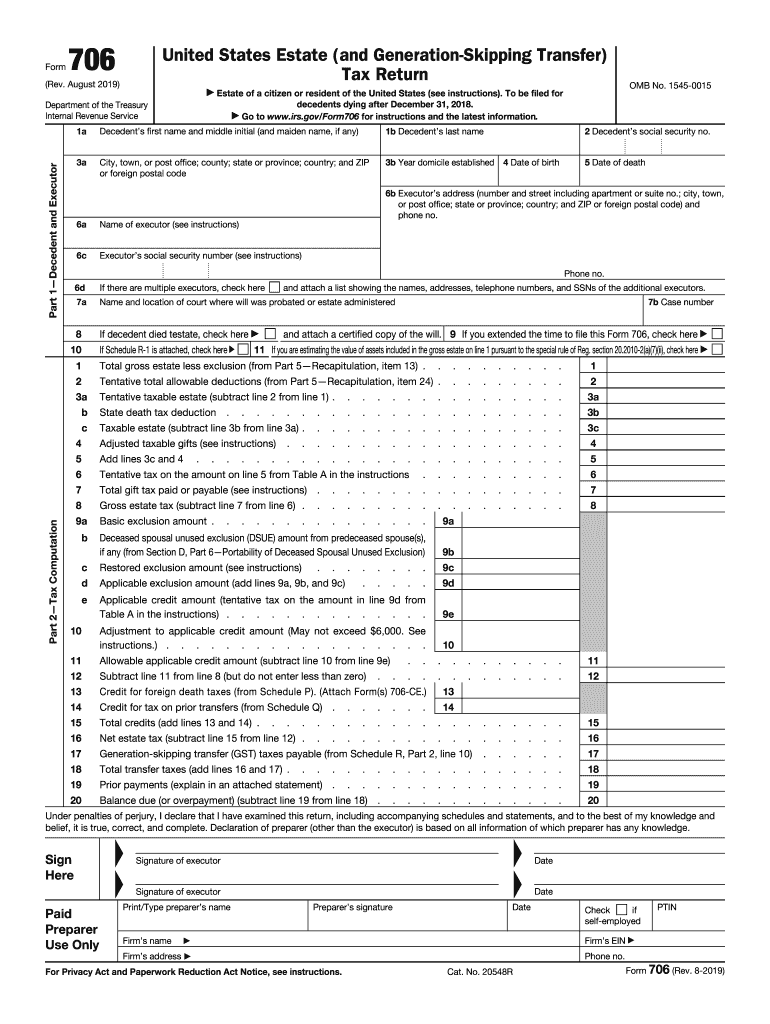
. . . . . . . . . 9e 11 Adjustment to applicable credit amount (May not exceed $6,000. See instructions.) . . . . . . . . . . . . . . . . . . Allowable applicable credit amount (subtract line 10 from line 9e) . . . . . . . . . 11 12 13 14 15 16 17 Subtract line 11 from line 8 (but do not enter less than zero) . . . . . . . Credit for foreign death taxes (from Schedule P). (Attach Form(s) 706-CE.) 13 Credit for tax on prior transfers (from Schedule Q) . . . . . . . 14 Total credit.
Loading

Open form follow the instructions

Easily sign the form with your finger

Send filled & signed form or save
How to fill out the IRS 706 online
Filling out the IRS 706, the United States Estate (and Generation-Skipping Transfer) Tax Return, is an essential step for executors managing an estate. This guide provides clear, step-by-step instructions to assist you in completing the form online, ensuring compliance with necessary regulations.
Follow the steps to accurately complete the IRS 706 online
- Click ‘Get Form’ button to access the 706 form and open it in your chosen editor.
- In Part 1, provide details about the decedent and the executor, including names, Social Security numbers, addresses, and dates of birth and death.
- In Part 2, compute the tax by filling in the total gross estate and any allowable deductions. Ensure accurate calculations based on the given values.
- Complete Parts 3 to 6 by following instructions specific to each section about elections, general information, and portability of the deceased spousal unused exclusion.
- In Part 5, consolidate estate values and deductions across all relevant schedules, ensuring all amounts are totaled correctly.
- Complete any applicable schedules (A to U), detailing real estate, stocks, bonds, insurance, and any other account adjustments.
- Finally, review all entries for accuracy, save your changes, and use options to download, print, or share your completed form.
Start completing your IRS 706 form online today to ensure timely compliance with estate tax obligations.
Experience a faster way to fill out and sign forms on the web. Access the most extensive library of templates available.
Related content
May 23, 2025 — The executor of a decedent's estate uses Form 706 to figure the estate...
They are allowable as an income tax deduction on Form 1041, U.S. Income Tax Return for...
Form 706 to transfers taking effect at applicable.) If you filed gift tax returns for...
Get answers to your most pressing questions about US Legal Forms API.
What does code 706 mean on an IRS transcript?
Code 706 on an IRS transcript typically indicates that the IRS has processed a Form 706 or a related adjustment. This code reflects actions concerning estate tax accounts and can provide insight into a decedent's estate tax status. Checking for this code can help you understand where the process stands.
What is the difference between estate tax return and inheritance tax return?
An estate tax return, like the IRS 706, is filed for calculating taxes on a deceased person's total estate. Inheritance tax, however, is levied on the beneficiaries receiving the estate's assets. It's important to note that not all states impose an inheritance tax, so consulting the rules in your state is advisable.
What is the difference between a 706 and 709 return?
The primary difference between the IRS 706 and IRS 709 returns lies in their purpose; one relates to estate taxes while the other pertains to gifts. Form 706 deals with the tax on the entire estate upon death, while Form 709 reports individual gifts to the IRS during a person's lifetime. Understanding this difference is crucial to navigate tax obligations accurately.
What is a 709 tax return?
The IRS 709 tax return, or the Gift Tax Return, is filed by individuals who give gifts that exceed the annual exclusion amount set by the IRS. This form tracks taxable gifts and ensures that individuals adhere to federal gift tax laws. Individuals using the IRS 709 can effectively manage their tax responsibilities related to significant gifts.
Is a Form 706 a gift tax return?
No, Form 706 is not a gift tax return; it is the Estate Tax Return. While the IRS 709 form handles gift taxes, the IRS 706 focuses solely on taxes owed after someone's death. Understanding the distinction between these forms is essential for effective estate planning.
What is IRS form 706 used for?
The IRS 706 form is specifically designed to report and calculate estate taxes for the deceased. It assesses the value of a deceased person's estate to determine how much tax is owed to the government. Utilizing the IRS 706 allows executors to ensure compliance with federal tax regulations surrounding estate transfers.
What is the difference between IRS form 706 and 709?
The IRS 706 and IRS 709 forms serve distinct purposes. The IRS 706 is the Estate Tax Return, used to calculate the estate tax owed when someone passes away. In contrast, the IRS 709 is the Gift Tax Return, filed to report gifts made during an individual's lifetime that exceed the annual exclusion limit.
Who signs Form 706?
The executor of the estate typically signs Form 706 to certify the accuracy of the information provided. In situations where there is no designated executor, the person acting on behalf of the estate will sign this form. It is important that the signer has a thorough understanding of the estate's financial elements to ensure the IRS 706 is completed accurately and submitted on time.
Who is required to file a Form 706?
You are required to file Form 706 if the gross estate exceeds the exemption amount set forth by the IRS. If you are an executor of an estate that meets or exceeds this threshold, submitting the IRS 706 is essential. Moreover, certain gifts made during the lifespan of the decedent may also necessitate this filing. It helps to consult a tax professional to assess your specific circumstances.
Who should elect portability?
Married couples should consider electing portability to take advantage of the deceased spouse's unused estate tax exemption. This option allows the surviving spouse to increase their exemption limit when they pass away. Filing Form 706 effectively elects portability, which can lead to significant tax savings down the line. Platforms like uslegalforms provide guidance on this election process.
Use professional pre-built templates to fill in and sign documents online faster. Get access to thousands of forms.
If you believe that this page should be taken down, please follow our DMCA take down process here.