Loading
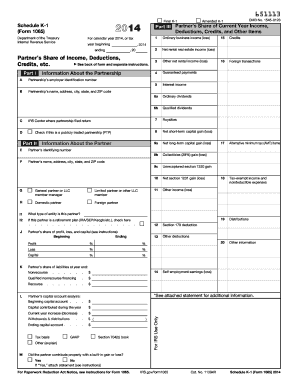
Get Irs 1065 - Schedule K-1 2014
This website is not affiliated with IRS
How it works
-

Open form follow the instructions
-

Easily sign the form with your finger
-

Send filled & signed form or save
How to fill out the IRS 1065 - Schedule K-1 online
Filling out the IRS 1065 - Schedule K-1 can seem daunting, but with the right guidance, you can navigate it with ease. This comprehensive guide will walk you through each section of the form, ensuring you provide the necessary information accurately and efficiently.
Follow the steps to complete the IRS 1065 - Schedule K-1 online.
- Click ‘Get Form’ button to obtain the form and open it in the online editor.
- Begin with Part I, which includes the partnership's information such as the name, address, and employer identification number. Ensure all details are entered correctly.
- In Part II, provide information about the partner, including their name, address, and identifying number. Indicate whether the partner is a general partner or a limited partner.
- Proceed to Part III, where you will report the partner’s share of current year income, deductions, credits, and other items. Carefully enter amounts in fields for ordinary business income, guaranteed payments, and any applicable deductions.
- Detail any claims for credits or foreign transactions as outlined in the respective sections. Make certain to reference the relevant guidance for each line item.
- In the final fields, report any self-employment earnings or losses, tax-exempt income, and distributions. It's important to ensure accuracy, as these will affect the partner’s tax return.
- Once all sections have been completed, review the form for any errors or missing information. Save any changes made in the editor.
- Finally, you can download, print, or share the completed Schedule K-1 as needed.
Start filling out your IRS 1065 - Schedule K-1 online today for accurate and efficient document management.
Get form
Experience a faster way to fill out and sign forms on the web. Access the most extensive library of templates available.
Related links form
To enter Schedule K-1 in TurboTax, go to the 'Income' section and select the 'Other Income' option. From there, you can choose 'Schedule K-1,' allowing you to input the required details. This step is essential for reporting your IRS 1065 - Schedule K-1 income accurately. If you find it complex, US Legal Forms provides helpful resources.
Get This Form Now!
Use professional pre-built templates to fill in and sign documents online faster. Get access to thousands of forms.