Loading
Get Irs 8453-eo 2019
This website is not affiliated with IRS
How it works
-

Open form follow the instructions
-

Easily sign the form with your finger
-

Send filled & signed form or save
How to fill out the IRS 8453-EO online
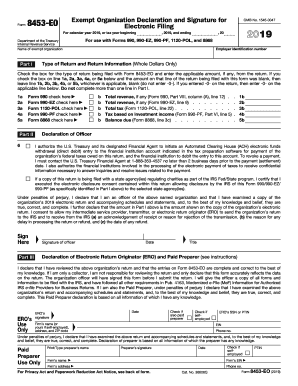
Filling out the IRS 8453-EO form is an essential step for exempt organizations seeking to authenticate their electronic tax returns. This guide provides a straightforward approach to navigating the form online, ensuring that users can complete it with confidence.
Follow the steps to complete the IRS 8453-EO online.
- Click ‘Get Form’ button to access the form and open it in your chosen editor.
- Enter the name of the exempt organization in the designated field at the top of the form.
- Input the employer identification number (EIN) for the organization to ensure proper identification.
- Check the appropriate box under Part I for the type of return being filed alongside Form 8453-EO.
- For the type of return selected, enter the applicable total revenue or tax amount in the corresponding section; leave sections blank where the amounts are not applicable.
- Move to Part II and verify that the declaration of the officer is filled out accurately, ensuring the financial institution's account details, such as routing number and account type, are provided if electronic payment is chosen.
- Sign and date the form in the designated area to validate the declaration of the officer.
- If applicable, complete Part III by having the Electronic Return Originator (ERO) or paid preparer sign the form, entering their PTIN, and ensuring all necessary details are accurate.
- Once the form is complete, save your changes, then download, print, or share the form as needed for submission.
Ensure your organization is compliant by completing the IRS 8453-EO online today.
Get form
Experience a faster way to fill out and sign forms on the web. Access the most extensive library of templates available.
Yes, in most cases, you need to mail in form 8453 to complete the e-filing process. This form, part of the IRS 8453-EO, is essential for providing a record of your electronic return submission. Mailing it ensures that the IRS has all the information it needs to process your tax return accurately. Always check the instructions provided by your tax software or the IRS for specific mailing requirements.
Get This Form Now!
Use professional pre-built templates to fill in and sign documents online faster. Get access to thousands of forms.