Me (loss) Code A Other portfolio income (loss) See the Partner s Instructions B Involuntary conversions See the Partner s Instructions C Sec. 1256 contracts & straddles Form 6781, line 1 D Mining exploration costs recapture See Pub. 535 E Cancellation of debt Schedule 1 (Form 1040), line 21 or Form 982 F Section 951A income G Section 965(a) inclusion H Subpart F income other than See the Partner s Instructions sections 951A and 965 inclusion I Other income (loss) 12. Section 179 deduction.

Open form follow the instructions

Easily sign the form with your finger

Send filled & signed form or save
How to use or fill out the IRS 1065 - Schedule K-1 online
Filling out the IRS 1065 - Schedule K-1 online can seem challenging, but with the right guidance, you can navigate through the process seamlessly. This guide provides step-by-step instructions to help you accurately complete your Schedule K-1 form.
Follow the steps to complete your Schedule K-1 online.
- Click 'Get Form' button to obtain the form and open it in the editor.
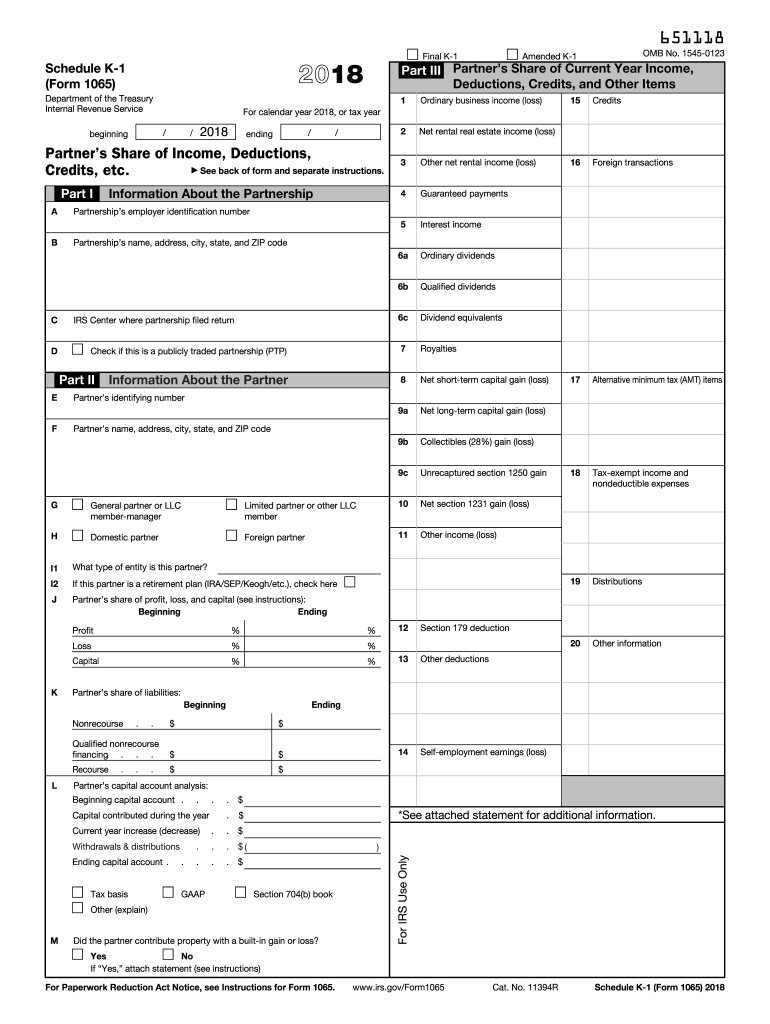
- Fill in Part I with the information about the partnership, including the partner's share of income, deductions, and other relevant details. Make sure to enter the correct employer identification number and the partnership's name and address.
- Complete Part II by providing information about the partner. This includes the partner's name, address, and identifying number. Also, indicate whether the partner is a limited partner or a general partner.
- In Part III, document the partner's share of current year income, deductions, credits, and other items. This section includes ordinary business income, guaranteed payments, interest income, and any deductions or credits applicable.
- Review all entered information for accuracy. Ensure that all relevant fields are completed and that numbers are entered correctly.
- Once the form is filled out, you can save your changes, download the form, print it if needed, or share it with other relevant parties.
Start filling out your Schedule K-1 online today for a smoother tax filing experience.
Experience a faster way to fill out and sign forms on the web. Access the most extensive library of templates available.
Related content
Schedule K-1. (Form 1065). 2024. Partner's Share of Income, Deductions,. Credits, etc...
This list identifies the codes used on Schedule K-1 for all partners and provides...
c Schedules K-1 are filed with the return and furnished to the partners on or before the...
Get answers to your most pressing questions about US Legal Forms API.
How do I get a copy of my Schedule K-1?
To get a copy of your Schedule K-1, contact the partnership or S corporation that you are a part of. They are required to send you a copy for your records and tax filing. If you have trouble obtaining it, consider using resources like uslegalforms to find the necessary forms or templates.
Do I include K-1 with 1065?
You do not submit Schedule K-1 with your IRS 1065 - Schedule K-1 when filing your return. Instead, you use the information from Schedule K-1 to prepare your individual tax return. Ensure to file the 1065 separately while keeping the K-1 data handy for accuracy.
Do I need to file Schedule K-1 with form 1065?
Typically, you do not need to file Schedule K-1 with your IRS 1065 - Schedule K-1. Instead, you report the K-1 information on your personal tax return. However, keep this form for your records, as it provides the necessary details to complete your tax filing correctly.
Why did I get a Schedule K-1 Form 1065?
You received a Schedule K-1 Form 1065 because you are either a partner in a partnership or involved with an S corporation. This form reflects your share of the business's income, deductions, and credits. It's essential for accurately reporting your earnings on your tax return.
What is Schedule K-1 form 1065 self-employment earnings?
Schedule K-1 includes your share of partnership income, which may count as self-employment earnings if you actively participate in the business. This income is subject to self-employment tax. It's crucial to review your K-1 details to understand your tax obligations and report your earnings correctly.
Where do I enter Schedule K-1 form 1065 in TurboTax?
In TurboTax, you can enter your IRS 1065 - Schedule K-1 information in the 'Search' bar by typing 'Schedule K-1' and following the prompts. The software will guide you through entering the relevant details from your K-1. This ensures your tax return accurately reflects your partnership income.
Who generates Schedule K-1?
The partnership or S corporation generates Schedule K-1 for each partner or shareholder. It's their responsibility to report individual shares of profits, losses, and distributions. Keep in mind that each partner receives a unique K-1 form detailing their specific tax contributions.
Does Schedule K-1 need to be filed?
Yes, you must file Schedule K-1 if you are a partner in a partnership or if you receive a distribution from an S corporation. The IRS 1065 - Schedule K-1 form provides essential information about your share of income, deductions, and credits. It'll help you report your earnings accurately on your tax return.
Can I file 1065 myself?
Yes, you can file Form 1065 yourself if you feel comfortable with tax preparation. However, it can be complicated due to the specific requirements and calculations involved. If you prefer peace of mind, consider using resources like uslegalforms or consulting a tax professional for assistance to ensure everything is filed correctly.
Who fills out schedule K-1 form 1065?
The partnership's designated member or a tax professional fills out Schedule K-1 Form 1065. They compile the financial information of the partnership to represent each partner's share of income, deductions, and credits. This process is crucial for ensuring that every partner can report their tax liability accurately.
Use professional pre-built templates to fill in and sign documents online faster. Get access to thousands of forms.
If you believe that this page should be taken down, please follow our DMCA take down process here.
This form is available in several versions. Select the version you need from the drop-down list below.