Loading
Get Pa Rct-101-i 2018
How it works
-

Open form follow the instructions
-

Easily sign the form with your finger
-

Send filled & signed form or save
How to fill out the PA RCT-101-I online
Completing the PA RCT-101-I online is essential for corporations who have been inactive during the tax period. This guide provides clear and concise instructions for filling out each section of the form, ensuring a smooth filing process.
Follow the steps to complete the PA RCT-101-I form accurately.
- Click ‘Get Form’ button to access the form and open it for editing.
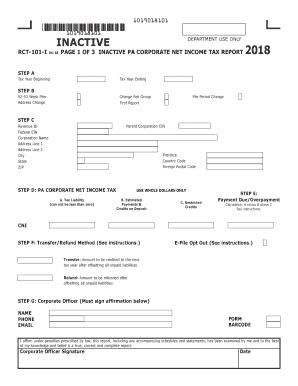
- Step A requires you to enter the tax year ending and the tax year beginning. Make sure to provide accurate dates.
- In Step B, indicate any applicable changes such as the federal group changes, 52-53 week filer status, address changes, or if this is the first report.
- Step C includes filling in details about the corporation such as the parent corporation EIN, revenue ID, federal EIN, corporation name, and address. Ensure all fields are completed accurately.
- In Step D, report the tax liability which cannot be less than zero, estimated payments and credits currently on deposit, and any restricted credits.
- Step E involves calculating the payment due or overpayment by subtracting the total of estimated payments and credits from the tax liability.
- In Step F, choose the transfer/refund method. You can either opt for a transfer to the next tax year or a refund after settling any unpaid liabilities.
- Step G requires a corporate officer to sign the affirmation statement confirming the accuracy of the report, including providing their contact information.
- In Step H, check the appropriate box to confirm corporate inactivity during the specified tax period.
- Step I asks for general information such as the location of corporate records, incorporation date, and any changes in business activity.
- Step J necessitates noting any corporate status changes, final report information, and must include all corporate officers with their details.
- After reviewing the completed form for accuracy, you can save your changes, download, print, or share the completed PA RCT-101-I.
Complete your PA RCT-101-I online today to ensure compliance and avoid any penalties.
Get form
Experience a faster way to fill out and sign forms on the web. Access the most extensive library of templates available.
Related links form
In Pennsylvania, several items are exempt from sales tax, including most food, clothing, and prescriptions. Additionally, certain organizations may qualify for exemptions based on their non-profit status. Knowing what products and services are exempt can help you plan your expenditures more effectively. Consulting the PA RCT-101-I guidelines ensures you maximize your benefits while remaining compliant with tax laws.
Get This Form Now!
Use professional pre-built templates to fill in and sign documents online faster. Get access to thousands of forms.