Loading
Form preview
  • US Legal Forms
  • Other Templates
  • Tax Forms
  • Executive Department Treasury IRS Forms
  • Irs 5329 2019

Get Irs 5329 2019

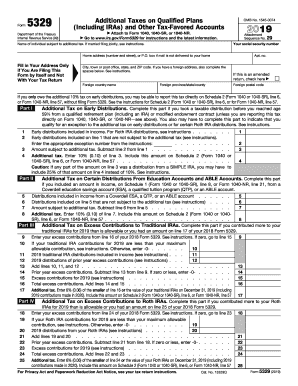
L Tax on Excess Contributions to Traditional IRAs. Complete this part if you contributed more to your traditional IRAs for 2018 than is allowable or you had an amount on line 17 of your 2017 Form 5329. Enter your excess contributions from line 16 of your 2017 Form 5329. See instructions. If zero, go to line 15 9 9 10 If your traditional IRA contributions for 2018 are less than your maximum allowable contribution, see instructions. Otherwise, enter -010 11 2018 traditional IRA distributions inclu.

This website is not affiliated with IRS

How it works

  1. Open form

    Open form follow the instructions

  2. Easily sign form

    Easily sign the form with your finger

  3. Share form

    Send filled & signed form or save

How to fill out the IRS 5329 online

The IRS 5329 form is utilized to report additional taxes on qualified plans and other tax-favored accounts. This guide will offer you clear, step-by-step instructions to help you fill out the form online effectively.

Follow the steps to complete the IRS 5329 online.

  1. Click ‘Get Form’ button to obtain the form and open it in the editor.
  2. Begin by entering your social security number in the designated field.
  3. Fill in the name of the individual subject to the additional tax. If you are married and filing jointly, refer to the instructions provided.
  4. Complete your home address, including number and street or P.O. box, only if you are filing this form separately from your tax return.
  5. If applicable, indicate if this is an amended return by checking the appropriate box.
  6. For Part I, report any early distributions you received from a qualified retirement plan, including IRAs. Follow the instructions to determine if any distributions are exempt from additional tax.
  7. Proceed to calculate the total early distributions included in your income and any amounts not subject to the additional tax.
  8. Identify appropriate exception numbers from the IRS instructions, if applicable, and then calculate the amount subject to additional tax.
  9. Enter the additional tax amount, which is 10% of the amount subject to additional tax, and include this amount on Schedule 2 of your tax return.
  10. Continue through Parts II to IX, following similar steps to report additional taxes related to various accounts such as education accounts, traditional IRAs, Roth IRAs, and HSAs.
  11. Once you have completed all relevant sections, review the form for accuracy.
  12. Finally, save your changes, download, print, or share the completed form as needed.

Complete your IRS 5329 form online today to ensure accurate tax reporting.

Get form

Experience a faster way to fill out and sign forms on the web. Access the most extensive library of templates available.

Related content

About Form 5329, Additional Taxes on Qualified...
Use Form 5329 to report additional taxes on IRAs, other qualified retirement plans...
Learn more
Instructions for form 5329, additional taxes...
Instructions for form 5329, additional taxes attributable to qualified retirement plans...
Learn more
2016 Publication 575
Jan 4, 2017 — Even if you don't owe any of these taxes, you may have to complete Form...
Learn more

Related links form

Aspen Dental Patient Authorization for Release of Health Records to External Parties Avanti Commercial Insurance Questionnaire Avenue Homecare Hepapitis B Vaccine Consent/Declination Form Baylor Scott & White Health Medication Reconciliation

Questions & Answers

Get answers to your most pressing questions about US Legal Forms API.

Contact support

The IRS form that pertains to 529 withdrawals is different from IRS form 5329. While form 5329 addresses RMD penalties, the 529 withdrawal process involves reporting qualified expenses on other forms, such as the 1099-Q. Understanding the correct IRS forms ensures you handle your education savings correctly.

A form 5329 waiver is a request for the IRS to forgive any penalties imposed for not meeting RMD requirements. This waiver can alleviate financial burdens and allow taxpayers to correct their course without facing harsh penalties. Submitting IRS 5329 alongside supporting documentation can help you make your case.

The RMD might be waived for several reasons, including illness, financial hardship, or other unique circumstances that prevented you from taking the required distribution. The IRS allows certain leniency in special cases, which you can explain using IRS form 5329. By detailing your situation, you increase your chances of receiving a waiver.

Form 5329 is typically filled out by individuals who have failed to withdraw the required minimum distributions from their retirement accounts. This includes retirees and those over age 70½ who have traditional IRAs or retirement plans. If you meet these criteria, filling out IRS 5329 is essential to address potential penalties.

Yes, form 5329 is available in TurboTax, making it easier for you to complete your tax filings. The software simplifies the process of filling out IRS 5329 by guiding you through relevant questions. Using TurboTax can save you time and ensure accurate completion of this important form.

To request a waiver for your RMD penalty, you should complete IRS form 5329 and provide the necessary details about your situation. On the form, you will indicate the reason for your missed RMD and supply any supporting documents. Using the proper procedure with IRS 5329 helps in presenting your case effectively.

The main purpose of IRS form 5329 is to report and request relief for various penalties associated with retirement plans and IRAs. This includes penalties for not taking RMDs. By using IRS 5329, you can ensure that you address any tax issues related to your retirement accounts directly with the IRS.

The IRS waiver form 5329 is a document that taxpayers use to request a waiver for certain tax penalties related to retirement accounts. This form is specifically designed for cases where individuals did not take their Required Minimum Distributions (RMDs). By filling out IRS 5329, you can explain your situation and seek relief from penalties.

A reasonable cause for form 5329 can include unforeseen circumstances that led to the failure of meeting tax requirements. Examples might involve medical emergencies, family crises, or incorrect tax advice received. By documenting your circumstances clearly, you can strengthen your case when filing this form.

To fix a botched required minimum distribution (RMD) and avoid the 50% penalty, you will need to withdraw the missed amount as soon as possible. Additionally, file IRS form 5329 to report the missed RMD and explain your situation. If you have reasonable cause, the IRS may waive the penalty, so it is crucial to provide all relevant documentation.

Get This Form Now!

Use professional pre-built templates to fill in and sign documents online faster. Get access to thousands of forms.
If you believe that this page should be taken down, please follow our DMCA take down processhere.
Get IRS 5329
  • Adoption
  • Bankruptcy
  • Contractors
  • Divorce
  • Home Sales
  • Employment
  • Identity Theft
  • Incorporation
  • Landlord Tenant
  • Living Trust
  • Name Change
  • Personal Planning
  • Small Business
  • Wills & Estates
  • Packages A-Z
  • Affidavits
  • Bankruptcy
  • Bill of Sale
  • Corporate - LLC
  • Divorce
  • Employment
  • Identity Theft
  • Internet Technology
  • Landlord Tenant
  • Living Wills
  • Name Change
  • Power of Attorney
  • Real Estate
  • Small Estates
  • Wills
  • All Forms
  • Forms A-Z
  • Other Templates
  • Legal Hub
  • About Us
  • Help Portal
  • Legal Resources
  • Blog
  • Affiliates
  • Contact Us
  • Delete My Account
  • Site Map
  • Industries
  • Forms in Spanish
  • Localized Forms
  • State-specific Forms
  • Forms Kit
  • Real Estate Handbook
  • All Guides
  • Notarize
  • Incorporation services
  • For Consumers
  • For Small Business
  • For Attorneys
  • USLegal
  • FormsPass
  • pdfFiller
  • signNow
  • altaFlow
  • DocHub
  • Instapage
Form Packages
  • Adoption
  • Bankruptcy
  • Contractors
  • Divorce
  • Home Sales
  • Employment
  • Identity Theft
  • Incorporation
  • Landlord Tenant
  • Living Trust
  • Name Change
  • Personal Planning
  • Small Business
  • Wills & Estates
  • Packages A-Z
Form Categories
  • Affidavits
  • Bankruptcy
  • Bill of Sale
  • Corporate - LLC
  • Divorce
  • Employment
  • Identity Theft
  • Internet Technology
  • Landlord Tenant
  • Living Wills
  • Name Change
  • Power of Attorney
  • Real Estate
  • Small Estates
  • Wills
  • All Forms
  • Forms A-Z
  • Other Templates
Customer Service
  • Legal Hub
  • About Us
  • Help Portal
  • Legal Resources
  • Blog
  • Affiliates
  • Contact Us
  • Delete My Account
  • Site Map
  • Industries
  • Forms in Spanish
  • Localized Forms
  • State-specific Forms
  • Forms Kit
Legal Guides
  • Real Estate Handbook
  • All Guides
Prepared for you
  • Notarize
  • Incorporation services
Our Customers
  • For Consumers
  • For Small Business
  • For Attorneys
Our Sites
  • USLegal
  • FormsPass
  • pdfFiller
  • signNow
  • altaFlow
  • DocHub
  • Instapage
Social Media
Call us now toll free:
+1 833 426 79 33
As seen in:
© Copyright 1999-2026 airSlate Legal Forms, Inc. 17 Station Street, Suite 303, Brookline, MA 02445
  • Your Privacy Choices
  • Terms of Service
  • Privacy Notice
  • Content Takedown Policy
  • Bug Bounty Program
IRS 5329
This form is available in several versions.
Select the version you need from the drop-down list below.
2024 IRS 5329
Select form
  • 2024 IRS 5329
  • 2023 IRS 5329
  • 2022 IRS 5329
  • 2019 IRS 5329
  • 2018 IRS 5329
  • 2017 IRS 5329
  • 2016 IRS 5329
  • 2015 IRS 5329
  • 2014 IRS 5329
  • 2013 IRS 5329
  • 2010 IRS 5329
  • 2008 IRS 5329
  • Irs Form 5329 2019
Select form