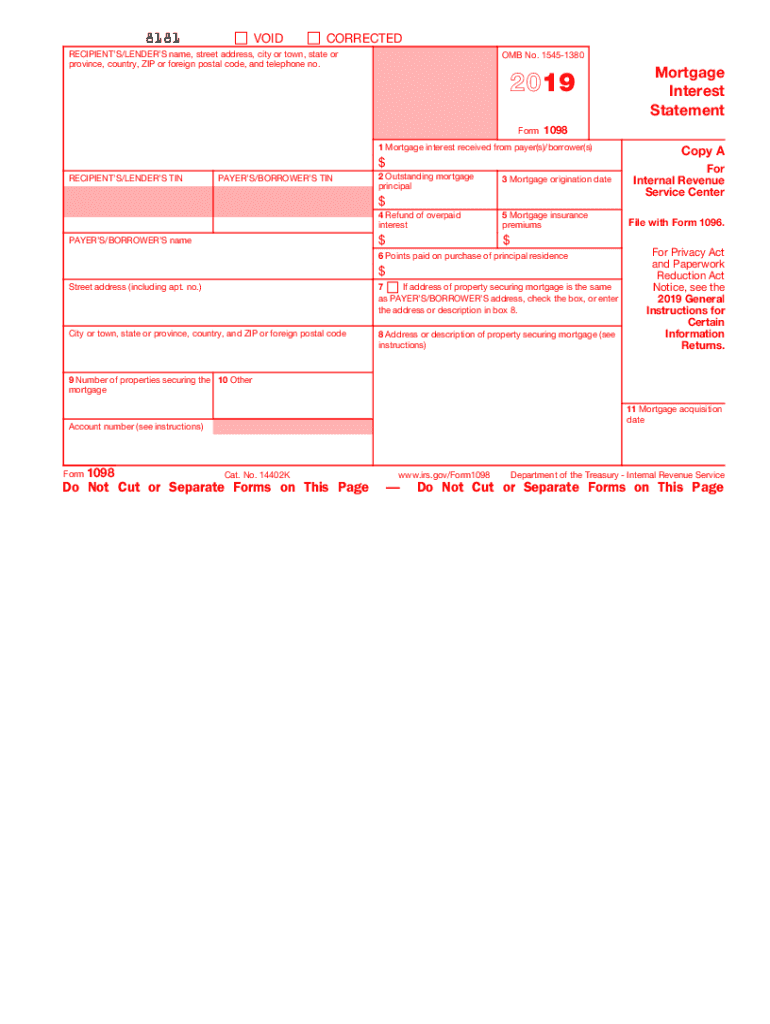
Secured property may apply. Also, you may only deduct interest to the extent it was incurred by you, actually paid by you, and not reimbursed by another person. Form 1098 2018 1 Mortgage interest received from payer(s)/borrower(s)* $ RECIPIENT'S/LENDER'S TIN PAYER'S/BORROWER'S TIN 2 Outstanding mortgage principal as of 1/1/2018 3 Mortgage origination date Mortgage Interest Statement Copy B For Payer/ Borrower The information in boxes 1through 9 is important tax information and is being.
Loading

Open form follow the instructions

Easily sign the form with your finger

Send filled & signed form or save
How to fill out the IRS 1098 online
Filing the IRS Form 1098 online is essential for accurately reporting mortgage interest payments. This guide will assist you through the necessary steps to ensure each component is correctly filled out, making the process straightforward for users of all experience levels.
Follow the steps to complete the IRS 1098 online.
- Click ‘Get Form’ button to access the form and open it in your preferred editor.
- Provide the recipient’s/lender’s name, address, and taxpayer identification number (TIN) in the designated fields. Ensure that the details are accurate and correspond to the documentation related to your mortgage.
- Input the payer’s/borrower’s name and TIN in the corresponding sections. This information is critical for both the recipient and the IRS records.
- In Box 1, report the total mortgage interest received from the payer(s)/borrower(s). This figure is necessary for tax deductions and should reflect the accurate amount paid.
- Fill Box 2 with the outstanding mortgage principal as of January 1 of the filing year. If the mortgage originated during the year, record the principal amount at that time.
- Specify the mortgage origination date in Box 3, which indicates when the mortgage was established.
- Report any refunds of overpaid interest in Box 4. This amount should not be deducted from your interest payments.
- In Box 5, enter any mortgage insurance premiums if applicable. Ensure to consult relevant IRS guidelines for eligibility.
- If you paid points for the purchase of your principal residence, input the amount in Box 6. Be aware of the rules regarding deductions for these amounts.
- If the address of the mortgage property is the same as the payer's/borrower's, check the box provided. Otherwise, enter the property address in Box 8.
- Complete Boxes 9 and 10 to indicate the number of properties securing the mortgage and any additional information required.
- Lastly, fill in Box 11 with the mortgage acquisition date if applicable and verify the account number if provided.
- Once all sections are accurately filled, users can save changes, download, print, or share the completed form.
Start filing your IRS 1098 online today for a smooth tax reporting experience.
Experience a faster way to fill out and sign forms on the web. Access the most extensive library of templates available.
Related content
The official printed version of Copy A of this IRS form is scannable, but the online...
Jun 6, 2025 — Eligible educational institutions file Form 1098-T for each student they...
Form 1098-T may serve as proof of payment IF payments received are recorded in Box 1. For...
Get answers to your most pressing questions about US Legal Forms API.
How do I enter my 1098-T on my tax return?
To enter your 1098-T on your tax return, locate the relevant sections for education credits or deductions. Fill in the amounts as indicated on your 1098-T, making sure they align with your tax software’s prompts. Accurate entry can lead to financial benefits, so it’s crucial to follow guidelines closely. Using platforms like UsLegalForms can assist you in ensuring proper form entry.
What is the deadline for filing Form 1098?
The deadline for filing Form 1098 is typically the last day of January following the tax year. This timeframe allows the IRS to process the forms before the tax filing season. Ensure that you submit your IRS 1098 on time to avoid penalties and late fees. Consulting tools like UsLegalForms can help you stay informed about these deadlines.
Should I put my 1098 on my taxes?
Yes, you should include your 1098 on your taxes, especially if it contains mortgage interest information. This document provides crucial details that can benefit your overall tax situation. Properly reporting your IRS 1098 can potentially lead to significant deductions on your taxable income. Always consult with a tax advisor to understand the best practices.
How do I file a 1098 on my taxes?
To file a 1098 on your taxes, you must report the information included on the form accurately. Typically, you will need to attach the form to your tax return. You can also use tax preparation software that guides you through the process. It simplifies the inclusion of your IRS 1098 and ensures that all relevant details are captured.
What if I forgot to file my 1098 mortgage interest statement?
If you forgot to file your 1098 mortgage interest statement, it’s important to act quickly. You may need to amend your tax return to include the form, as it provides significant deductions. Consider checking with a tax professional or using platforms like UsLegalForms to guide you through the process. They can help you ensure all necessary forms are submitted correctly.
Can form 1098 be filed electronically?
Absolutely, Form 1098 can be filed electronically. Many taxpayers prefer this method for its convenience and speed. When you choose to file electronically, you need to use IRS-approved e-filing software. This can help ensure that your IRS 1098 is submitted properly and on time.
Can 1099's be sent electronically to the IRS?
Yes, 1099 forms can be sent electronically to the IRS. Electronic filing is efficient and allows for quicker processing. Ensure you use an approved e-filing system to submit your forms accurately. This method often helps reduce errors and provides immediate confirmation of submission.
What happens if I don't file my 1098 mortgage interest statement?
Not filing your IRS 1098 mortgage interest statement may result in missed deductions and higher taxes. If the IRS does not receive this form, it may raise questions about your reported mortgage interest. This could lead to an audit or other complications. To avoid these issues, it is wise to use a platform like USLegalForms to ensure all necessary forms are filed correctly.
Can I file my taxes without my 1098?
Filing your taxes without the IRS 1098 is possible, but it may result in missing out on important deductions. You should still attempt to gather as much information as possible to file accurately. If issues arise, consulting with a tax professional or using uslegalforms can help you understand your options and ensure proper filing.
What if I filed my taxes and forgot a 1098?
If you filed your taxes and forgot to include the IRS 1098, you may need to amend your return. This involves filing Form 1040-X with the correct information. It's critical to update your return to reflect accurate income and deductions. Uslegalforms can guide you through the amendment process to ensure you comply with tax requirements.
Use professional pre-built templates to fill in and sign documents online faster. Get access to thousands of forms.
If you believe that this page should be taken down, please follow our DMCA take down process here.
This form is available in several versions. Select the version you need from the drop-down list below.