Ions Payment settlement entity (PSE) Check to indicate transactions reported are: Payment card Electronic Payment Facilitator (EPF)/Other third party Third party network Check to indicate if FILER is a (an): Form 1099-K 2 Merchant category code 3 Number of payment transactions 4 Federal income tax withheld 5b February $ $ $ 5c March 5d April $ $ 5e May Street address (including apt. no.) 5f June $ $ 5g July 5h August $ $ 5i September City or town, state or province, cou.
Loading

Open form follow the instructions

Easily sign the form with your finger

Send filled & signed form or save
How to fill out the IRS 1099-K online
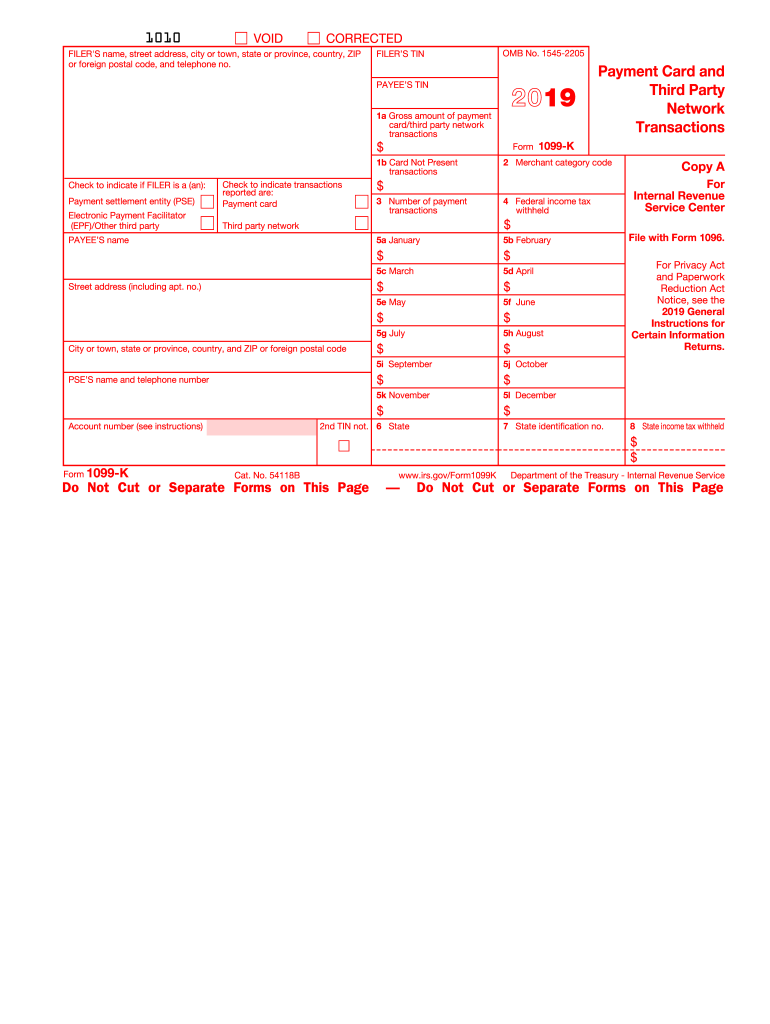
Filling out the IRS 1099-K form online is an important step for taxpayers who have received payment card and third-party network transactions. This guide will walk you through each section of the form to ensure accuracy and compliance.
Follow the steps to fill out the IRS 1099-K online.
- Press the ‘Get Form’ button to access the IRS 1099-K form and open it in the editor.
- Identify the filer’s name and address information at the top of the form. Enter your name, street address, city or town, state, ZIP code, and telephone number in the appropriate fields.
- Input the filer’s taxpayer identification number (TIN) in the designated box to ensure proper identification.
- Fill in the payee’s TIN, which indicates the individual or entity receiving the form.
- Report the gross amount of payment card and third-party network transactions in Box 1a, ensuring the accuracy of the reported figures.
- If applicable, note the amount of card-not-present transactions in Box 1b for clarity on transaction types.
- Check the relevant boxes to indicate the type of transactions reported, selecting between payment card, electronic payment facilitator/other third party, or third-party network.
- List the merchant category code in Box 2 as necessary for transaction identification.
- Enter the total number of payment transactions in Box 3, excluding refunds.
- If any federal income tax was withheld, report this amount in Box 4.
- Provide the transaction amounts for each month of the calendar year in Boxes 5a through 5l.
- If applicable, complete Boxes 6 through 8 with information regarding state identification numbers and any state tax withheld.
- Once you have completed all sections of the form, save your changes and choose to download, print, or share the form as needed.
Start filling out your IRS 1099-K form online today to ensure compliance and accuracy.
Experience a faster way to fill out and sign forms on the web. Access the most extensive library of templates available.
Related content
Merchant acquirers and third party settlement organizations, as payment settlement...
Dec 2, 2024 — Stay updated on the evolving IRS Form 1099-K reporting thresholds. Learn...
Jan 31, 2012 — 1099-K represent gross payments company, on line 16a of Schedule K...
Get answers to your most pressing questions about US Legal Forms API.
Will a 1099-K affect my tax return?
K can significantly affect your tax return because it adds to your total income. This increase may impact your tax bracket and potentially increase your tax liability. Therefore, understanding how this income interacts with your overall tax situation is crucial. Utilizing resources such as uslegalforms can guide you through effectively managing these transactions on your tax return.
Where do I enter my 1099-K on TurboTax?
To enter your IRS 1099-K on TurboTax, you'll go to the income section of the program. Select the option for 'Self-Employment Income,' and you can input the information directly from your 1099-K. It’s essential to enter it correctly for accurate tax calculations. Following these steps can ease the concern about reporting your income.
How do I report a 1099-K on my tax return?
Reporting a 1099-K on your tax return involves including the income reported on the form in your total income. Specifically, you will report it under the business income if you are self-employed. Remember to double-check your entries to ensure accuracy. Using a tax software like uslegalforms can help simplify the process.
Where do I enter 1099-K in TurboTax?
Entering your IRS 1099-K in TurboTax is straightforward. Go to 'Federal Taxes,' then 'Wages & Income,' and find the section for 'Self-Employment.' Here, you can input the information from your 1099-K. This ensures TurboTax calculates your taxes correctly based on your reported income.
Where do I report K1 income on TurboTax?
To report K1 income in TurboTax, first locate the ‘Income’ section and choose to enter K1 income directly. Your K1 income will inform how your IRS 1099-K fits into your overall tax picture. Be thorough with the details to ensure correct reporting and compliance. This step is crucial for properly calculating your tax liability.
Where do I enter self-employment expenses on TurboTax?
In TurboTax, navigate to the 'Business Income and Expenses' section to enter your self-employment expenses related to your IRS 1099-K. You will find an option to report your income and expenses in a straightforward manner. Enter all relevant expenses to accurately reflect your business's financial performance. This will help reduce your taxable income effectively.
Where do I put 1099-K on my tax return?
You will report your IRS 1099-K information on Schedule 1 of your Form 1040, specifically for additional income. This income typically comes from online sales or payment services. Ensure the total reported matches the amount on your 1099-K. If you're self-employed, you also need to include it in your business income.
Does a 1099-K count as earned income?
Indeed, income reported on the IRS 1099-K is considered earned income and must be factored into your tax calculations. This classification is important for understanding your tax obligations and potential benefits. To streamline your tax filing process, consider using platforms like uslegalforms, which offer resources and guidance on managing your 1099-K effectively.
Do I have to report 1099-K income if I?
Yes, even if you believe your IRS 1099-K income is not significant, you still need to report it on your tax return. The IRS mandates that all income must be reported, regardless of the amount. This includes income from various sources such as freelancing or side gigs.
How do I enter 1099-K on my tax return?
To enter your IRS 1099-K on your tax return, you typically report the income on Schedule C if you are self-employed. Include the total amount shown on the form under gross receipts or sales. Make sure to consider any business-related expenses that can reduce your taxable income.
Use professional pre-built templates to fill in and sign documents online faster. Get access to thousands of forms.
If you believe that this page should be taken down, please follow our DMCA take down process here.
This form is available in several versions. Select the version you need from the drop-down list below.