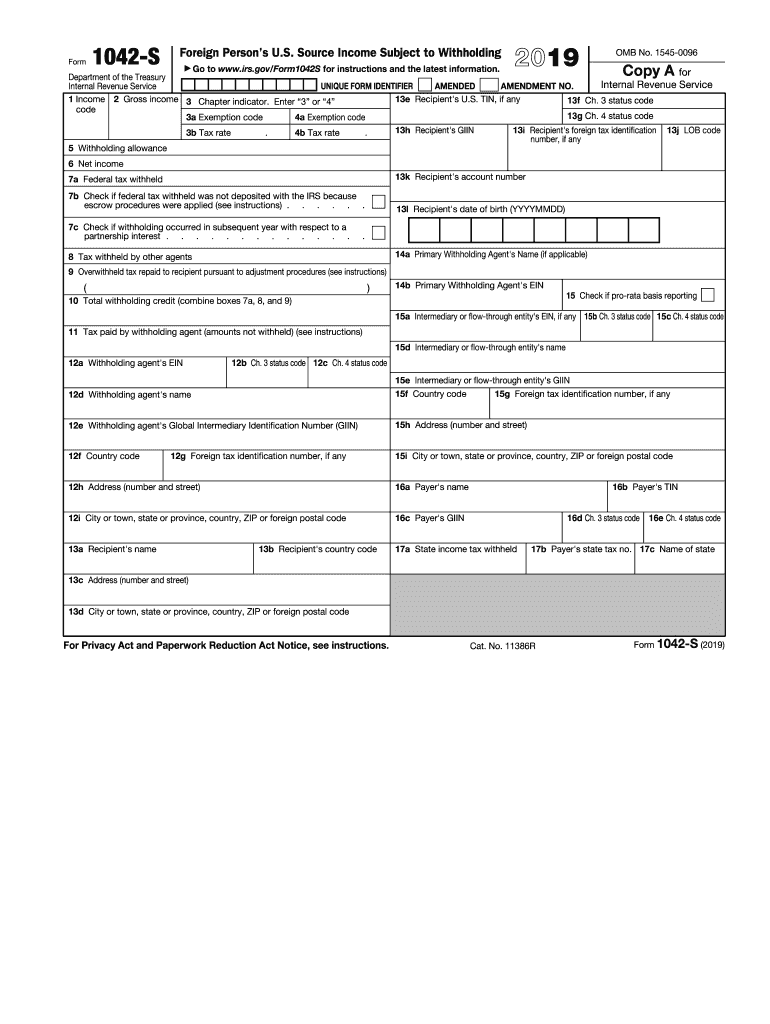
Ents 9 Overwithheld tax repaid to recipient pursuant to adjustment procedures (see instructions) ( ) 14a Primary Withholding Agent's Name (if applicable) 10 Total withholding credit (combine boxes 7a, 8, and 9) 14b Primary Withholding Agent's EIN 11 Tax paid by withholding agent (amounts not withheld) (see instructions) 15 Check if pro-rata basis reporting 15a Intermediary or flow-through entity's EIN, if any 15b Ch. 3 status code 15c Ch. 4 status code 12a Withholding agent's EIN 12b Ch.
Loading

Open form follow the instructions

Easily sign the form with your finger

Send filled & signed form or save
How to fill out the IRS 1042-S online
Filling out the IRS 1042-S form can be a straightforward process, especially when done online. This guide provides a comprehensive, step-by-step approach to assist users in completing the form accurately and efficiently.
Follow the steps to complete the IRS 1042-S online.
- Press the ‘Get Form’ button to access the form, which will allow you to open it in your online editor.
- Start with box 1 and select the relevant income code that describes the type of income being reported.
- In box 2, enter the gross amount of income that is subject to withholding.
- In box 3, indicate the chapter under which the income is taxed by entering ‘3’ or ‘4’.
- Complete boxes 3a and 4a with the appropriate exemption codes if applicable.
- In boxes 3b and 4b, specify the tax rates that apply to the income.
- Provide the recipient's U.S. TIN, if available, in box 13e.
- Fill in the recipient's foreign tax identification number in box 13i, if applicable.
- Indicate the federal tax withheld in box 7a, and if there are any special notes (like escrow procedures), mark box 7b.
- Review the information for accuracy, ensuring all necessary boxes are completed.
- After completing the form, you may choose to save your changes, download the completed form, print it, or share it as needed.
Complete your IRS 1042-S form online today for a hassle-free filing experience.
Experience a faster way to fill out and sign forms on the web. Access the most extensive library of templates available.
Related content
U.S. Income Tax Filing Requirements. Generally, every nonresident alien individual...
Use Form 1042-S to report: Income and amounts withheld as described in the Instructions...
Apr 15, 2015 — Form(s) 1042-S, you generally must include the amount shown in box 2 of...
Get answers to your most pressing questions about US Legal Forms API.
Do I need to attach 1042-S to a tax return?
You do not need to attach IRS Form 1042-S to your tax return, but you must report the income stated on it. This form informs you of the payments you received, which you must include in your taxable income. Keeping this document for your records is advisable, as it may be necessary for future reference. Use services like USLegalForms to ensure you meet all reporting requirements.
Can I ignore 1042-S?
Ignoring the IRS 1042-S is not an option if you received one, as it indicates taxable income. Neglecting to address this form could lead to penalties and complications with your tax return. It is essential to report this income accurately to stay in good standing with the IRS. Platforms like USLegalForms can provide guidance in understanding how to handle this form.
What is IRS Form 1042-S for?
IRS Form 1042-S is designed to report income earned by foreign individuals from U.S. sources. This includes interest, dividends, royalties, and various forms of compensation. The form helps both the payee and the IRS track income and withholding tax obligations. Using USLegalForms can simplify the process of understanding and filing this important tax document.
What is the difference between a 1099 and a 1042-S?
The IRS 1042-S and 1099 forms serve different purposes, particularly regarding the recipient's tax status. The 1099 is generally used for U.S. taxpayers to report various types of income, whereas the 1042-S is specifically for foreign individuals and entities receiving U.S. income. Both forms report income, but the 1042-S also indicates any tax withheld under U.S. regulations. Understanding the right form is key to ensuring correct tax reporting.
Why am I receiving 1042-S?
You receive the IRS 1042-S if you have earned income from U.S. sources that are subject to withholding tax. This form serves to inform you and the IRS of any payments made to you as a non-resident. It is typically issued by the paying entity, which might be a financial institution or an employer. Understanding this form is crucial, as it affects your tax obligations and reporting requirements.
Do I need to report 1042-S as income?
Yes, you should report amounts shown on your IRS 1042-S as income on your tax return. This form provides important information about U.S. source income that is subject to withholding. If you received this form, it indicates that you earned income that the IRS needs to know about. Reporting it properly ensures compliance with tax laws and helps you avoid problems down the line.
What are the most common errors on Form 1042-S?
Common errors on the IRS 1042-S include incorrect recipient information, missing amounts, and wrong tax classifications. These mistakes can lead to delays and possible penalties. Ensuring accuracy is vital to avoid complications in your tax-related matters. US Legal Forms offers resources to minimize these errors and facilitate correct filing.
Do I need to report 1042-S in my tax return?
Yes, you need to report the income stated on your IRS 1042-S in your tax return. This ensures you comply with tax regulations and accurately reflect your total income. Not doing so can lead to discrepancies and possible penalties from the IRS. Services like US Legal Forms can assist you in accurately reporting this information.
How does Form 1042-S affect my taxes?
The IRS 1042-S provides critical information on income that is subject to withholding for non-resident aliens. This form impacts how much tax you owe or the refund you may receive. Understanding your IRS 1042-S helps you accurately report income and manage your tax responsibilities. For convenience, consider using US Legal Forms for guidance in completing the process.
What happens if I don't file 1042-S?
If you do not file the IRS 1042-S, you may face penalties and interest on any tax you owe. The IRS has strict deadlines, and missing them can complicate your taxation process. It's crucial to submit this form to keep your tax situation clear and compliant. Using resources like US Legal Forms can help you file accurately and on time.
Use professional pre-built templates to fill in and sign documents online faster. Get access to thousands of forms.
If you believe that this page should be taken down, please follow our DMCA take down process here.
This form is available in several versions. Select the version you need from the drop-down list below.