Loading

Open form follow the instructions

Easily sign the form with your finger

Send filled & signed form or save
How to fill out the WI DoR Schedule WD online
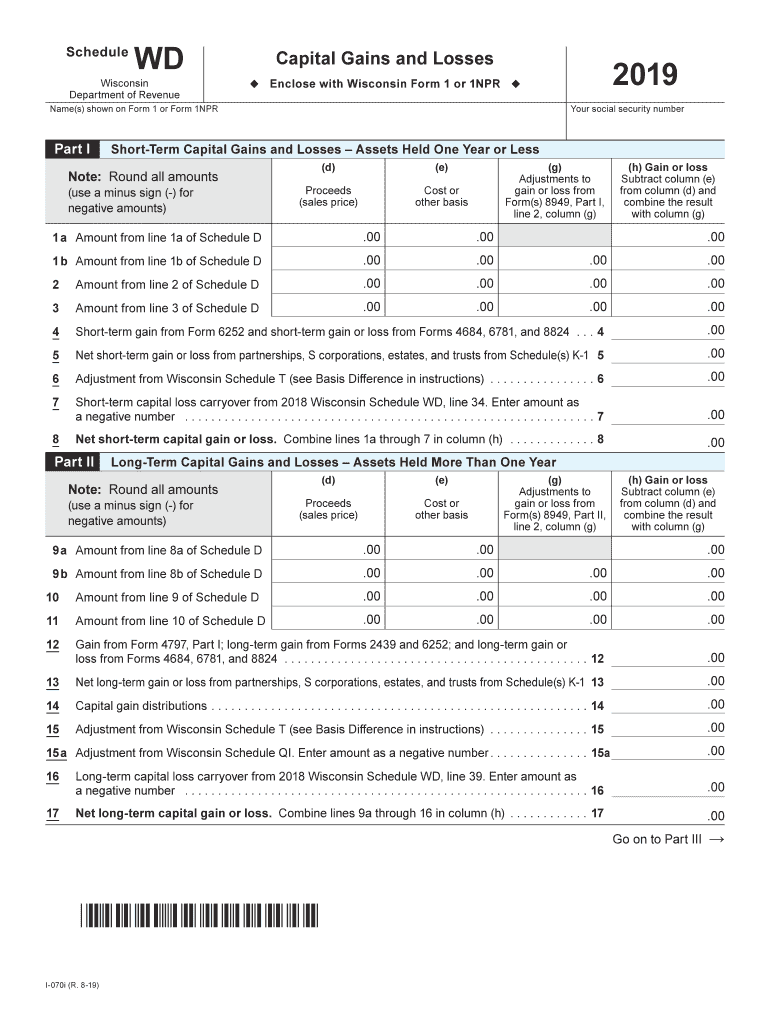
The WI DoR Schedule WD is a crucial form for reporting capital gains and losses in Wisconsin. This guide will walk you through each section of the form to ensure you complete it accurately and efficiently online.
Follow the steps to fill out the WI DoR Schedule WD online.
- Click 'Get Form' button to obtain the Schedule WD and open it in the editor.
- Begin with the section for your name(s) and social security number. Ensure that the information matches what is shown on Form 1 or Form 1NPR.
- Proceed to Part I, where you will report short-term capital gains and losses for assets held one year or less. Fill in the proceeds from each transaction in column (d) and the corresponding cost or basis in column (e). Round all amounts and use a minus sign for negative amounts.
- In column (g), enter any adjustments to your gain or loss from Form(s) 8949, and then calculate your gain or loss in column (h) by subtracting column (e) from column (d) and adding any adjustments from column (g). Complete all relevant lines 1 through 7.
- Next, move to Part II for long-term capital gains and losses for assets held more than one year. Follow the same procedure as in Part I to fill in columns (d), (e), (g), and (h) for lines 9 through 16.
- Continue to Part III, where you will summarize your results from Parts I and II. Line 18 is where you will combine your net gain or loss. Proceed through the remaining lines to compute your adjustments and ensure you accurately reflect any losses.
- Finally, review all completed sections for accuracy. You can save the changes, download, print, or share the form as necessary.
Complete the WI DoR Schedule WD online for an accurate and efficient filing process.
Experience a faster way to fill out and sign forms on the web. Access the most extensive library of templates available.
Related content
Short-term capital loss carryover from 2023 Wisconsin Schedule WD, line 34 ....
Dec 31, 2019 — Tax Rates Reduced – The tax rate for the first and second tax bracket...
by S Links — Library of Congress Cataloging-in-Publication Data. The state of the...
Get answers to your most pressing questions about US Legal Forms API.
Where do I get a Schedule D tax form?
You can get a Schedule D tax form from the IRS website or through leading tax preparation platforms. Print versions may also be available at local tax offices or libraries. For added convenience, visit uslegalforms, where you can easily access the Schedule D tax form and other necessary documents for your tax filings.
What is the difference between Schedule D and form 8949?
The primary difference between Schedule D and Form 8949 lies in their purpose and detail. Schedule D summarizes your capital gains and losses, while Form 8949 provides the detailed transaction information required for accurate reporting. When filing your WI DoR Schedule WD, it's crucial to understand how both forms interact for a seamless tax preparation process.
Is the 30 capital gain exclusion in Wisconsin?
Yes, Wisconsin does allow a 30% exclusion on certain capital gains, making it beneficial for taxpayers with qualifying assets. This exclusion can help reduce your taxable income on your WI DoR Schedule WD, allowing you to retain more of your gains. Always consult a tax professional for personalized advice to maximize your benefits.
Does TurboTax include Schedule D?
Yes, TurboTax includes Schedule D as part of its software offerings, making it easy to report capital gains and losses. This integration simplifies the process of filing your taxes, ensuring you can accurately complete your WI DoR Schedule WD. If you're seeking a user-friendly platform, TurboTax provides a comprehensive solution.
Where can I get a Schedule D form?
You can obtain a Schedule D form through the IRS website or from various tax preparation software programs. Additionally, local tax offices may have printed copies available. For a comprehensive resource, check out uslegalforms, where you can find the Schedule D form and other related documents.
What is Wisconsin schedule WD?
Wisconsin Schedule WD is a tax form used to report capital gains and losses for state income tax purposes. This schedule is essential for individuals and businesses that realize gains from the sale of assets. Understanding the details of the WI DoR Schedule WD can help you accurately report your income while potentially optimizing your tax liability.
Where can I get Wisconsin income tax forms?
You can obtain Wisconsin income tax forms directly from the Wisconsin Department of Revenue, or you can download them from their official website. Additionally, many local libraries and tax assistance centers offer printed copies. If you prefer a more convenient option, you can visit uslegalforms to find various tax forms, including the WI DoR Schedule WD.
Is it worth claiming capital losses?
Claiming capital losses is often beneficial as it can reduce your taxable income, potentially leading to lower tax liabilities. Especially if you have realized gains, offsetting them with losses can be a practical strategy. Using tools and resources from US Legal Forms can simplify the process of filing your WI DoR Schedule WD.
Do I need to fill out Schedule D?
Yes, if you have capital gains or losses to report, you need to complete Schedule D as part of your federal tax return. This form helps calculate your overall capital gain or loss, which is essential when preparing the WI DoR Schedule WD as well. Accurate reporting can lead to tax advantages and compliance.
Are capital losses 100% deductible?
Capital losses are not fully deductible against ordinary income. You can deduct a maximum of $3000 of your capital losses against your income, with any remaining losses carried forward to future years. Understanding this rule will help you fill out the WI DoR Schedule WD effectively.
Use professional pre-built templates to fill in and sign documents online faster. Get access to thousands of forms.
If you believe that this page should be taken down, please follow our DMCA take down process here.
This form is available in several versions. Select the version you need from the drop-down list below.