Loading
Get Irs 990 - Schedule B 2019
This website is not affiliated with IRS
How it works
-

Open form follow the instructions
-

Easily sign the form with your finger
-

Send filled & signed form or save
How to fill out the IRS 990 - Schedule B online
Filling out Schedule B of the IRS Form 990, 990-EZ, or 990-PF is essential for organizations to report their contributors. This guide provides a clear and organized approach to help users complete the form online with confidence.
Follow the steps to successfully complete the IRS 990 - Schedule B.
- Click ‘Get Form’ button to obtain the form and open it in the editor.
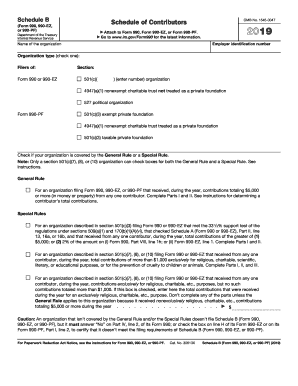
- Begin by entering your organization's employer identification number and name at the top of the form. Select the appropriate organization type by checking the corresponding box.
- Indicate whether your organization is covered by the General Rule or a Special Rule. Review the criteria provided to determine which applies to your organization.
- In Part I, list each contributor by entering a sequential number in column (a). Fill out the contributor's name, address, and ZIP code in column (b).
- Next, enter the total contributions from each contributor in column (c) and specify the type of contribution (Person, Payroll, Noncash) in column (d) by checking the appropriate box.
- If you have noncash contributions to report, complete Part II. Reference the corresponding contributor number from Part I in column (a), describe the contribution in column (b), and provide its fair market value in column (c). Document the date received in column (d).
- For organizations described in section 501(c)(7), (8), or (10), complete Part III if you received contributions for religious, charitable, or similar purposes totaling more than $1,000 from any contributor. Fill in details as requested.
- Review your entries for accuracy. Save your changes, and once completed, download or print the form for your records or to share as needed.
Complete your IRS 990 - Schedule B online today for a smooth filing experience.
Get form
Experience a faster way to fill out and sign forms on the web. Access the most extensive library of templates available.
Schedule E on Form 990 is an area where organizations disclose their professional fundraising services and the total amount raised. It details the relationship with any fundraisers and the fees associated with them. This transparency is important for ensuring accountability in fundraising operations. Organizations can benefit from utilizing tools like uslegalforms to navigate Schedule E properly.
Get This Form Now!
Use professional pre-built templates to fill in and sign documents online faster. Get access to thousands of forms.