Loading
Form preview
  • US Legal Forms
  • Other Templates
  • Tax Forms
  • Executive Department Treasury IRS Forms
  • Irs 5500-ez 2019

Get Irs 5500-ez 2019

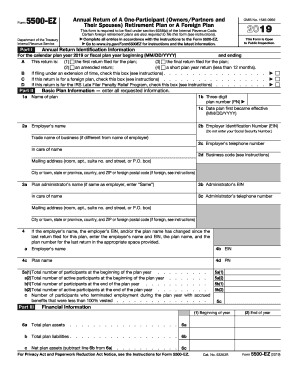
6a . . . . . . . . . . . . . . . . . . . 6a b Total plan liabilities . . . . . . . . . . . . . . . . . . . 6b Net plan assets (subtract line 6b from 6a) . . . . . . . . . . . 6c c Total plan assets For Privacy Act and Paperwork Reduction Act Notice, see the Instructions for Form 5500-EZ. Cat. No. 63263R (2) End of year Form 5500-EZ (2018) Form 5500-EZ (2018) Part III 7 Page Amount Contributions received or receivable from: . . .

This website is not affiliated with IRS

How it works

  1. Open form

    Open form follow the instructions

  2. Easily sign form

    Easily sign the form with your finger

  3. Share form

    Send filled & signed form or save

How to fill out the IRS 5500-EZ online

Filing the IRS 5500-EZ is essential for maintaining compliance with federal regulations for retirement plans. This guide provides comprehensive instructions on how to accurately complete the form online, ensuring that individuals and businesses can fulfill their reporting obligations confidently.

Follow the steps to complete the IRS 5500-EZ online.

  1. Use the ‘Get Form’ button to acquire the IRS 5500-EZ form and open it in your preferred editing tool.
  2. Enter the Annual Return Identification Information. This includes indicating whether this is your first return, an amended return, or a final return. Additionally, check if you are filing under an extension, for a foreign plan, or under the IRS Late Filer Penalty Relief Program.
  3. Proceed to Part II to provide Basic Plan Information. Fill in all relevant fields: the name of the plan, Employer Identification Number (EIN), contact information for the employer, and details about the plan administrator if different from the employer.
  4. In Part III, input the financial information related to the plan. This includes total participants at the beginning and end of the plan year, as well as any contributions received from participants and employers.
  5. Continue to Part IV to specify the plan characteristics by entering the two-character feature codes as required.
  6. Complete Part V, answering compliance and funding questions. Indicate whether any participant loans were taken and if the plan meets the minimum funding requirements, providing necessary amounts as instructed.
  7. Finally, certify the completion of the form by providing your signature, date, and printed name where indicated. Review all entries for accuracy before finalizing.
  8. After completing the form, you will have the option to save changes, download, print, or share the form as needed.

Initiate your IRS 5500-EZ filing today by completing the form online.

Get form

Experience a faster way to fill out and sign forms on the web. Access the most extensive library of templates available.

Related content

About Form 5500-EZ, Annual Return of A...
Nov 12, 2024 — Form 5500-EZ is used by one-participant plans and certain foreign plans...
Learn more
Instructions for Form 5500-EZ
We ask for the information on this form to carry out the Internal Revenue laws of the...
Learn more
2016 Publication 560
Jan 26, 2017 — You must file Form 5500EZ or Form. 5500SF. All oneparticipant plans...
Learn more

Related links form

CVS 91-13393a DE Fraport Pflicht Bescheinigung zur Vorlage DE Mobile Kaufvertrag uber ein Gebrauchtfahrzeug Von Privat DEA Biennial Controlled Substance Inventory Form

Questions & Answers

Get answers to your most pressing questions about US Legal Forms API.

Contact support

The IRS 5500-EZ is primarily for one-participant retirement plans or for plans with fewer than 100 participants. To qualify for using this form, your plan must meet specific criteria outlined by the IRS, such as being a single-employer plan. By utilizing US Legal Forms, you can easily navigate these thresholds and ensure compliance with IRS regulations.

The primary difference between Form 5500 and Form 5500-EZ lies in who is required to file them. Form 5500 is for larger plans that have more complex reporting requirements, while the IRS 5500-EZ is simpler and designed for one-participant retirement plans. Understanding these distinctions can help you determine which form applies to your situation, and US Legal Forms can guide you through the process.

Yes, Form 5500-EZ can be filed electronically using the IRS EFAST2 system. Electronic filing offers a streamlined process, making it easier to submit your form promptly and accurately. Using US Legal Forms can further assist you in preparing your filing, ensuring that all information is submitted in the correct format.

The plan administrator is generally responsible for filing the IRS 5500-EZ. This individual or entity must ensure compliance with reporting requirements and maintain accurate records. If you're unsure about your responsibilities, US Legal Forms provides useful information and tools to clarify your obligations regarding form submission.

Yes, you can file your own IRS 5500-EZ if you feel comfortable completing the form and have the required information. However, it is important to understand the specific rules and guidelines associated with this form to avoid mistakes. For added convenience, US Legal Forms offers resources and templates that can simplify the filing process and help you avoid common pitfalls.

To file Form 5500-EZ, first gather the necessary information about your retirement plan, including plan details and financial information. You can access the form on the IRS website, complete it, and then mail it to the appropriate IRS address listed in the form instructions. If you prefer a simplified experience, consider using the US Legal Forms platform to guide you through the filing process and ensure that you meet all requirements.

Individuals who maintain a qualified retirement plan with only one participant typically need to file IRS form 5500-EZ. This includes sole proprietors and their businesses, but only under certain conditions. Staying compliant with this filing is essential to avoid potential penalties and ensure your retirement plan remains in good standing.

The primary difference between IRS form 5500 and 5500-EZ lies in the size and type of the plan. Form 5500 is used for larger retirement plans that meet certain criteria, whereas 5500-EZ is for one-participant plans or small plans that qualify for simplified reporting. Understanding these distinctions can help you choose the correct form for your filing needs.

Typically, the plan administrator or sponsor fills out IRS form 5500. This may often be an accountant or an authorized employee with knowledge of the plan's operations and financial status. Utilizing a user-friendly platform like UsLegalForms can simplify this process by offering guidance and templates for form completion.

Yes, accountants can file IRS form 5500, especially if they have expertise in retirement plan compliance. They help ensure that all required information is accurately reported and submitted on time. However, the ultimate responsibility for the filing rests with the plan sponsor, so it’s important to work closely with your accountant.

Get This Form Now!

Use professional pre-built templates to fill in and sign documents online faster. Get access to thousands of forms.
If you believe that this page should be taken down, please follow our DMCA take down processhere.
Get IRS 5500-EZ
  • Adoption
  • Bankruptcy
  • Contractors
  • Divorce
  • Home Sales
  • Employment
  • Identity Theft
  • Incorporation
  • Landlord Tenant
  • Living Trust
  • Name Change
  • Personal Planning
  • Small Business
  • Wills & Estates
  • Packages A-Z
  • Affidavits
  • Bankruptcy
  • Bill of Sale
  • Corporate - LLC
  • Divorce
  • Employment
  • Identity Theft
  • Internet Technology
  • Landlord Tenant
  • Living Wills
  • Name Change
  • Power of Attorney
  • Real Estate
  • Small Estates
  • Wills
  • All Forms
  • Forms A-Z
  • Other Templates
  • Legal Hub
  • About Us
  • Help Portal
  • Legal Resources
  • Blog
  • Affiliates
  • Contact Us
  • Delete My Account
  • Site Map
  • Industries
  • Forms in Spanish
  • Localized Forms
  • State-specific Forms
  • Forms Kit
  • Real Estate Handbook
  • All Guides
  • Notarize
  • Incorporation services
  • For Consumers
  • For Small Business
  • For Attorneys
  • USLegal
  • FormsPass
  • pdfFiller
  • signNow
  • altaFlow
  • DocHub
  • Instapage
Form Packages
  • Adoption
  • Bankruptcy
  • Contractors
  • Divorce
  • Home Sales
  • Employment
  • Identity Theft
  • Incorporation
  • Landlord Tenant
  • Living Trust
  • Name Change
  • Personal Planning
  • Small Business
  • Wills & Estates
  • Packages A-Z
Form Categories
  • Affidavits
  • Bankruptcy
  • Bill of Sale
  • Corporate - LLC
  • Divorce
  • Employment
  • Identity Theft
  • Internet Technology
  • Landlord Tenant
  • Living Wills
  • Name Change
  • Power of Attorney
  • Real Estate
  • Small Estates
  • Wills
  • All Forms
  • Forms A-Z
  • Other Templates
Customer Service
  • Legal Hub
  • About Us
  • Help Portal
  • Legal Resources
  • Blog
  • Affiliates
  • Contact Us
  • Delete My Account
  • Site Map
  • Industries
  • Forms in Spanish
  • Localized Forms
  • State-specific Forms
  • Forms Kit
Legal Guides
  • Real Estate Handbook
  • All Guides
Prepared for you
  • Notarize
  • Incorporation services
Our Customers
  • For Consumers
  • For Small Business
  • For Attorneys
Our Sites
  • USLegal
  • FormsPass
  • pdfFiller
  • signNow
  • altaFlow
  • DocHub
  • Instapage
Social Media
Call us now toll free:
+1 833 426 79 33
As seen in:
© Copyright 1999-2026 airSlate Legal Forms, Inc. 17 Station Street, Ste. 203, Brookline, MA 02445
  • Your Privacy Choices
  • Terms of Service
  • Privacy Notice
  • Content Takedown Policy
  • Bug Bounty Program
IRS 5500-EZ
This form is available in several versions.
Select the version you need from the drop-down list below.
2023 IRS 5500-EZ
Select form
  • 2023 IRS 5500-EZ
  • 2022 IRS 5500-EZ
  • 2021 IRS 5500-EZ
  • 2020 IRS 5500-EZ
  • 2019 IRS 5500-EZ
  • 2018 IRS 5500-EZ
  • 2017 IRS 5500-EZ
  • 2016 IRS 5500-EZ
  • 2015 IRS 5500-EZ
  • 2014 IRS 5500-EZ
  • 2013 IRS 5500-EZ
  • 2012 IRS 5500-EZ
  • 2011 IRS 5500-EZ
  • 2010 IRS 5500-EZ
  • 2002 IRS 5500-EZ
  • 2001 IRS 5500-EZ
Select form