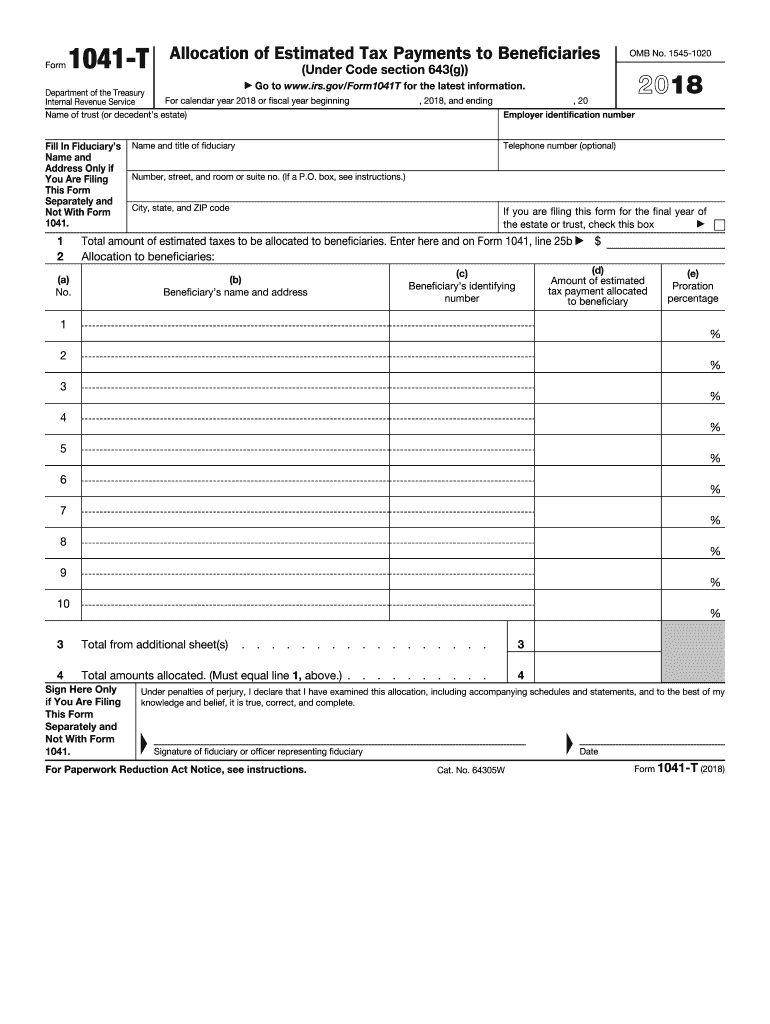
Top of the form. If the due date falls on a Saturday, Sunday, or legal holiday, file on the next business day. For a 2018 calendar year decedent s estate or trust, that date is March 6, 2019. Period Covered File the 2018 form for calendar year 2018 and fiscal years beginning in 2018 and ending in 2019. If the form is for a fiscal year or a short tax year, fill in the tax year space at the top of the form. Where To File If you are located in Please mail to the Connecticut, Delawar.

Open form follow the instructions

Easily sign the form with your finger

Send filled & signed form or save
How to fill out the IRS 1041-T online
Filling out the IRS 1041-T form is essential for trustees or fiduciaries wishing to allocate estimated tax payments to beneficiaries. This guide provides clear, step-by-step instructions to successfully complete the form online, ensuring compliance with IRS regulations.
Follow the steps to accurately complete the IRS 1041-T online.
- Press the ‘Get Form’ button to acquire the form and launch it in your preferred editor.
- In the first section, fill in the name of the trust or decedent’s estate along with the employer identification number. Indicate the year the form is applicable for, either using a calendar year or fiscal year.
- Complete the fiduciary’s name and address only if filing this form separately. If this is the final year for the trust or estate, check the corresponding box.
- Enter the total amount of estimated taxes to be allocated to beneficiaries in line 1. Ensure this amount also appears on Form 1041, line 25b.
- List each beneficiary's name and address in column (b), and enter their identifying number (either SSN or EIN) in column (c).
- For each beneficiary, indicate the amount of estimated tax payment allocated to them in column (d). Use code A to report this amount in box 13 of Schedule K-1 (Form 1041).
- Calculate the proration percentage for each beneficiary in column (e) by dividing the amount in column (d) by the total amount in line 1.
- If allocating payments to more than 10 beneficiaries, continue your list on an additional sheet following the same format as line 2.
- Summarize the total amounts allocated in line 4, ensuring this equals the total from line 1.
- Finally, sign the form and provide the date. Ensure the signature is included only if you are filing this form separately and not with Form 1041.
- Once the form is completed, you can save changes, download, print, or share the document as needed.
Complete your IRS 1041-T form online today to ensure accurate tax allocation for your beneficiaries.
Experience a faster way to fill out and sign forms on the web. Access the most extensive library of templates available.
Related content
Jan 29, 2025 — Information about Form 1041-T, Allocation of Estimated Tax Payments to...
The fiduciary files Form 1041-T to make the election. Once made, the election is...
Jan 4, 2017 — The earnings aren't taxed until distributed either in a with- drawal or in...
Get answers to your most pressing questions about US Legal Forms API.
What is the IRS form 1041-T?
IRS Form 1041-T is used to report the income tax for estates and trusts. This form calculates the amount of tax due and reports income for the beneficiaries. Understanding IRS 1041-T is crucial for anyone managing an estate or trust, and platforms like USLegalForms simplify this process by providing clear guidance.
Can an IL 1041 be filed electronically?
Yes, an IL 1041 can be filed electronically using state-approved tax preparation software. However, the processes may differ from IRS 1041-T, so be sure to follow the guidelines specific to Illinois. Using USLegalForms can help you navigate both federal and state filing requirements efficiently.
Who must file a 1041 form?
Any estate or trust with gross income exceeding $600 must file IRS Form 1041. Additionally, if the estate or trust has a beneficiary who is a non-resident alien, filing is mandatory regardless of income. It's essential to understand your obligations to prevent future issues with IRS 1041-T.
Can form 1041-T be filed electronically?
Form 1041-T can indeed be filed electronically through approved software. This electronic filing option makes it convenient for users, helping avoid errors inherent in manual submissions. Using tools like USLegalForms, users can ensure their IRS 1041-T is prepared correctly and submitted on time.
Can you efile 1041-T?
Yes, you can efile 1041-T if you use IRS-approved tax preparation software. This method reduces administrative burdens and streamlines your filing process. Platforms like USLegalForms guide you in preparing forms accurately, ensuring a smooth submission to the IRS.
What forms cannot be electronically filed?
Certain forms, including some variations of the IRS 1041, may not qualify for electronic filing. Generally, forms that require additional schedules or certain conditions must be submitted in paper format. Always check the IRS guidelines to confirm which forms you can or cannot file electronically.
When to file form 1041-T?
You need to file form 1041-T by the due date for the estate or trust's income tax return. This form is typically due on the 15th day of the fourth month following the end of the tax year. If you miss the deadline, it's crucial to take action quickly to avoid penalties related to IRS 1041-T.
Can I file IRS Form 1041 electronically?
Yes, you can file IRS Form 1041 electronically using approved software. This option simplifies the process and reduces the chance of errors. Many online platforms, like USLegalForms, provide a straightforward interface for completing and submitting IRS 1041-T, making your tax filing easier.
What is an IRS 1041 form for?
IRS 1041 is the form used to report income, deductions, gains, and losses for estates and trusts. It provides the IRS with essential information regarding the financial activities of these entities. Filing this form helps in accurately determining tax obligations and ensuring compliance.
Do I need to file a tax return on an irrevocable trust?
Yes, an irrevocable trust often requires filing IRS 1041 if it generates income. This ensures clarity in tax responsibilities for the trustee and beneficiaries. It's wise to consult a tax expert to navigate these regulations effectively.
Use professional pre-built templates to fill in and sign documents online faster. Get access to thousands of forms.
If you believe that this page should be taken down, please follow our DMCA take down process here.
This form is available in several versions. Select the version you need from the drop-down list below.