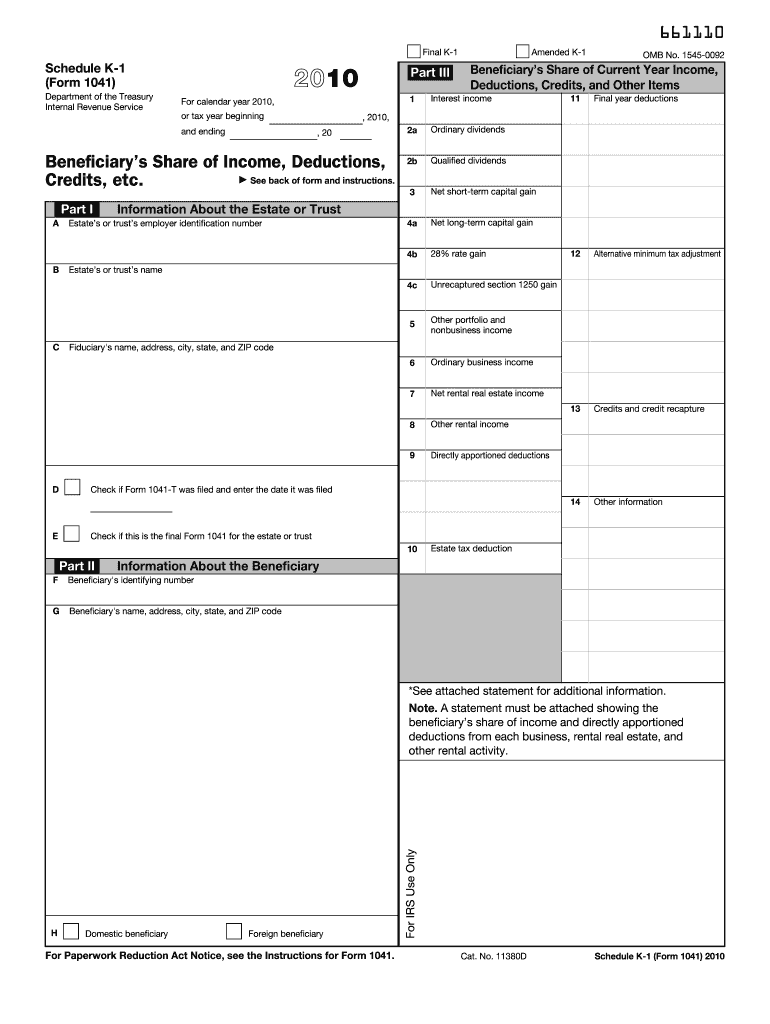
Tions, Credits, and Other Items and ending Interest income 2a Alternative minimum tax adjustment Credits and credit recapture Other information Qualified dividends , 2010, , 20 Beneficiary s Share of Income, Deductions, See back of form and instructions. Credits, etc. 3 Net short-term capital gain 4a Net long-term capital gain 4b 28% rate gain 4c Unrecaptured section 1250 gain 5 Other portfolio and nonbusiness income 6 Ordinary business income 7 Net rental real estat.
Loading

Open form follow the instructions

Easily sign the form with your finger

Send filled & signed form or save
How to fill out the IRS 1041 - Schedule K-1 online
Filling out the IRS 1041 - Schedule K-1 online is an essential step for beneficiaries receiving income from an estate or trust. This guide provides clear and comprehensive instructions to help you navigate the form accurately and confidently.
Follow the steps to complete your Schedule K-1 efficiently.
- Click ‘Get Form’ button to access the IRS 1041 - Schedule K-1 form and open it in your preferred online editor.
- Fill out Part I with the information about the estate or trust, including their employer identification number, name, and fiduciary’s contact details.
- Proceed to Part II and provide information about the beneficiary, including their identifying number and address.
- In Part III, accurately report the beneficiary’s share of current year income, deductions, credits, and other items, which is vital for tax calculations.
- Ensure to include any necessary codes for items listed in boxes 1 through 14, as indicated in the instructions.
- Attach an additional statement if there are amounts that require further detail as noted in the form.
- Review your entries for accuracy and completeness before saving your changes.
- Finally, download, print, or share the completed form as needed for your records or submission.
Start completing the IRS 1041 - Schedule K-1 online now to ensure a smooth tax filing process.
Experience a faster way to fill out and sign forms on the web. Access the most extensive library of templates available.
Related content
Note: A statement must be attached showing the beneficiary's share of income and directly...
The fiduciary of a trust or decedent's estate uses Schedule. K-1 to report your share of...
Jan 31, 2012 — Schedule K-1 (Form 1041), or other and geothermal property. Examples...
Get answers to your most pressing questions about US Legal Forms API.
Who must file an IRS form 1041?
Form 1041 must be filed by estates or trusts that have a gross income of $600 or more, or estates with any beneficiaries who are non-resident aliens. This form helps ensure that the estate or trust's income is taxed appropriately. Additionally, the executor or trustee must file if required by IRS guidelines. You can find helpful resources and solutions on uslegalforms to assist with your 1041 filing.
How does a K-1 affect my personal taxes?
A Schedule K-1 affects your personal taxes by adding your share of income, deductions, and credits from partnerships or trusts to your overall tax return. This record helps determine your taxable income, which can influence your total tax liability. Accurate reporting of the K-1 is critical to ensure you are taxed correctly. If you use uslegalforms, you can streamline the process of filing and reporting K-1 correctly.
Who must file Schedule K-1?
Schedule K-1 must be filed by partnerships, S corporations, estates, and trusts that report income. If you are a partner, shareholder, or beneficiary receiving distributions, the organization must issue a K-1 to you. This form is essential for reporting your share of income on your tax return. Be sure to check with your tax advisor to confirm if you need to file a K-1 based on your situation.
Who needs to file Schedule 1?
Schedule 1 is for individuals who have additional income or adjustments to income beyond what is reported on Form 1040. Taxpayers who receive income from sources like unemployment, self-employment, or rental property should consider filing Schedule 1. Understanding the requirements of filing Schedule 1 ensures that you report all your income correctly, including amounts reported on IRS 1041 - Schedule K-1. You can consult uslegalforms for guidance in completing this process.
What happens if you don't file a K-1?
Failing to file a Schedule K-1 when required can lead to penalties and interest on taxes owed. The IRS actively seeks compliance, and missing a K-1 could trigger an audit or further scrutiny of your tax return. You may also face difficulties when claiming deductions or credits that depend on the information from the K-1. It is vital to file accurately to avoid these potential issues.
Do I need to report a K-1 with no income?
Even if your Schedule K-1 reports no income, you still need to include it on your tax return. The IRS requires complete disclosure for transparency and accurate record-keeping. Ignoring a K-1, even with zero income, could raise questions during an audit. You should ensure all tax documents are reported correctly, which includes any K-1 received.
Does Schedule K-1 need to be filed with 1041?
Yes, if you are filing Form 1041 for an estate or trust, you must include any Schedule K-1 that is applicable. The K-1 provides necessary details about income distributed to the beneficiaries. By including the K-1, you ensure that the IRS receives a complete picture of the estate's or trust’s income. This helps maintain compliance with tax regulations.
Who needs to file a Schedule K-1?
Individuals who receive income from a partnership, S corporation, estate, or trust must file a Schedule K-1. This includes beneficiaries of an estate or trust who received distributions. Filing this form aids the IRS in tracking income accurately and allows you to report your share of income on your tax return. It is essential to understand your obligation to file if you receive a K-1.
Can an IL 1041 be filed electronically?
Yes, an IL 1041 can be filed electronically, similar to the IRS 1041 – Schedule K-1. Many state jurisdictions allow for e-filing to promote efficiency and accuracy in tax submissions. Make sure you are using an approved electronic filing platform that meets state requirements. If you have questions regarding the process, platforms like uslegalforms can provide valuable resources and support.
Can Form 1041 A be filed electronically?
As of now, you cannot file Form 1041-A electronically. This form is specifically for certain estates and trusts, and the IRS requires paper submissions. If you find yourself in need of assistance with preparing your filings, consider using platforms like uslegalforms, which offer guidance and resources tailored for these forms. Always double-check IRS instructions for any changes.
Use professional pre-built templates to fill in and sign documents online faster. Get access to thousands of forms.
If you believe that this page should be taken down, please follow our DMCA take down process here.
This form is available in several versions. Select the version you need from the drop-down list below.