X deduction 13. Credits and credit recapture L Indian employment credit N Credit for employer-provided child care and facilities O Biodiesel and renewable diesel fuels credit P Credit to holders of tax credit bonds Q Credit for employer differential wage payments R Recapture of credits 14. Other information Report on Form 1040, line 65 Form 1040, line 64 See the beneficiary s instructions A Tax-exempt interest Form 1040, line 8b B Foreign taxes Schedule A, line 28 11. Final year deduc.
Loading

Open form follow the instructions

Easily sign the form with your finger

Send filled & signed form or save
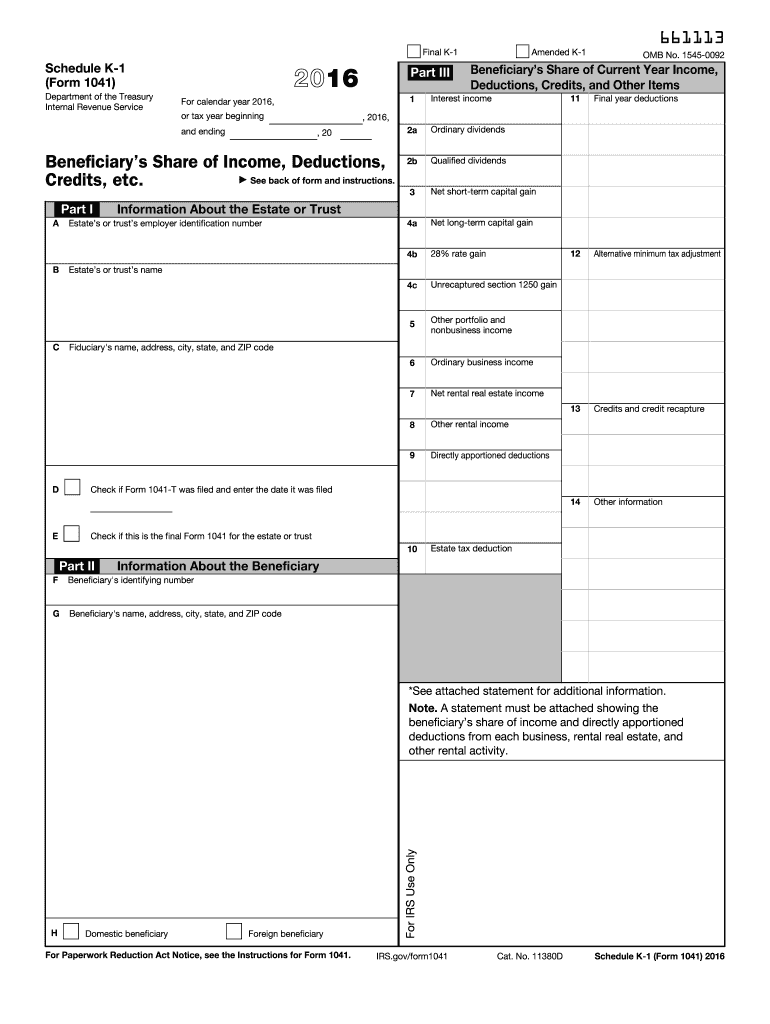
How to fill out the IRS 1041 - Schedule K-1 online
Filling out the IRS Schedule K-1 (Form 1041) can be a detailed process, especially for those unfamiliar with tax documentation. This guide aims to provide clear and concise steps to assist users in accurately completing the form online.
Follow the steps to fill out your IRS 1041 - Schedule K-1 online.
- Click the ‘Get Form’ button to access the form and open it in your preferred viewing application.
- Begin by filling in Part I, which includes information about the estate or trust. This includes the employer identification number, name of the estate or trust, and the fiduciary's name and address.
- Complete the checkbox if Form 1041-T has been filed and provide the filing date. Indicate if this is the final Form 1041 for the estate or trust.
- Move to Part II to provide details regarding the beneficiary. Input the beneficiary's identifying number, name, address, city, state, and ZIP code. Additionally, indicate whether the beneficiary is domestic or foreign.
- In Part III, record the beneficiary's share of income, deductions, credits, and other items. Fill out sections for qualified dividends, capital gains, ordinary business income, rental income, and various deductions.
- Ensure that a statement is attached showing the beneficiary's share of income and directly apportioned deductions from each activity mentioned on the form.
- Finally, review the completed form for accuracy. Once satisfied, you can save changes, download the form, print it for your records, or share it as needed.
Start completing your IRS 1041 - Schedule K-1 online today.
Experience a faster way to fill out and sign forms on the web. Access the most extensive library of templates available.
Related content
Note: A statement must be attached showing the beneficiary's share of income and directly...
The fiduciary of a trust or decedent's estate uses Schedule. K-1 to report your share of...
Jan 31, 2012 — Schedule K-1 (Form 1041), or other and geothermal property. Examples...
Get answers to your most pressing questions about US Legal Forms API.
Who must file an IRS form 1041?
Anyone managing a trust or estate that earns income must file IRS Form 1041. This includes executors of estates or trustees of a trust. If you're unsure about your responsibilities, uslegalforms provides resources to help you understand and fulfill your obligations with ease.
How does a K1 affect my personal taxes?
1 can significantly impact your personal taxes as it reflects the income you must report on your return. Depending on the amounts reported, your overall tax liability might increase or decrease. Understanding its implications can be complex, but uslegalforms can help clarify how to integrate this information effectively.
What is required to be reported on Schedule K-1?
Schedule K-1 requires reporting income, deductions, and credits allocated to each beneficiary from the trust or estate. Information such as capital gains and interest income is included to provide beneficiaries with their share of taxable income. Knowing what to report can be made simpler with uslegalforms, which offers valuable resources.
Who must file Schedule K-1?
Trustees and executors are responsible for filing Schedule K-1 for every beneficiary receiving income from an estate or trust. Each beneficiary needs this information to correctly report their tax obligations. Using uslegalforms can streamline this process and ensure that you meet all requirements without hassle.
Does Schedule K-1 need to be filed with 1041?
Schedule K-1 must be included with Form 1041 when you file your taxes. This form details the income distributed to beneficiaries during the tax year. Omitting it can lead to issues, so accurate completion is crucial, and uslegalforms can guide you in managing this paperwork effortlessly.
What is Schedule K-1 form 1041 line 14?
Line 14 on Schedule K-1 often reports the total capital gains and losses attributable to the beneficiaries. This line is especially important for beneficiaries, as it affects their individual tax filings. Knowing this can help you manage tax implications effectively, and uslegalforms provides tools to understand these details better.
How do I know if I need to file a 1041?
You must file IRS Form 1041 if you are the executor of an estate or the trustee of a trust that generates income. Generally, if the estate or trust has gross income of $600 or more, it is required to file. Understanding your specific situation is crucial, and uslegalforms offers guidance to determine your filing obligations.
Do you have to file a K-1 with a 1041?
Yes, you typically need to file a Schedule K-1 with Form 1041 if you are managing an estate or trust. The K-1 reports the beneficiaries' share of income, deductions, and credits. It's essential to ensure accurate reporting, as the IRS uses this information to verify the income of the beneficiaries. Using resources like uslegalforms can help simplify this process.
How to fill out a 1041 estate tax return?
Filling out the 1041 estate tax return requires gathering financial information regarding the estate's income, expenses, and distributions. You will complete various sections detailing this data. Utilizing platforms like US Legal Forms can provide guidance and resources, ensuring you correctly navigate the IRS 1041 - Schedule K-1 filing process.
What is the IRS form 1041 for dummies?
The IRS Form 1041 is essentially the income tax return for estates and trusts. It is used to report income earned by the estate or trust, and any distributions made to beneficiaries. Understanding the IRS 1041 - Schedule K-1 can simplify the process, making it easier to manage your tax obligations.
Use professional pre-built templates to fill in and sign documents online faster. Get access to thousands of forms.
If you believe that this page should be taken down, please follow our DMCA take down process here.
This form is available in several versions. Select the version you need from the drop-down list below.