% rate gain . . . . . . . . . . . . . . . 14c Total net gain or (loss). Combine lines 13 and 14a . . 15 (2) Estate s or trust s 2 (3) Total Note: If line 15, column (3), is a net gain, enter the gain on Form 1041, line 4 (or Form 990-T, Part I, line 4a). If lines 14a and 15, column (2), are net gains, go to Part V, and do not complete Part IV. If line 15, column (3), is a net loss, complete Part IV and the Capital Loss Carryover Worksheet, as necessary. Part IV 16 a Capital Loss Li.

Open form follow the instructions

Easily sign the form with your finger

Send filled & signed form or save
How to fill out the IRS 1041 - Schedule D online
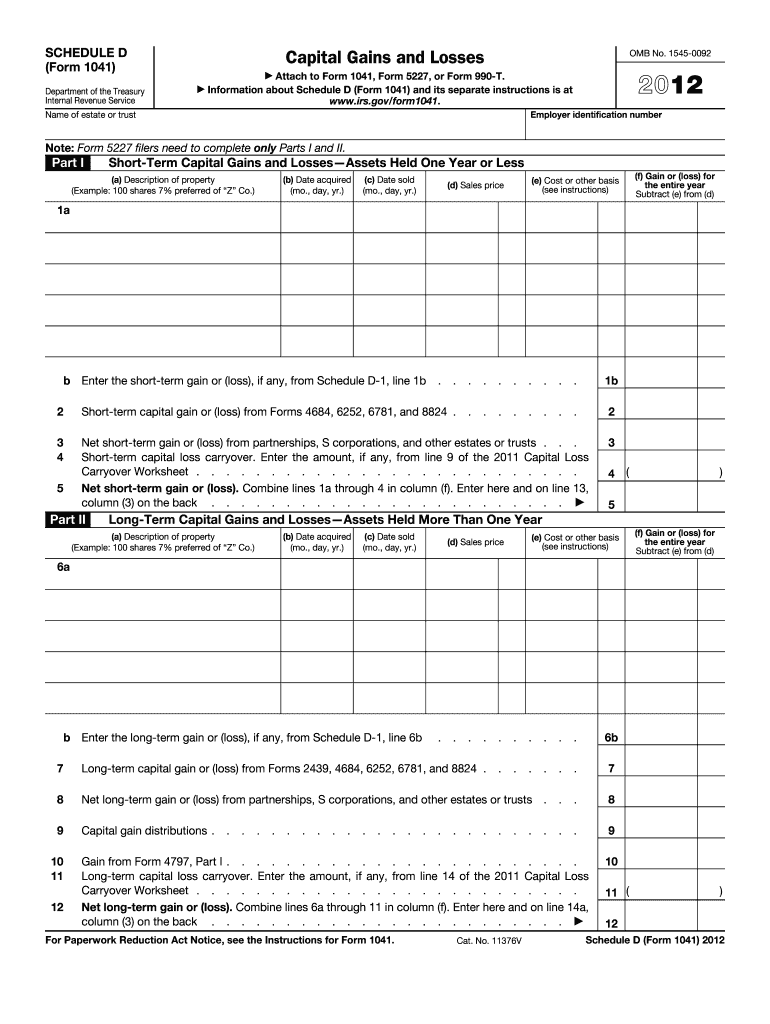
Filling out the IRS 1041 - Schedule D is essential for reporting capital gains and losses for estates and trusts. This guide provides a clear and detailed approach to help you complete the form effectively, ensuring you meet your reporting requirements.
Follow the steps to fill out the IRS 1041 - Schedule D.
- Press the ‘Get Form’ button to access the form and open it for editing.
- In the top section, enter the employer identification number and the name of the estate or trust. These details are crucial for identifying the entity reporting the gains and losses.
- Move to Part I, which covers short-term capital gains and losses. List each asset held for one year or less, providing descriptions, acquisition and sale dates, costs, and sales prices.
- For each transaction in Part I, calculate the gain or loss by subtracting the cost (e) from the sales price (d). Enter the result in column (f).
- If applicable, input any short-term gains or losses from other schedules as directed.
- Proceed to Part II for long-term capital gains and losses. Similar to Part I, provide details for assets held more than one year.
- Calculate long-term gains or losses in the same manner as in Part I and record them in column (f).
- Complete the summary in Part III, adding up the net short-term and long-term gains or losses to report on the form.
- Follow through to Part IV to report any capital loss limitations, entering the smaller of the loss or $3,000.
- If necessary, complete Part V to calculate tax using maximum capital gains rates. This is applicable only under specific conditions outlined in the instructions.
- Finally, review your entries for accuracy, then save your changes, download or print the form for your records, and share as needed.
Begin completing the IRS 1041 - Schedule D online to ensure accurate reporting of your capital gains and losses.
Experience a faster way to fill out and sign forms on the web. Access the most extensive library of templates available.
Related content
Use Schedule D to report the following. • The overall capital gains and losses from...
Jan 22, 2013 — Purpose of Form. Use Schedule D (Form 1041) to report gains and losses...
19. Enter the loss, if any, from line 21 of your 2017 Schedule D (Form 1040). (Estates and...
Get answers to your most pressing questions about US Legal Forms API.
Can I file a 1041 online IRS?
Yes, you can file a 1041 online through the IRS e-File system. Many tax preparation software platforms support electronic filing, making it more convenient for you. Utilizing these online resources can simplify the process, particularly when incorporating the IRS 1041 - Schedule D into your submission.
What are the instructions for Schedule D line 13?
To complete Schedule D line 13, you need to account for any net capital gains that qualify. Follow the provided guidelines, which direct you to include relevant data from your investments. By accurately following the instructions and understanding the IRS 1041 - Schedule D, you can ensure proper reporting and compliance.
Do I have to file a Schedule D if I sold my house?
If you sold your house and realized a capital gain, you typically need to file a Schedule D. However, if you qualify for the primary residence exclusion, you may not have to report the sale. Be sure to check the IRS guidelines and consult resources like US Legal Forms to clarify your situation regarding the IRS 1041 - Schedule D.
What should I report on Schedule D?
On Schedule D, you should report all capital gains and losses from the sale of stocks, bonds, and other investments. This includes both short-term and long-term transactions, ensuring that you accurately capture your financial activity for the year. Accurate reporting is essential for completing your IRS 1041 - Schedule D correctly.
What is the $3000 capital loss rule?
The $3000 capital loss rule allows individuals to use net capital losses to offset taxable income. If your losses exceed your gains, you can deduct up to $3000 from your other income on your tax return. This rule is important for anyone navigating the IRS 1041 - Schedule D, helping to reduce tax burdens.
What is line 13 on taxes?
Line 13 on taxes refers to the section where you report your capital gains or losses. Specifically, it is part of the IRS 1041 - Schedule D, where you detail the net long-term capital gain or loss after considering short-term transactions. This line plays a critical role in determining your overall tax liability.
Where do I enter Schedule D on TurboTax?
You can enter Schedule D on TurboTax by navigating to the 'Wages & Income' section of the software. Look for the section labeled 'Investment Income' and select 'Stocks, Bonds, Mutual Funds.' From there, follow the prompts to input your transactions related to the IRS 1041 - Schedule D, ensuring everything is reported accurately.
Who sends Schedule D?
Schedule D is typically filled out by the taxpayer and is included with their Form 1041 for filing. It is not sent by the IRS or any third party. However, your tax preparation software or tax professional might assist you in completing the IRS 1041 - Schedule D accurately.
Do I have to include Schedule D on my tax return?
If you have capital gains or losses that need reporting, then including IRS 1041 - Schedule D in your tax return is necessary. It ensures that all relevant information is submitted to the IRS. Failing to include it may lead to discrepancies and potential penalties.
Is there a Schedule D for form 1041?
Yes, there is an IRS 1041 - Schedule D specifically designed for estates and trusts. This form helps report capital gains and losses for these entities. It is essential to fill out the correct Schedule D to comply with tax regulations for estates and trusts.
Use professional pre-built templates to fill in and sign documents online faster. Get access to thousands of forms.
If you believe that this page should be taken down, please follow our DMCA take down process here.
This form is available in several versions. Select the version you need from the drop-down list below.