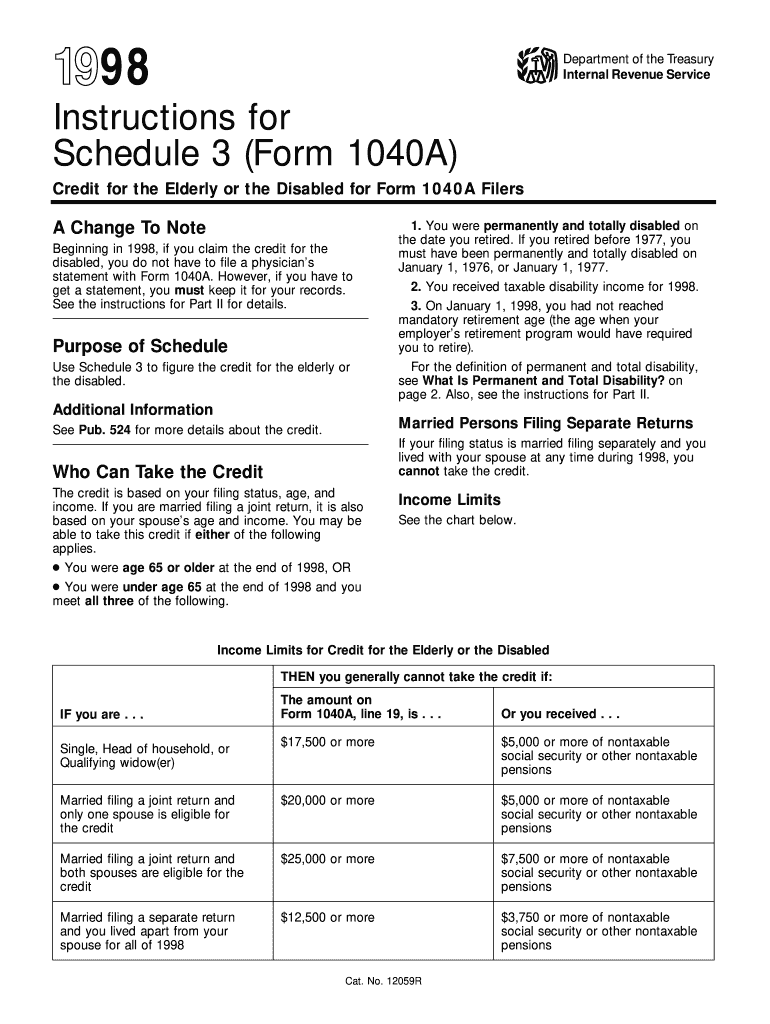
The credit. A person is permanently and totally disabled if both 1 and 2 below apply. 1. He or she cannot engage in any substantial gainful activity because of a physical or mental condition, and 2. A physician determines that the condition has lasted or can be expected to last continuously for at least a year or can lead to death. Examples 1 and 2 below show situations in which the individuals are considered engaged in a substantial gainful activity. Example 3 shows a person who might not be c.

Open form follow the instructions

Easily sign the form with your finger

Send filled & signed form or save
How to use or fill out the IRS 1040A Schedule 3 Instructions online
Filling out the IRS 1040A Schedule 3 is essential for individuals seeking a credit for the elderly or the disabled. This guide will provide clear, step-by-step instructions on how to effectively complete this form online, ensuring you have all necessary information at your fingertips.
Follow the steps to efficiently complete your Schedule 3 online
- Click ‘Get Form’ button to obtain the form and open it in the editor.
- Review the purpose of Schedule 3, which is to determine the credit for the elderly or the disabled. Familiarize yourself with the eligibility criteria, including age and income limits.
- In Part I, indicate your filing status and check the appropriate boxes that apply to your situation regarding disability status.
- Complete Part II if applicable, where you may need to provide a physician's statement certifying your permanent and total disability. Remember, starting from 1998, you do not need to submit this statement with your form but must keep it for your records.
- Move on to Part III. Use the chart provided to accurately fill in the amounts regarding your disability income based on your selections in Part I.
- Enter any applicable social security benefits on the appropriate lines. Ensure you follow the instructions carefully regarding taxable and non-taxable amounts.
- Once all fields are completed, review your entries for accuracy. Make any necessary changes before finalizing your form.
- After reviewing, save your changes, download the completed form, and print or share it as required.
Take action now and begin completing your IRS 1040A Schedule 3 online to secure your benefits.
Experience a faster way to fill out and sign forms on the web. Access the most extensive library of templates available.
Related content
Dec 16, 2024 — Page 1. Instructions for Form 1040 ... You may only need to file Form...
United States. Internal Revenue Service. Instructions for Schedule 3 (Form 1040A), credit...
If line 6 is equal to or more than line 3, skip Part III and enter the amount from line 3...
Get answers to your most pressing questions about US Legal Forms API.
What does the IRS consider to be a digital asset?
The IRS considers digital assets to include cryptocurrencies, tokens, and virtual currencies that can be used as a medium of exchange. These assets are subject to capital gains taxes when sold or exchanged. Understanding this classification is critical, and referring to the IRS 1040A Schedule 3 Instructions can clarify how to report them correctly.
Do I have to report crypto less than $600?
Yes, even if your cryptocurrency transactions are under $600, the IRS still requires you to report them. The digital asset nature of cryptocurrency means that all transactions incur reporting responsibilities. To ensure compliance, consult the IRS 1040A Schedule 3 Instructions for valuable insights on reporting digital currencies.
What is the new IRS rule for digital income?
The new IRS rule for digital income requires taxpayers to report earnings from online platforms and services. This includes income from social media, freelance work, and e-commerce. To navigate these regulations successfully, refer to the IRS 1040A Schedule 3 Instructions, which outline your reporting obligations.
What is the new 1040 form for seniors?
The new IRS 1040 form for seniors simplifies reporting for those aged 65 and older. It includes streamlined sections for income and deductions specific to senior needs, making tax filing more accessible. For detailed guidance on completing this form, consult the IRS 1040A Schedule 3 Instructions.
What is the new IRS $600 rule?
The new IRS $600 rule requires taxpayers to report income from third-party platforms if they receive over $600 in a calendar year. This change impacts freelancers and gig economy workers who rely on platforms like PayPal or Venmo. Familiarizing yourself with the IRS 1040A Schedule 3 Instructions can help ensure you comply with these reporting requirements.
What are nonrefundable credits on 1040?
Nonrefundable credits on the IRS 1040 form reduce your tax liability but cannot exceed the amount of tax you owe. Common examples include education credits and the child tax credit. Understanding these credits can help you maximize your tax savings, making it essential to refer to the IRS 1040A Schedule 3 Instructions for precise guidance.
Where can I get instructions for 1040?
You can find the IRS 1040A Schedule 3 Instructions on the official IRS website, which provides comprehensive guidance. Additionally, various tax software applications offer easy access to these instructions for your convenience. If you prefer printed materials, consider visiting a local library or a tax help center.
What is the line 26 adjustment to income from Schedule 1?
Line 26 on Schedule 1 represents certain adjustments to income before calculating your adjusted gross income. This may include educator expenses, self-employment taxes, and contributions to retirement accounts. Make sure to consult the IRS 1040A Schedule 3 Instructions for guidance on what specific adjustments apply. These adjustments can lower your taxable income, potentially leading to tax savings.
What are the IRS rules for claiming a dependent?
The IRS has specific rules for claiming a dependent outlined in the IRS 1040A Schedule 3 Instructions. Generally, a dependent must be related to you and must meet additional requirements such as age and residency. Additionally, you must provide support for them and ensure they meet the income thresholds specified by the IRS. Understanding these requirements helps ensure you get the credits and deductions you deserve.
How to calculate line 26 on 1040?
Calculating line 26 on Form 1040 requires a few steps as outlined in the IRS 1040A Schedule 3 Instructions. Begin with your total income and deduct any adjustments made earlier in the form. Always verify each entry to ensure accuracy, as this line directly impacts your overall tax obligation.
Use professional pre-built templates to fill in and sign documents online faster. Get access to thousands of forms.
If you believe that this page should be taken down, please follow our DMCA take down process here.