If you also receive salaries and wages, you may be able to avoid having to make estimated tax payments on your other income by asking your employer to take more tax out of your earnings. To do this, file a new Form W-4, Employee's Withholding Allowance Certificate, with your employer. Additional Information You May Need You can find most of the information you will need in Pub. 505, Tax Withholding and Estimated Tax. Other available information: Pub. 519, U.S. Tax Guide for Aliens. Instructio.
Loading
Open form follow the instructions
Easily sign the form with your finger
Send filled & signed form or save
How to fill out the IRS 1040-ES (NR) online
The IRS 1040-ES (NR) form is essential for nonresident alien individuals to estimate and pay their taxes. This guide provides clear, step-by-step instructions to help users navigate the online filling process with ease.
Follow the steps to successfully complete your IRS 1040-ES (NR) online.
- Click ‘Get Form’ button to obtain the form and open it in the digital editor.
- Input your personal information in the designated fields including your name, SSN or ITIN, and address.
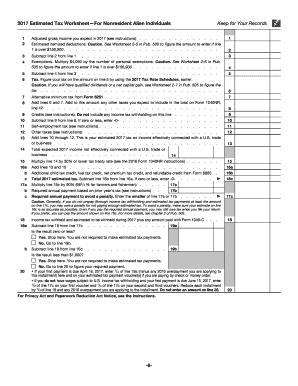
- Refer to the 2016 Estimated Tax Worksheet to calculate your expected adjusted gross income for 2017.
- Enter the estimated deductions you expect to claim and subtract this from your expected adjusted gross income.
- Calculate your exemptions by multiplying $4,050 by the number of personal exemptions and subtract from your previous result.
- Use the 2017 Tax Rate Schedules to compute your estimated tax based on the amount from the previous step.
- Add any additional taxes, such as self-employment tax, to your calculated estimated tax.
- Incorporate any available credits and subtract them from your total estimated tax liability.
- Check the payment due dates and decide on a payment schedule, whether it is a quarterly or a one-time payment.
- Save your completed form. You can download, print, or securely share it as needed.
Complete your IRS 1040-ES (NR) form online today to ensure timely tax payments and compliance!
Experience a faster way to fill out and sign forms on the web. Access the most extensive library of templates available.
Related content
Dec 4, 2024 — If you are a nonresident alien, use this package to figure and pay your...
Form 1040-ES is used to figure and pay estimated tax for 2025 on income not subject to...
Apr 15, 2015 — Estimated tax paid with Form. 1040-ES or Form 1040-ES (NR). 3. Tax paid...
Get answers to your most pressing questions about US Legal Forms API.
Who qualifies for non-resident alien?
To qualify as a non-resident alien, you generally must not meet the substantial presence test specified by the IRS. This status applies to individuals living outside the U.S. who earn U.S. income. Proper understanding of your qualifications can help guide your tax filing choices.
What is Form 1040-ES NR?
Form 1040-ES NR is a payment voucher for estimated tax payments for non-resident aliens. If you expect to owe taxes, you should use this form to make quarterly payments. This helps you stay compliant with IRS regulations and avoids any underpayment penalties.
What is the difference between a 1040 and a 1040-NR?
IRS 1040 is used by U.S. residents, while 1040-NR is designed for non-resident aliens. The forms differ in the income calculations, deductions, and tax credits available. Understanding these differences is key for proper tax reporting and compliance.
Can I file 1040-NR online?
Yes, you can file IRS 1040-NR online using various tax preparation software. Many platforms simplify the process for non-resident aliens. However, ensure you select a service that specifically caters to IRS 1040-NR to avoid any issues during the filing.
What happens if I file 1040 instead of 1040-NR?
Filing IRS 1040 instead of 1040-NR could lead to complications. The IRS might question your residency status and your taxable income could be miscalculated. It is crucial to use the correct form to comply with IRS regulations, thus preventing any potential penalties.
What are the filing statuses for 1040-NR?
The IRS 1040-NR supports two primary filing statuses: Single and Married Filing Separately. Your choice will affect your tax rates and eligibility for certain credits. Therefore, choose the status that aligns with your situation to ensure proper tax computations.
Who qualifies for 1040-NR?
Individuals who are classified as non-resident aliens for tax purposes qualify to file IRS 1040-NR. This includes those who do not meet the substantial presence test in the U.S. If you meet these criteria, it’s essential to file the correct form to avoid any potential issues with the IRS.
Who is eligible for 1040-NR?
To be eligible for IRS 1040-NR, you must be a non-resident alien who has income from sources in the United States. Typically, this includes foreign individuals who earned income through wages, rentals, or investments within the country. Make sure to check the specific income thresholds as these rules can vary annually.
How do I know if I need to file estimated taxes?
You may need to file estimated taxes if you anticipate owing $1,000 or more in taxes after subtracting withholding and credits. Additionally, if your income comes from sources that do not withhold taxes, it's likely you will need to file using IRS 1040-ES (NR). UsLegalForms provides valuable resources to help you assess your specific situation and prepare accordingly.
Do I have to make quarterly estimated tax payments?
Whether you need to make quarterly estimated tax payments depends on your tax situation, including your overall tax liability for the year. If your income is not subject to withholding or if you expect to owe a certain amount, you may need to file using IRS 1040-ES (NR) quarterly. Consulting UsLegalForms can simplify this process and ensure you meet your obligations.
Use professional pre-built templates to fill in and sign documents online faster. Get access to thousands of forms.
If you believe that this page should be taken down, please follow our DMCA take down process here.
This form is available in several versions. Select the version you need from the drop-down list below.