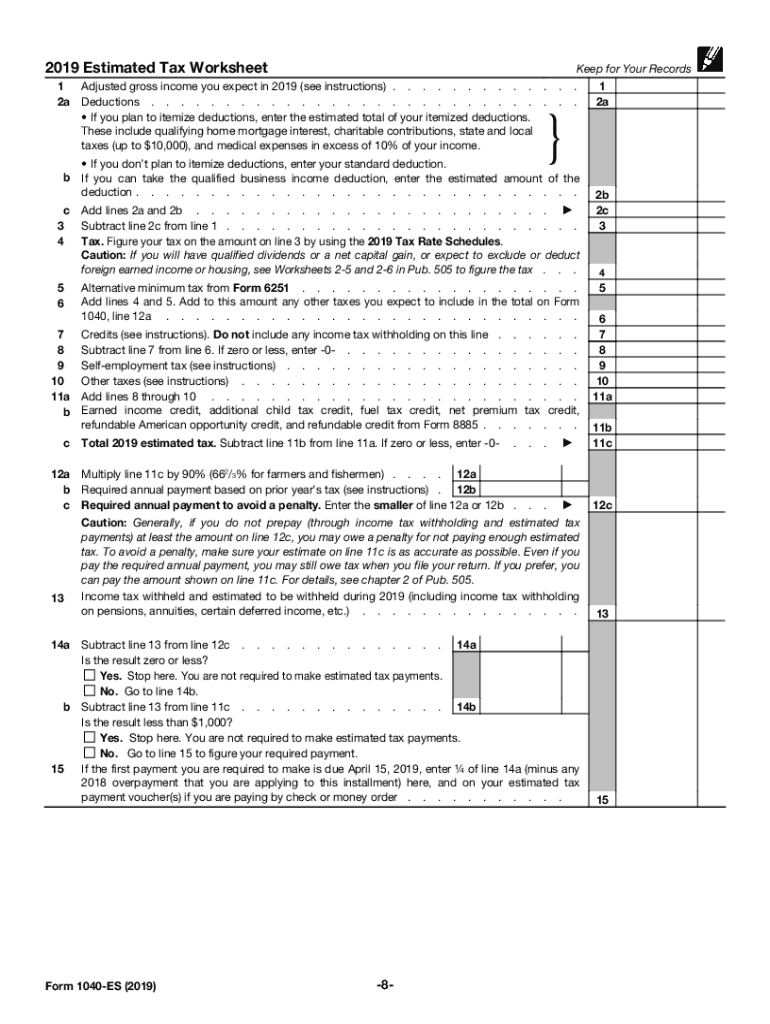
And its instructions for more information. THEN your standard deduction is... Married filing jointly or Qualifying widow(er) $24,400 Head of household $18,350 Single or Married filing separately $12,200 How To Figure Your Estimated Tax You will need: The 2019 Estimated Tax Worksheet, The Instructions for the 2019 Estimated Tax Worksheet, The 2019 Tax Rate Schedules, and Your 2018 tax return and instructions to use as a guide to figuring your income, deductions, and cred.
Loading

Open form follow the instructions

Easily sign the form with your finger

Send filled & signed form or save
How to fill out the IRS 1040-ES online
Filling out the IRS 1040-ES online is an essential task for individuals who need to pay estimated taxes. This guide will walk you through the process step-by-step, ensuring that you complete the form accurately and efficiently.
Follow the steps to complete your IRS 1040-ES online
- Click ‘Get Form’ button to obtain the form and open it in the editor.
- Enter your personal information in the designated fields, including your name, address, and Social Security number.
- For the estimated tax payment calculation, refer to your adjusted gross income from your previous tax return. Enter this amount in the appropriate section.
- Determine your deductions based on whether you will itemize or take the standard deduction. Enter this amount accordingly.
- Use the 2019 Tax Rate Schedules to calculate your projected taxes based on the information provided. Add any additional taxes you expect.
- Follow the prompts to add any applicable tax credits. Make sure these reflect your situation accurately.
- Subtract the total credits from your estimated tax liability to arrive at your estimated tax due for the year.
- Recheck all the entries you have made to ensure accuracy before submission.
- Finally, you can save your changes, download the completed form, or print it out. Make any necessary payments online or according to the instructions provided.
Complete your IRS 1040-ES form online today to ensure timely submission and avoid any penalties.
Experience a faster way to fill out and sign forms on the web. Access the most extensive library of templates available.
Related content
May 15, 2025 — Use Form 1040-ES to figure and pay your estimated tax. Estimated tax is...
Use Form 1040-ES to figure and pay your estimated tax for 2025. Estimated tax is the...
Mar 1, 2017 — Form 1040 or Form 1040A instructions. If you did not pay estimated tax...
Get answers to your most pressing questions about US Legal Forms API.
How to file self-employment taxes step by step?
Filing self-employment taxes involves several steps: First, calculate your estimated earnings and expenses to determine your tax liability. Next, complete the IRS 1040-ES to make estimated payments throughout the year. Finally, when filing your annual return, report income on Schedule C, calculate your self-employment tax on Schedule SE, and submit your completed forms to the IRS.
How do I get the most out of my self-employed tax return?
To maximize your self-employed tax return, track all business expenses meticulously and take advantage of available deductions. Utilizing the IRS 1040-ES can help you plan your estimated taxes effectively and avoid penalties. Additionally, consulting tax professionals or platforms like uslegalforms can provide insights and strategies tailored to your unique situation.
How do I file taxes if I am self-employed?
To file taxes as a self-employed individual, start by completing the IRS 1040-ES to estimate your tax obligations throughout the year. When filing your annual return, include income and expenses on Schedule C and calculate self-employment tax using Schedule SE. Consider using platforms like uslegalforms to simplify the filing process and ensure compliance.
Can you get a tax refund if you're self-employed?
Yes, it is possible to receive a tax refund even if you are self-employed. If you have overpaid your estimated taxes using the IRS 1040-ES form, the IRS may refund the excess amount once you file your tax return. To maximize your chances of a refund, ensure you track all deductible expenses throughout the year.
Does 1040 ES include self-employment tax?
The IRS 1040-ES form is primarily used to estimate annual taxes, including income from self-employment. However, self-employment tax is calculated separately on Schedule SE when filing your annual return. It's crucial to consider both when estimating your tax payments, as overlooking self-employment tax can lead to unexpected liabilities later.
How to claim estimated tax payments?
To claim estimated tax payments, you need to report them on your tax return using IRS Form 1040, particularly on Line 26. It’s also important to keep records of all payments made with your IRS 1040-ES vouchers. By accurately tracking these payments, you can reduce your overall tax liability.
Are 1040 ES payments optional?
IRS 1040-ES payments are generally not optional if you expect to owe taxes of $1,000 or more when you file your return. While some individuals may qualify for certain exemptions, it is crucial to understand your tax situation. If you're unsure, platforms like US Legal Forms provide resources to help you determine if you need to make these payments.
Why did the IRS send me a 1040-ES?
The IRS sends you a 1040-ES if they believe you could owe estimated taxes based on your previous tax filings or other information. This form serves as a reminder that you should be making estimated tax payments throughout the year. By using IRS 1040-ES, you can help ensure that you meet your tax responsibilities and avoid any unexpected tax bills.
Who fills out 1040-ES?
Individuals who owe estimated taxes typically fill out IRS 1040-ES. This includes self-employed individuals, freelancers, or anyone who receives income without adequate tax withholding. Knowing when to use Form 1040-ES is essential for managing your financial health and avoiding potential IRS penalties.
Can I file 1040-ES electronically?
Yes, you can file IRS 1040-ES electronically, which is often the simplest method. E-filing your estimated payments allows for faster processing and immediate confirmation of submission. This approach minimizes paperwork and helps you manage your tax responsibilities more efficiently.
Use professional pre-built templates to fill in and sign documents online faster. Get access to thousands of forms.
If you believe that this page should be taken down, please follow our DMCA take down process here.
This form is available in several versions. Select the version you need from the drop-down list below.