Loading
Form preview
  • US Legal Forms
  • Other Templates
  • Tax Forms
  • Executive Department Treasury IRS Forms
  • Irs 1040 Tax Table 2013

Get Irs 1040 Tax Table 2013

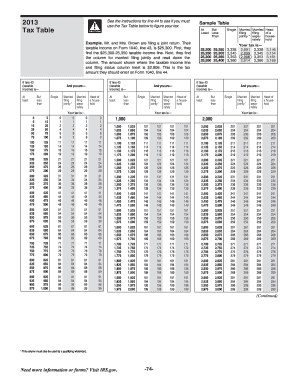
34,550 34,450 34,500 34,550 34,600 4,718 4,725 4,733 4,740 4,271 4,279 4,286 4,294 4,718 4,725 4,733 4,740 4,526 4,534 4,541 4,549 37,400 37,450 37,500 37,550 37,450 37,500 37,550 37,600 5,285 5,298 5,310 5,323 4,721 4,729 4,736 4,744 5,285 5,298 5,310 5,323 4,976 4,984 4,991 4,999 31,600 31,650 31,700 31,750 31,650 31,700 31,750 31,800 4,298 4,305 4,313 4,320 3,851 3,859 3,866 3,874 4,298 4,305 4,313 4,320 4,106 4,114 4,121 4,129 34,600 34,650 34,700 34,750 34,650 34,700 34,.

This website is not affiliated with IRS

How it works

  1. Open form

    Open form follow the instructions

  2. Easily sign form

    Easily sign the form with your finger

  3. Share form

    Send filled & signed form or save

How to fill out the IRS 1040 Tax Table online

Filing your taxes can be a daunting task, but understanding how to use the IRS 1040 Tax Table is essential for accurately determining your tax liability. This guide will provide you with a step-by-step process to efficiently complete this form online.

Follow the steps to successfully complete the IRS 1040 Tax Table.

  1. Click ‘Get Form’ button to obtain the form and open it in the editor.
  2. Locate your taxable income from Form 1040, line 43.
  3. Find the row that corresponds to your taxable income range in the Tax Table.
  4. Identify your filing status (single, married filing jointly, married filing separately, or head of household).
  5. Follow the intersecting column from your taxable income row to find the corresponding tax amount.
  6. Record the tax amount on Form 1040, line 44.
  7. After ensuring all information is accurate, save your changes, then download, print, or share the form as needed.

Start filing your documents online to ensure a smooth tax season.

Get form

Experience a faster way to fill out and sign forms on the web. Access the most extensive library of templates available.

Related content

Instructions for Form 1040 Tax Tables (2024)
This booklet only contains Tax and Earned Income. Credit Tables from the Instructions for...
Learn more
instructions for form 1040, united states...
ITEMS EXEMPT FROM TAX.—Explain items claimed to be exempt in Schedule I, except interest...
Learn more
2014 Instructions for Form 1040NR
Apr 15, 2015 — What's New. Premium tax credit. You may be eligible to claim the premium...
Learn more

Related links form

IRS 1120S - Schedule M-3 2013 IRS 1120S - Schedule M-3 2012 IRS 1120S - Schedule M-3 2011 IRS 1120X 2016

Questions & Answers

Get answers to your most pressing questions about US Legal Forms API.

Contact support

Schedule A is used for itemizing deductions on your 1040 tax return. It allows you to report various allowable expenses such as mortgage interest, medical expenses, and charitable contributions, which can potentially lower your taxable income. Submitting Schedule A can provide significant benefits, as your deductions will be directly compared to the figures outlined in the IRS 1040 Tax Table.

The new 1040 form for seniors, known as the 1040SR, is a simplified version of the traditional 1040 form designed to assist older taxpayers. This form includes features like larger text and an easier layout to enhance accessibility. Using the 1040SR allows seniors to efficiently navigate their tax obligations, ensuring they calculate their dues accurately according to the IRS 1040 Tax Table.

To find your tax table, you can refer to the IRS website, where they provide up-to-date tax information including the IRS 1040 Tax Table. Additionally, tax preparation software often contains built-in tax tables for your convenience. By locating the appropriate table, you can quickly determine your tax rate based on your taxable income.

1040 Schedule 1 is used to report additional income such as unemployment compensation or alimony. Schedule 2, on the other hand, focuses on additional taxes such as self-employment tax or the penalty for early withdrawal from retirement accounts. Both schedules play a crucial role in calculating your overall tax liability, which is often referenced against the IRS 1040 Tax Table.

To find your taxable income on the 1040 form, you need to start with your total income from all sources, then subtract any adjustments and deductions. This total is typically located on Line 15 of the 1040 form. Once you have your taxable income, you can refer to the IRS 1040 Tax Table to determine your tax rate and liability.

The primary difference between the 1040 and 1040SR forms lies in their target audience. The 1040SR is designed specifically for seniors aged 65 and older, featuring a larger font and simplified layout for easier reading. Both forms ultimately lead to the same IRS 1040 Tax Table, determining your tax obligations based on your reported income and deductions.

1040 tax schedules refer to specific forms that taxpayers use alongside the main 1040 form to report certain types of income and deductions. Common schedules include Schedule A for itemized deductions and Schedule C for reporting self-employment income. These schedules supplement the IRS 1040 Tax Table, ensuring that you report your tax situation comprehensively and correctly.

Schedules on the 1040 form are additional worksheets that help you report various types of income, deductions, or credits. These schedules provide detailed information that isn't included directly on the main form. Essentially, they allow you to calculate your taxable income and tax liability accurately. Understanding these schedules can streamline your filing process and align your information with the IRS 1040 Tax Table.

Using the 1040 tax table is relatively straightforward; first, find your taxable income and then locate the tax bracket that matches it. This table guides you in determining the amount of tax you owe based on your filing status. Referencing the IRS 1040 Tax Table helps ensure that you do not underpay or overpay your taxes. Consulting tools available on platforms like USLegalForms can streamline this process.

Seniors can earn a certain amount without needing to file taxes, which varies based on filing status and age. Generally, if your income is below the standard deduction threshold, you might not need to file. Understanding these thresholds is key, and utilizing the IRS 1040 Tax Table helps clarify your income limits. For personalized guidance, platforms like USLegalForms may offer tailored resources.

Get This Form Now!

Use professional pre-built templates to fill in and sign documents online faster. Get access to thousands of forms.
If you believe that this page should be taken down, please follow our DMCA take down processhere.
Get IRS 1040 Tax Table
  • Adoption
  • Bankruptcy
  • Contractors
  • Divorce
  • Home Sales
  • Employment
  • Identity Theft
  • Incorporation
  • Landlord Tenant
  • Living Trust
  • Name Change
  • Personal Planning
  • Small Business
  • Wills & Estates
  • Packages A-Z
  • Affidavits
  • Bankruptcy
  • Bill of Sale
  • Corporate - LLC
  • Divorce
  • Employment
  • Identity Theft
  • Internet Technology
  • Landlord Tenant
  • Living Wills
  • Name Change
  • Power of Attorney
  • Real Estate
  • Small Estates
  • Wills
  • All Forms
  • Forms A-Z
  • Other Templates
  • Legal Hub
  • About Us
  • Help Portal
  • Legal Resources
  • Blog
  • Affiliates
  • Contact Us
  • Delete My Account
  • Site Map
  • Industries
  • Forms in Spanish
  • Localized Forms
  • State-specific Forms
  • Forms Kit
  • Real Estate Handbook
  • All Guides
  • Notarize
  • Incorporation services
  • For Consumers
  • For Small Business
  • For Attorneys
  • USLegal
  • FormsPass
  • pdfFiller
  • signNow
  • altaFlow
  • DocHub
  • Instapage
Form Packages
  • Adoption
  • Bankruptcy
  • Contractors
  • Divorce
  • Home Sales
  • Employment
  • Identity Theft
  • Incorporation
  • Landlord Tenant
  • Living Trust
  • Name Change
  • Personal Planning
  • Small Business
  • Wills & Estates
  • Packages A-Z
Form Categories
  • Affidavits
  • Bankruptcy
  • Bill of Sale
  • Corporate - LLC
  • Divorce
  • Employment
  • Identity Theft
  • Internet Technology
  • Landlord Tenant
  • Living Wills
  • Name Change
  • Power of Attorney
  • Real Estate
  • Small Estates
  • Wills
  • All Forms
  • Forms A-Z
  • Other Templates
Customer Service
  • Legal Hub
  • About Us
  • Help Portal
  • Legal Resources
  • Blog
  • Affiliates
  • Contact Us
  • Delete My Account
  • Site Map
  • Industries
  • Forms in Spanish
  • Localized Forms
  • State-specific Forms
  • Forms Kit
Legal Guides
  • Real Estate Handbook
  • All Guides
Prepared for you
  • Notarize
  • Incorporation services
Our Customers
  • For Consumers
  • For Small Business
  • For Attorneys
Our Sites
  • USLegal
  • FormsPass
  • pdfFiller
  • signNow
  • altaFlow
  • DocHub
  • Instapage
Social Media
Call us now toll free:
+1 833 426 79 33
As seen in:
© Copyright 1999-2026 airSlate Legal Forms, Inc. 17 Station Street, Ste. 203, Brookline, MA 02445
  • Your Privacy Choices
  • Terms of Service
  • Privacy Notice
  • Content Takedown Policy
  • Bug Bounty Program
IRS 1040 Tax Table
This form is available in several versions.
Select the version you need from the drop-down list below.
2022 IRS 1040 Tax Table
Select form
  • 2022 IRS 1040 Tax Table
  • 2017 IRS 1040 Tax Table
  • 2016 IRS 1040 Tax Table
  • 2015 IRS 1040 Tax Table
  • 2014 IRS 1040 Tax Table
  • 2013 IRS 1040 Tax Table
  • 2011 IRS 1040 Tax Table
Select form