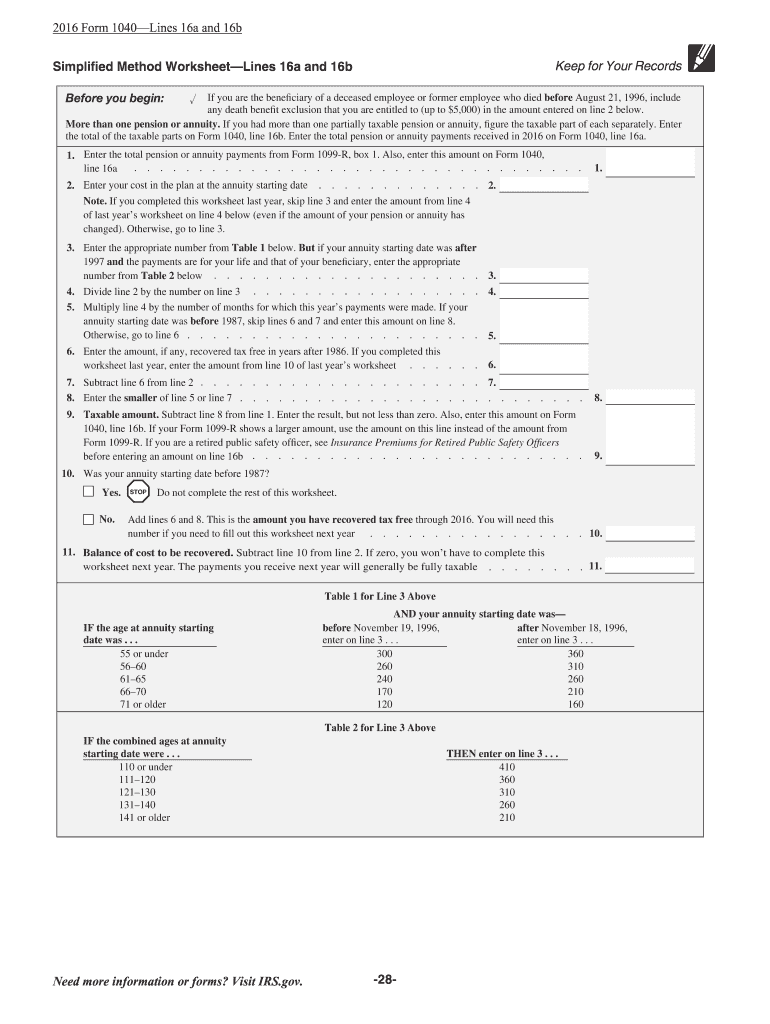
2 below. More than one pension or annuity. If you had more than one partially taxable pension or annuity, figure the taxable part of each separately. Enter the total of the taxable parts on Form 1040, line 16b. Enter the total pension or annuity payments received in 2015 on Form 1040, line 16a. 1. Enter the total pension or annuity payments from Form 1099-R, box 1. Also, enter this amount on Form 1040, . . . . . . . . . . . . . . . . . . . . . . . . . . . . . . . . . line 16a . . 1. . . . . .

Open form follow the instructions

Easily sign the form with your finger

Send filled & signed form or save
How to fill out the IRS 1040 Lines 16a and 16b online
Filling out the IRS 1040 Lines 16a and 16b accurately is essential for reporting your pension and annuity income. This guide will walk you through each step to ensure you complete these sections correctly while filing online.
Follow the steps to complete Lines 16a and 16b effectively.
- Click ‘Get Form’ button to obtain the form and open it in the editor.
- Begin by entering the total pension or annuity payments from Form 1099-R, box 1 on Line 16a. Ensure this amount is accurately reflected to report all income received.
- Calculate the taxable amount for Line 16b by subtracting line 8 from line 1. The result must be at least zero. If your Form 1099-R shows a larger amount, use the amount you calculated instead.
- If you were a retired public safety officer, review the guidelines related to insurance premiums before finalizing the amount for Line 16b.
- Complete the Simplified Method Worksheet to determine the appropriate values for Line 16b if necessary. Enter your cost in the plan at the annuity starting date on line 2 of the worksheet.
- Use Table 1 or Table 2 provided in the worksheet based on your age at the annuity starting date to find the correct number. Enter this into line 3 of the worksheet.
- Divide the number entered in line 2 by the number obtained in line 3 and place this result on line 4 of the worksheet.
- Multiply the result from line 4 by the number of months for which this year's payments were made. If your annuity starting date was before 1987, enter this amount on line 8.
- Complete any additional calculations as directed in the worksheet until you finalize the values necessary for Lines 16a and 16b.
- Upon finishing the necessary calculations, review the entries made on Lines 16a and 16b for accuracy before continuing to save changes, download, print, or share the form.
Start filling out your IRS 1040 Lines 16a and 16b online today for a smooth tax filing experience.
Experience a faster way to fill out and sign forms on the web. Access the most extensive library of templates available.
Related content
Feb 21, 2025 — Line 16 is a manual entry of tax in the far right-hand column. Review the...
Single. Head of household (HOH). Married filing jointly (even if only one had income)...
Jan 4, 2017 — Report the payments on Form 1040, lines 16a and 16b; Form 1040A, lines 12a...
Get answers to your most pressing questions about US Legal Forms API.
What is line 16 on 1040 TurboTax?
On 1040 TurboTax, line 16 typically represents a crucial figure in your total tax calculation. This number reflects your tax liabilities, considering the adjustments made throughout your tax return process. As you navigate through your return, understanding how IRS 1040 Lines 16a and 16b impact this figure is essential for accurate reporting. If you encounter difficulties, US Legal Forms is available to help clarify your situation.
What is line 16 on Schedule D?
Line 16 on Schedule D pertains to the capital gain distributions that you receive. This includes income generated from the sale of capital assets, such as stocks. It is essential to report this income correctly because it affects your overall tax calculation tied to IRS 1040 Lines 16a and 16b. For a comprehensive understanding of your tax situation, consider resources like US Legal Forms to guide you.
How is line 16 on W-2 calculated?
Line 16 on your W-2 corresponds to your state wages and is calculated based on your total earnings within a state, minus certain deductions. Employers often use payroll software to accurately compute these amounts. Knowing how line 16 interacts with IRS 1040 Lines 16a and 16b can help you ensure your tax return reflects your income correctly. To find more detailed explanations about tax calculations, you can turn to US Legal Forms.
Where does line 16 come from on 1040 TurboTax?
In TurboTax, line 16 on your IRS 1040 form is populated based on the information you enter about your income and deductions. TurboTax calculates this figure utilizing data provided through various forms and schedules that you fill out during your tax preparation process. It's crucial to ensure accuracy while entering your financial data to achieve a correct figure on IRS 1040 Lines 16a and 16b. If you need further assistance, consider the guidance offered by US Legal Forms.
What is box 16 on taxes?
Box 16 typically refers to a specific segment on certain tax forms, especially W-2 forms. For income taxes, it usually details state wages. Understanding how this figure relates to IRS 1040 Lines 16a and 16b is vital, as it impacts your overall tax liability. If you're unsure about your entries, platforms like US Legal Forms can guide you through the intricacies of tax documentation.
Why doesn't the tax on my return line 16 match the tax table?
If the tax on your return line 16 does not match the tax table, it may be due to various factors, such as your filing status, taxable income, or applicable credits. The IRS 1040 Lines 16a and 16b reflect your calculated liability based on these factors, not merely the table. Therefore, review your entries carefully, and make sure that you included adjustments and deductions accurately. If discrepancies persist, consider using a platform like US Legal Forms to clarify your tax calculations.
What is the new IRS rule for digital income?
The new IRS rule for digital income requires transparency in reporting all digital transactions, particularly for payments and earnings through cryptocurrencies. This regulation helps the IRS track digital asset transactions more accurately. Be sure to reflect this in IRS 1040 Lines 16a and 16b on your return.
Do I have to report crypto less than $600?
Currently, any cryptocurrency earnings below $600 do not need to be reported according to the IRS guidelines. However, maintaining accurate records is vital, as future changes may affect this threshold. When filling out your taxes, you should know how to navigate IRS 1040 Lines 16a and 16b to reflect your income properly.
What is the new IRS $600 rule?
The IRS $600 rule states that any digital income over $600 must be reported for tax purposes. This rule has significant implications for gig workers and those earning from cryptocurrency transactions. Keep in mind how this affects filings on IRS 1040 Lines 16a and 16b, ensuring you report correctly to avoid issues.
What is line 16 on the 1040 tax form?
Line 16 on the 1040 tax form pertains to your taxable income. It is divided into multiple sub-lines, including 16a and 16b, which relate to different types of income. This line is crucial, as it ultimately influences your total tax liability.
Use professional pre-built templates to fill in and sign documents online faster. Get access to thousands of forms.
If you believe that this page should be taken down, please follow our DMCA take down process here.
This form is available in several versions. Select the version you need from the drop-down list below.