Loading
Get Irs 1040 - Schedule H 2010
This website is not affiliated with IRS
How it works
-

Open form follow the instructions
-

Easily sign the form with your finger
-

Send filled & signed form or save
How to fill out the IRS 1040 - Schedule H online
Filling out the IRS 1040 - Schedule H is an essential step for individuals who employ household workers. This guide will provide you with a clear, step-by-step approach to completing this form online, ensuring that you understand each section and field.
Follow the steps to successfully complete Schedule H.
- Click the ‘Get Form’ button to obtain the form and open it in the editor.
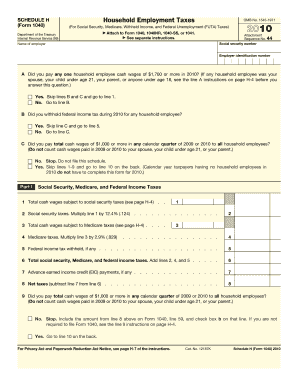
- Begin by entering your social security number and the name of the employer. Ensure that these details are accurate as they are critical for identification.
- Next, answer the questions regarding household employee wages. If you paid any one household employee cash wages of $1,700 or more in the year, select 'Yes' and continue to line 1. If 'No,' proceed to line B.
- For line B, indicate whether you withheld federal income tax for any household employee in 2010. If 'Yes,' skip to line 5. If 'No,' move on to line C.
- Complete line C by determining if you paid a total of $1,000 or more in cash wages in any calendar quarter of 2009 or 2010 to all household employees. If 'No,' you do not need to file this schedule. If 'Yes,' go to line 10 on the back.
- In Part I, calculate your cash wages subject to social security taxes. Enter the total in line 1, then calculate the social security taxes by multiplying line 1 by 12.4%, and enter this amount in line 2.
- Continue in Part I by calculating the total cash wages subject to Medicare taxes; enter the amount in line 3 and calculate the Medicare taxes by multiplying this by 2.9%, placing it in line 4.
- Add lines 2, 4, and 5 to find your total social security, Medicare, and federal income taxes, and enter the total in line 6.
- If you received advance earned income credit payments, enter that amount in line 7, then calculate your net taxes by subtracting line 7 from line 6 and entering this result in line 8.
- Continue by assessing if you need to complete Part II for Federal Unemployment (FUTA) Tax. Depending on your answers to questions 10-12, either complete Section A or Section B, listing the necessary details about state unemployment contributions.
- Once completed, ensure all relevant calculations are accurate, and enter the totals as required on the form. Complete Part III and ensure to check whether you are required to file Form 1040.
- In Part IV, fill out your address and signature details only if required. Review the declaration statement and confirm that you declare the schedule is true and correct.
- Finally, save your changes, and you may choose to download, print, or share the form as necessary.
Complete your IRS forms online with confidence and ease to ensure compliance and accuracy.
Get form
Experience a faster way to fill out and sign forms on the web. Access the most extensive library of templates available.
Related links form
Schedule B is an attachment to IRS Form 1040 that is used to report interest and dividend income. If you receive more than a certain amount of interest or dividends in a year, you must fill out this schedule to accurately inform the IRS. Using Schedule B ensures that you comply with tax regulations while also allowing you to claim any necessary deductions associated with this income.
Get This Form Now!
Use professional pre-built templates to fill in and sign documents online faster. Get access to thousands of forms.