Get Irs 1040 - Schedule H 2017
How it works
-

Open form follow the instructions
-

Easily sign the form with your finger
-

Send filled & signed form or save
How to fill out the IRS 1040 - Schedule H online
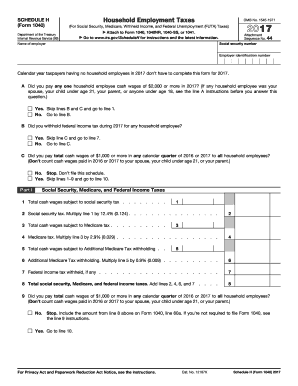
Filling out the IRS 1040 - Schedule H is an essential step for taxpayers with household employees. This guide will provide comprehensive, step-by-step instructions to help you complete the form accurately and efficiently online.
Follow the steps to fill out Schedule H accurately and effortlessly.
- Click ‘Get Form’ button to obtain the form and open it in the editor.
- Begin by entering your social security number in the designated field. This is crucial for identification and processing purposes.
- Next, provide your name in the field labeled 'Name of employer'. Ensure that you use your legal name as it appears on other tax documents.
- Enter your employer identification number in the appropriate field. This number is important for tax identification related to household employment.
- Respond to question A regarding cash wages paid to any household employee. If you paid any employee $2,000 or more, skip to line 1. If not, proceed to line B.
- For question B, indicate whether you withheld federal income tax in 2017. If yes, you can skip line C and move to line 7.
- If you answered 'no' to both questions A and B, you will answer question C regarding total cash wages. If your total was $1,000 or more in any calendar quarter for the specified years, you will proceed to line 10.
- In Part I, report the total cash wages subject to social security tax on line 1, and calculate the social security tax by multiplying line 1 by 12.4% on line 2.
- Continue to complete the medical tax calculations on lines 3 and 4 similarly, following the percentage guidelines provided.
- Proceed to complete lines 6 through 9 as indicated, which summarize the federal income tax, social security, and Medicare taxes calculated.
- In Part II, answer questions 10 through 12 regarding federal unemployment tax, ensuring you check 'Yes' or 'No' accurately.
- Complete either Section A or Section B based on your answers from the previous step, calculating any required FUTA taxes.
- In Part III, add the taxes calculated and ensure the totals are accurate for the final reporting.
- At the final step, review your entries for both accuracy and completeness, then save changes, download, print, or share the finished document as needed.
Be proactive and complete your IRS forms online to ensure timely and accurate submissions.
Get form
Related links form
Schedules 1, 2, and 3 are various forms that supplement the IRS 1040, each serving unique functions. Schedule 1 is used for additional income and adjustments to income, while Schedule 2 covers additional taxes owed. Schedule 3 addresses nonrefundable credits. All these schedules can create a comprehensive view of your taxes, including aspects like those found in the IRS 1040 - Schedule H, which can streamline your filing process.