Loading
Get De Dor 200-c 2015
How it works
-

Open form follow the instructions
-

Easily sign the form with your finger
-

Send filled & signed form or save
How to fill out the DE DoR 200-C online
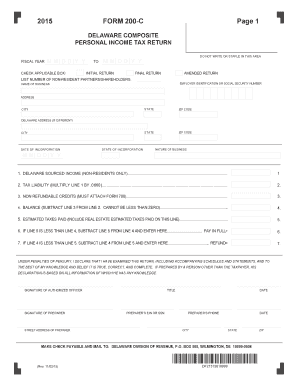
Filling out the DE DoR 200-C is an essential task for non-resident shareholders and partners in Delaware. This guide will provide comprehensive, step-by-step instructions to assist you in completing the form accurately and efficiently online.
Follow the steps to complete the DE DoR 200-C form online.
- Click 'Get Form' button to obtain the form and open it in the editor.
- Select the applicable fiscal year and check the corresponding box indicating whether this is your initial, final, or amended return.
- List the number of non-resident partners or shareholders in the designated field. This information is crucial for the processing of your return.
- Enter the employer identification number or social security number in the appropriate box. Ensure this number is correct to avoid processing delays.
- Fill in the name and address of the business, including city, state, and ZIP code. If the Delaware address differs, complete the separate Delaware address section.
- Indicate the date of incorporation and the state of incorporation to provide further identification of the business.
- Describe the nature of the business succinctly, ensuring clarity regarding the activities conducted.
- Input the Delaware sourced income amount for non-residents only in line 1.
- Calculate the tax liability by multiplying the amount from line 1 by 0.0660. Enter this total in line 2.
- List any non-refundable credits on line 3, ensuring to attach Form 700 if applicable.
- Subtract line 3 from line 2 to determine the balance owed on line 4. Note that this amount cannot be less than zero.
- Enter any estimated taxes that have been paid on line 5, including real estate estimated taxes.
- If the amount on line 5 is less than line 4, enter the difference on line 6. This represents the amount due.
- If line 5 exceeds line 4, calculate the refund by subtracting line 4 from line 5 and enter this amount on line 7.
- Lastly, ensure the form is signed and dated by an authorized officer or preparer, including their contact information. This final step affirms the accuracy of the submitted information.
- Review all entries for accuracy, save changes, and then download, print, or share the completed form as needed.
Complete your DE DoR 200-C form online today to ensure timely and accurate filing.
Get form
Experience a faster way to fill out and sign forms on the web. Access the most extensive library of templates available.
Yes, Delaware imposes state income tax on non-residents who earn income within the state. This includes income from Delaware-based jobs or investments. Non-residents should complete the DE DoR 200-C form to ensure they file their taxes correctly. It's essential to recognize your tax obligations to avoid any penalties.
Get This Form Now!
Use professional pre-built templates to fill in and sign documents online faster. Get access to thousands of forms.