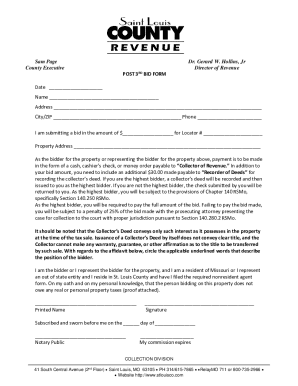
Sam Page County ExecutiveQuentin Wilson Director of RevenueDate Name Address City/ZIP Phone I am submitting a bid in the amount of $ for Locator # Property Address As the bidder for the property or.
Open form follow the instructions
Easily sign the form with your finger
Send filled & signed form or save
How to fill out the MO Post Third Sale Bid Form online
The MO Post Third Sale Bid Form is a key document for individuals looking to submit a bid for property at a tax sale. This guide provides clear instructions to help users complete the form accurately and efficiently online.
Follow the steps to fill out the MO Post Third Sale Bid Form online.
- Click ‘Get Form’ button to obtain the form and open it in the editor.
- Fill in the date at the top of the form, ensuring that it is current and reflects the day you are submitting the bid.
- Enter your name in the designated space. It is essential to provide your full legal name as it will appear on any official documents regarding the sale.
- Complete the address section with your full address, including street address, city, and ZIP code. This will establish your identity and contact information.
- Input your phone number, ensuring it is a number where you can be reached for any follow-up communications regarding your bid.
- State the bid amount you are submitting clearly. This is the total price you are willing to pay for the property.
- Fill in the locator number provided on the auction listing for the property you are bidding on. This aids in correctly identifying the property.
- Provide the property address for the property you are bidding upon to verify your intended purchase.
- Ensure you include the required payment details. Specify your payment type, which can be cash, cashier’s check, or money order, and remember to add the additional $30.00 for the Recorder of Deeds.
- Review the section related to tax obligations. Confirm that the person bidding does not owe any real or personal property taxes and attach the necessary proof.
- Circle the appropriate underlined options indicating your position related to the bidding.
- Sign the form in the designated area, providing your printed name below your signature.
- Complete the affidavit section with the notarization, ensuring it is signed by a Notary Public.
- Finally, save the changes you made to the form, and download the completed document for your records. You may also print or share the form as needed.
Compete your documents online and make your bid today!
Experience a faster way to fill out and sign forms on the web. Access the most extensive library of templates available.
Related content
Central Avenue, Clayton, MO 63105 – Ph: 314. 615.7865. BackTaxTeam@stlouiscountymo.gov...
This system is designed to streamline the competitive process for both UM Procurement and...
May 7, 2018 — The Technical College of the Lowcountry is requesting bids from a third...
Get answers to your most pressing questions about US Legal Forms API.
How to prepare a bid document example?
To prepare a bid document example for the MO Post Third Sale Bid Form, gather all necessary information relevant to the property and your bidding strategy. Create a document that reflects the required structure and information, such as personal details, property specifics, and a clear bid amount. This example will serve as a useful reference when you fill out your own bid.
What is a bid form?
A bid form is a document used to formally submit an offer on a property during a tax sale. For the MO Post Third Sale Bid Form, it captures essential details like your bid amount and personal information. This form is a critical component of participating in tax sales in Missouri.
How to fill out a bid?
Filling out a bid involves several key steps, similar to those for the MO Post Third Sale Bid Form. Start by providing your identification and the specific property details. Then, enter your bid amount and any additional required information. Carefully verify that everything is filled in correctly before you submit.
What is a bid sample?
A bid sample serves as a template or example of how to complete a bid form for tax sales. It includes the necessary fields you must fill in, allowing you to see what a well-prepared bid looks like. Utilizing a bid sample can help you better understand the requirements of the MO Post Third Sale Bid Form.
What is the redemption period for tax sales in Missouri?
In Missouri, the redemption period for tax sales typically lasts for one year. During this time, property owners can reclaim their properties by paying the owed taxes along with applicable interest and fees. Understanding this period is crucial when dealing with the MO Post Third Sale Bid Form, as it affects your bidding strategy.
How to fill out a bid form?
To fill out a bid form for the MO Post Third Sale Bid Form, start by entering your personal information, including your name and contact details. Next, specify the property details, including the tax identification number and the amount you intend to bid. Make sure to review all the information for accuracy before submitting your form.
How many years can you be behind on property taxes in Missouri?
§ 140.150, § 140.190). A tax sale must happen within three years, though state law permits an earlier sale if the taxes are delinquent.
What is the redemption period for tax sale in Missouri?
In Missouri, you can ordinarily redeem your home within one year after the tax sale and up until the purchaser gets the deed to your home—if the property sells on the collector's first or second sale attempt.
How long does a Missouri tax lien last?
Unless sooner released or discharged, the lien shall expire ten years after the certificate of lien was filed, unless within such ten-year period, the certificate of lien has been refiled by the director of revenue with the recorder.
How to buy delinquent tax properties in Missouri?
If you are a Missouri resident, at least 18 years of age, and you provide the collector with an affidavit attesting that you owe no delinquent property taxes, then you are eligible to bid; the affidavit can be downloaded from this website.
Use professional pre-built templates to fill in and sign documents online faster. Get access to thousands of forms.
If you believe that this page should be taken down, please follow our DMCA take down process here.