Loading
Get Oh It 1040es 2017
How it works
-

Open form follow the instructions
-

Easily sign the form with your finger
-

Send filled & signed form or save
How to fill out the OH IT 1040ES online
The OH IT 1040ES form is used for making estimated income tax payments in Ohio. Understanding how to properly fill out this form is essential for compliance and to avoid penalties. This guide provides a step-by-step approach to completing the OH IT 1040ES online.
Follow the steps to effectively complete your OH IT 1040ES form.
- Click ‘Get Form’ button to obtain the form and open it in the editor.
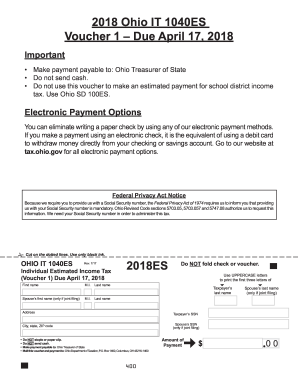
- Fill in the taxpayer's information. Enter the first name and last name in the designated fields. Include the taxpayer's middle initial if applicable. If filing jointly, provide the spouse's first and last names as well.
- Input the taxpayer's Social Security Number (SSN) and the spouse's SSN if applicable. It is essential to enter accurate SSNs as requested due to legal requirements.
- Provide the address details, including the city, state, and ZIP code. Ensure that the address is written clearly and accurately.
- Identify the amount of the payment in the allocated space on the form. This amount is based on the estimated tax owed.
- Double-check all entries for accuracy. Review the form to ensure that there are no discrepancies in the provided information.
- Prepare your payment by making it payable to the Ohio Treasurer of State. You may choose to pay via a check or money order. Please note that cash payments are not accepted.
- Mail the completed voucher along with the payment to the Ohio Department of Taxation at the specified address: P.O. Box 1460, Columbus, OH 43216-1460.
- If you wish to save your changes, download, print, or share the form, make sure to perform those actions before concluding your session.
Ensure compliance and avoid penalties by completing your OH IT 1040ES online today.
Get form
Experience a faster way to fill out and sign forms on the web. Access the most extensive library of templates available.
You can file your Ohio IT 1040 form online or by mail, based on your preference. If you choose to e-file, several software options simplify this process and enhance accuracy. Ensure you follow the guidelines provided by the Ohio Department of Taxation for a smooth submission.
Get This Form Now!
Use professional pre-built templates to fill in and sign documents online faster. Get access to thousands of forms.