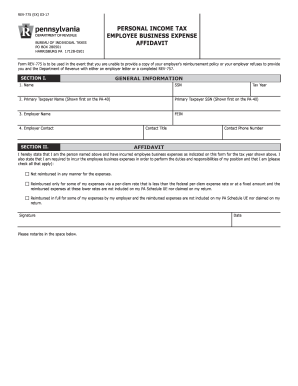
REV775 (EX) 0317BUREAU OF INDIVIDUAL TAXES PO BOX 280501 HARRISBURG PA 171280501PERSONAL INCOME TAX EMPLOYEE BUSINESS EXPENSE AFFIDAVITForm REV775 is to be used in the event that you are unable to.
Open form follow the instructions
Easily sign the form with your finger
Send filled & signed form or save
How to fill out the PA REV-775 EX online
The PA REV-775 EX form is a crucial document for individuals claiming employee business expenses when reimbursement policies or necessary documents cannot be provided. This guide offers a clear, step-by-step approach to filling out the form online, ensuring accurate completion.
Follow the steps to successfully complete your PA REV-775 EX form online.
- Press the ‘Get Form’ button to access the form and open it in the designated editor.
- In Section I, provide your general information. Fill in your name and social security number (SSN) for identification purposes, followed by the tax year for which you are filing.
- In the Affidavit section, affirm that you are the individual mentioned earlier and that you have incurred the stated employee business expenses. Indicate whether you are reimbursed for these expenses and check the appropriate boxes based on your situation.
- Sign and date the form. Ensure you print the document before signing to fulfill the requirement of providing a physical signature.
- Proceed to Section III, the Expense Summary Worksheet. Here, specify the part number of the PA Schedule UE where the expenses are claimed.
- Ensure that photocopied receipts supporting the claimed expenses are included, and confirm that all expenses are clearly identified. After completing the form, you can opt to save your changes, download, print, or share the form.
Take the first step towards filing your documents online by completing the PA REV-775 EX form today.
Experience a faster way to fill out and sign forms on the web. Access the most extensive library of templates available.
Related content
Form REV-775 is to be used in the event that you are unable to provide a copy of your...
by WJ Ollinger · 1967 — PA. L REV. 775 (1960); Hale & Hale, Competition or. Control IV;...
Sep 16, 2013 — This revenue ruling determines the status of individuals of the same-sex...
Get answers to your most pressing questions about US Legal Forms API.
How to get a PA tax transcript?
To get a PA tax transcript, navigate to the Pennsylvania Department of Revenue's website and access the transcript request section. You will need your personal and tax information handy to complete the request. This process allows you to retrieve your PA REV-775 EX transcripts easily and securely.
What is the quickest way to get a tax transcript?
The quickest way to obtain a tax transcript in Pennsylvania is to use the online services provided by the Pennsylvania Department of Revenue. Simply log into your account and follow the prompts to request your transcript. This method allows for immediate access to your PA REV-775 EX-related documents.
Can you claim union dues on PA state taxes?
Yes, you can claim union dues on your PA state taxes. These dues qualify as unreimbursed employee expenses that you should report on your tax return. By doing so, you may enhance your refund or lower your tax liability when filing your PA REV-775 EX.
What is PA schedule UE?
PA Schedule UE is a form used to report unreimbursed employee expenses in Pennsylvania. It allows workers to claim deductions for work-related expenses that their employers did not reimburse. If you have expenses associated with your job, completing this form can help you reduce your taxable income on your PA REV-775 EX.
How do I check my PA state taxes?
You can check your PA state taxes by visiting the Pennsylvania Department of Revenue's official website. There, you will find options to view your tax status and any outstanding balances. Utilizing this resource can give you a clear understanding of your PA REV-775 EX obligations.
How do I access previous tax returns?
Accessing previous tax returns in Pennsylvania is straightforward. You can request copies through the Pennsylvania Department of Revenue's online portal. This online service allows you to retrieve past documents, including your PA REV-775 EX forms and other related returns.
How do I get a copy of my PA sales tax certificate?
To obtain a copy of your PA sales tax certificate, you can visit the Pennsylvania Department of Revenue's website. You may need to provide your business details, including your sales tax account number. This process ensures you have the necessary documentation for your records or for any tax obligations.
Can you make payments on PA state taxes?
Yes, you can make payments on your PA state taxes in various ways. Options include electronic payments, checks through the mail, or even credit card payments for added convenience. For more information on payment options, check the PA REV-775 EX, which offers guidance on managing your state tax obligations smoothly.
Can you claim union dues on PA taxes?
Yes, you can claim union dues on your Pennsylvania tax return. This deduction can help reduce your taxable income, but it must be reported accurately. To navigate the claiming process, refer to the PA REV-775 EX to ensure all requirements are met effectively.
What is the PA Schedule E?
PA Schedule E is a form that reports income or loss from partnerships, S corporations, estates, or trusts in Pennsylvania. It's crucial for taxpayers who receive income from these sources to accurately fill out Schedule E. By referencing the PA REV-775 EX, you can find detailed information on how to complete this form and properly report your earnings.
Use professional pre-built templates to fill in and sign documents online faster. Get access to thousands of forms.
If you believe that this page should be taken down, please follow our DMCA take down process here.
This form is available in several versions. Select the version you need from the drop-down list below.