Get Ca Ftb 3557 A Bc 2016-2026
How it works
-

Open form follow the instructions
-

Easily sign the form with your finger
-

Send filled & signed form or save
How to fill out the CA FTB 3557 A BC online
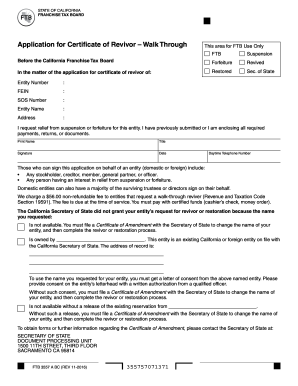
Filling out the CA FTB 3557 A BC form is essential for individuals seeking to apply for a certificate of revivor in California. This guide provides clear, step-by-step instructions on how to complete this form online, ensuring a smooth process for all users.
Follow the steps to complete the CA FTB 3557 A BC online.
- Click ‘Get Form’ button to obtain the form and open it in the editor for your convenience.
- Fill in the required details in the designated fields, including your entity number, FEIN, SOS number, and entity name.
- Provide the current address of your entity in the designated section, ensuring all information is accurate.
- Indicate your request for relief from suspension or forfeiture by checking the appropriate box.
- If applicable, submit any required payments, returns, or documents that relate to your request. This may include prior submissions if necessary.
- Fill in your name, title, and signature, followed by the date of completion.
- Enter a daytime telephone number where you can be reached for any follow-up.
- Review all entered information carefully for accuracy and completeness.
- Once satisfied with the information on the form, save your changes and choose an option to download, print, or share the form as needed.
Take action now and complete your CA FTB 3557 A BC form online to ensure your application is processed promptly.
Yes, you can reinstate a terminated LLC in California, but specific steps must be followed to ensure compliance. You need to file the necessary paperwork, including any outstanding tax returns and payments, to the CA FTB. Part of this process may involve submitting the CA FTB 3557 A BC form to indicate your intention to correct any prior issues. For assistance, uslegalforms provides resources to streamline the reinstatement of your LLC.