Loading
Get Il St-4-x 2001-2026
How it works
-

Open form follow the instructions
-

Easily sign the form with your finger
-

Send filled & signed form or save
How to fill out the IL ST-4-X online
Filling out the IL ST-4-X form online can be a straightforward process when you understand each section. This guide provides step-by-step instructions to ensure you complete the form correctly and efficiently.
Follow the steps to complete the IL ST-4-X form accurately.
- Click ‘Get Form’ button to obtain the form and open it in the online editor.
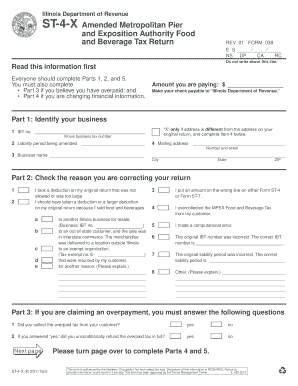
- In Part 1, identify your business. Enter your Illinois business tax (IBT) number, the liability period being amended, and your mailing address. Make sure to specify your business name and city, state, and ZIP code.
- In Part 2, check the reason for correcting your return. Select the appropriate box that corresponds to your situation, such as overpayment or correcting previous deductions.
- If claiming an overpayment, complete Part 3 by answering the questions regarding the collection and refund of overpaid tax.
- In Part 4, accurately correct your financial information. Input figures in the designated columns: Most recent figures filed and figures as they should have been filed. Calculate the taxable receipts, tax due, discounts, penalties, and any payments due.
- In Part 5, sign the form indicating that the information provided is accurate and complete. Include your title and contact information.
- Once all sections are completed and reviewed, you can save changes, download, print, or share the form as needed.
Complete your documents online today for a streamlined filing experience.
Filing Illinois state taxes as a non-resident involves reporting any income earned within the state. You can utilize the IL ST-4-X form for this purpose, as it allows you to declare your earnings accurately. It's crucial to understand the specific requirements for non-residents to avoid penalties. The uslegalforms platform provides helpful resources to ensure your filing is correct and compliant.