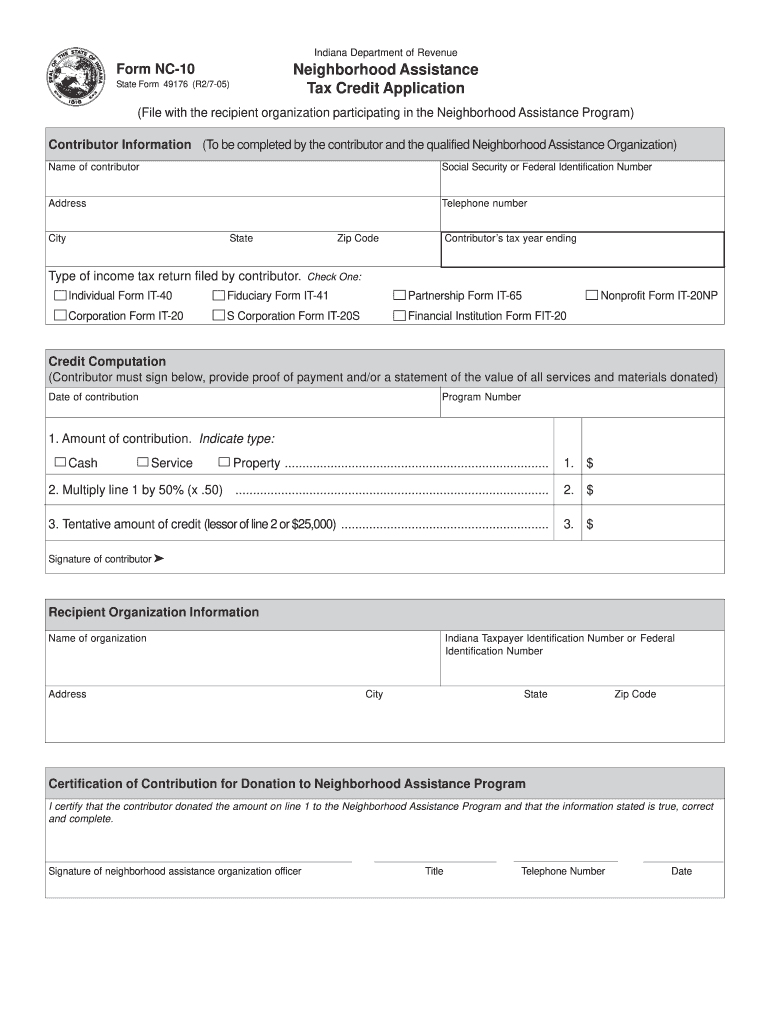
State Form 49176 (R2/7-05). Indiana Department of Revenue. Neighborhood Assistance. Tax Credit Application. (File with the recipient organization .
Loading

Open form follow the instructions

Easily sign the form with your finger

Send filled & signed form or save
How to fill out the IN DoR NC-10 online
The Indiana Department of Revenue Neighborhood Assistance Tax Credit Application, also known as the IN DoR NC-10 form, is designed for contributors wishing to support eligible organizations. This guide will provide you with clear, step-by-step instructions for successfully completing this form online.
Follow the steps to complete the IN DoR NC-10 form online.
- Click ‘Get Form’ button to access the NC-10 form and open it in your preferred editor.
- Fill out the contributor information section, including the name of the contributor, social security or federal identification number, address, telephone number, city, state, and zip code.
- Indicate the type of income tax return filed by the contributor. Select one of the options provided, such as Individual Form IT-40 or Partnership Form IT-65.
- Enter the contributor’s tax year ending date in the designated field.
- In the credit computation section, provide the date of contribution and the program number.
- Indicate the amount of contribution, specifying the type as cash, service, or property, and enter the corresponding dollar amount.
- Calculate the amount for line 2 by multiplying the amount on line 1 by 50%. Enter this value into the appropriate field.
- Determine the tentative amount of credit by indicating the lesser of line 2 or $25,000, and fill in this value.
- The contributor must sign the form in the provided space.
- Complete the recipient organization information by entering the name, Indiana taxpayer identification number or federal identification number, address, city, state, and zip code.
- The officer of the neighborhood assistance organization must certify the contribution by signing the form, providing their title, telephone number, and date.
- After reviewing all the entered information for accuracy, you can save changes, download the completed form, print it, or share it as needed.
Complete your IN DoR NC-10 form online today to support organizations in your community.
Experience a faster way to fill out and sign forms on the web. Access the most extensive library of templates available.
Related content
The gross premium tax return for protected cell captive insurance companies is due on or...
AN ACT TO ENACT THE NORTH CAROLINA PROVIDING ACCESS TO CAPITAL FOR ENTREPRENEURS AND SMALL...
Use two #10-24 x 3/8" mounting screws provided in hex mounting package to mount hex guide...
Get answers to your most pressing questions about US Legal Forms API.
Como usar o Principia NC-10 Niacinamida?
Para usar o Principia NC-10 Niacinamida, aplique uma pequena quantidade no rosto limpo. Massageie suavemente até completa absorção. Incorporar esse produto na sua rotina de cuidados diários, junto com o IN DoR NC-10, é a chave para resultados notáveis. Tenha também atenção a como sua pele responde ao produto.
Para que serve a Niacinamida 10%?
A Niacinamida 10% é um ingrediente ativo que melhora a barreira natural da pele e reduz a inflamação. Ele ajuda a regular a produção de óleo, tornando-se benéfico para todos os tipos de pele. Integrá-la com o IN DoR NC-10 pode maximizar os efeitos positivos. Muitas pessoas relatam melhorias significativas na clareza da pele ao usar Niacinamida.
O que é o princípio NC10?
O princípio NC10 é um tratamento avançado desenvolvido para regenerar a pele. Ele combina ingredientes especializados que otimizam a saúde dérmica. Utilizar o IN DoR NC-10 pode tornar sua pele visivelmente mais saudável. Essa fórmula se destaca pela sua eficácia em melhorar a textura da pele.
Para que serve a vitamina C10 da Principia?
A vitamina C10 da Principia é essencial para combater os sinais de envelhecimento. Ela ajuda a iluminar a pele e a reduzir manchas escuras. Incorporá-la ao seu regime de cuidados, junto com o IN DoR NC-10, pode oferecer uma pele mais clara e saudável. É uma escolha eficaz para quem busca rejuvenescimento.
Quando usar o NC 10 da Principia?
Recomenda-se usar o NC 10 da Principia diariamente em sua rotina de cuidados com a pele. Aplicá-lo pela manhã e à noite maximiza seus benefícios. Certifique-se de limpar bem a pele antes da aplicação para obter melhores resultados. O IN DoR NC-10 se integra facilmente a outros produtos de skincare.
Para que serve o princípio NC 10?
O princípio NC 10 é uma fórmula desenvolvida para melhorar a saúde da pele. Ele age promovendo a restauração e a proteção celular. Além disso, ajuda a uniformizar o tom da pele, tornando-a mais radiante. Usar o IN DoR NC-10 pode trazer ótimos resultados para a sua rotina de cuidados.
How to file for a title in NC?
Filing for a title in North Carolina involves submitting the NC title application along with any required documents and fees to your local DMV. Ensure that all information is filled out correctly to avoid processing delays. The IN DoR NC-10 provides comprehensive guidance on the filing process, making it easier for you to complete this task confidently.
What needs to be filled out on an NC title?
On an NC title, you need to fill out fields such as the owner's name, vehicle identification number, and odometer reading. It's also important to include pertinent seller information and signatures. Ensuring all details are completed will facilitate the title transfer process, allowing you to use tools like the IN DoR NC-10 for proper instructions.
When to fill form 10?
You should fill out form 10 when you are required to report a title transfer or when a vehicle is being registered for the first time in North Carolina. Completing it promptly after acquisition of a vehicle ensures compliance with state regulations. The IN DoR NC-10 clearly outlines the timelines for filling this form, preventing any unnecessary penalties.
How to apply for an NC withholding number?
To apply for an NC withholding number, you'll need to fill out the appropriate forms available through the North Carolina Department of Revenue. Supply required information about your business and its tax responsibilities. This process can seem complex, but resources like the IN DoR NC-10 can help guide you step-by-step through the application.
Use professional pre-built templates to fill in and sign documents online faster. Get access to thousands of forms.
If you believe that this page should be taken down, please follow our DMCA take down process here.