Loading
Form preview
  • US Legal Forms
  • Other Templates
  • Tax Forms
  • Vermont Tax Forms
  • Vt 8879-vt-c 2014

Get Vt 8879-vt-c 2014-2026

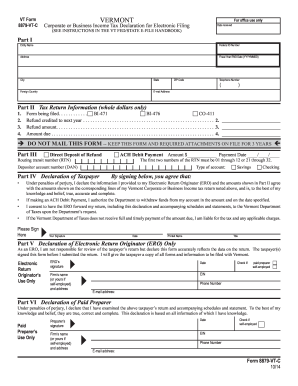
VT Form 8879VTC VERMONT For office use only Corporate or Business Income Tax Declaration for Electronic Filing Date received (SEE INSTRUCTIONS IN THE VT FED/STATE EFILE HANDBOOK) Part I Entity Name.

How it works

  1. Open form

    Open form follow the instructions

  2. Easily sign form

    Easily sign the form with your finger

  3. Share form

    Send filled & signed form or save

How to fill out the VT 8879-VT-C online

The VT 8879-VT-C is a crucial document for the submission of corporate or business income tax declarations for electronic filing in Vermont. This guide provides a step-by-step approach to assist users in completing the form accurately and efficiently.

Follow the steps to fill out the VT 8879-VT-C online.

  1. Click the ‘Get Form’ button to access the VT 8879-VT-C. This will open the form in an online editor for your convenience.
  2. Fill in the entity name, federal ID number, and complete address in Part I. Ensure accuracy to avoid any filing issues.
  3. Provide the fiscal year end date in the format YYYYMMDD, along with the city, state, telephone number, foreign country (if applicable), email address, and ZIP code.
  4. In Part II, enter whole dollar amounts for the tax return information. Specify the form being filed (BI-471, BI-476, or CO-411) and complete the sections for refund amounts and amounts due appropriately.
  5. If applicable, select the options for direct deposit of refund or ACH debit payment in Part III. Fill out the payment amount, date, routing transit number (RTN), and depositor account number.
  6. Sign and date the declaration in Part IV, affirming the accuracy of the information provided. Include your printed name and title.
  7. If an Electronic Return Originator (ERO) or paid preparer is involved, ensure they complete their sections in Parts V and VI, respectively, with signatures, firm details, and dates.
  8. Once all fields are completed, save your changes and consider downloading or printing the form for your records.

Complete your VT 8879-VT-C online today to ensure a smooth filing process.

Get form

Experience a faster way to fill out and sign forms on the web. Access the most extensive library of templates available.
Get form

Related content

Forms and Instructions
Corporate and Business Income Tax Forms and Instructions, Tax Year 2024 Estate and...
Learn more
Board of Visitors Meeting - August 18-20, 2025...
Aug 7, 2025 — ... C. Full Board Meeting - Announcements. • Introduction of New Board...
Learn more
Distribution and Fate of Energetics on DoD Test...
by R Engineer · 2006 · Cited by 39 — This report was prepared under contract to the...
Learn more

Related links form

Sample Character Letter To Judge ESSA DCL Key Protection For Children In Foster Care December 5 ... - Www2 Ed Construction Payment Request Form Lakestone Bank And Trust

Questions & Answers

Get answers to your most pressing questions about US Legal Forms API.

Contact support

You can obtain the VT 8879-VT-C easily through online tax filing services, like uslegalforms, that support electronic submission of tax documents. After entering your tax details into their platform, you will have the option to generate your 8879 form promptly. Additionally, you can download a template if needed, making it accessible and convenient for you to complete your tax obligations without hassle.

While the VT 8879-VT-C is not mandatory for all taxpayers, it is crucial for those filing electronically. This form acts as a signature authorization, and not using it may delay your e-filing or lead to rejection. If you plan to e-file your tax return, submitting the VT 8879-VT-C can streamline the process and enhance your filing experience.

If you have the VT 8879-VT-C but face issues during e-filing, it is essential to review the information you provided. Ensure all data is correct and that you have properly signed the form. If you need assistance, consider consulting with the uslegalforms platform, which provides resources and support to walk you through any complications related to the form and e-filing process.

Form VT 8879-VT-C is not universally required, but it plays a critical role in the e-filing process. If you choose to submit your tax return electronically, using this form verifies your signature and consent. While some individuals may qualify to e-file without it, it's generally advisable to include the VT 8879-VT-C to ensure compliance and avoid potential processing issues.

Generating the VT 8879-VT-C is a straightforward process. You can easily create this form using online tax software or platforms, such as uslegalforms, that offer integrated solutions for tax filing. Simply enter your tax information into the software, and it will produce the VT 8879-VT-C for you to review and sign. This efficient method saves you time and ensures accuracy in your tax submissions.

The key difference between Form 8453 and Form 8879 lies in their usage. Form 8453, also known as the U.S. Individual Income Tax Declaration for an IRS e-file Return, helps you authorize the e-filing of your tax return. In contrast, the VT 8879-VT-C serves as an electronic signature authorization, allowing taxpayers to confirm their intent to e-file without needing to submit a paper version of their return. Understanding these differences helps you choose the right form for your tax filing needs.

You can get form 8879 through various tax preparation platforms, including US Legal Forms. This service allows you to easily access the VT 8879-VT-C form and complete it as part of the e-filing process. You can also download it directly from the IRS website. Ensure that you are using the most current version to avoid any filing issues.

Downloading a PDF from the IRS is straightforward. Visit the IRS website, navigate to the forms section, and locate the form you need, such as the VT 8879-VT-C. Click the download link, and a PDF file will open for you to save to your device. Ensure that you have a stable internet connection for a smooth downloading experience.

No, form 8879 is not the same as form 1040. The 1040 form is the standard individual income tax return, while the VT 8879-VT-C form specifically pertains to signature authorization for e-filing. While both forms are part of the tax filing process, they serve distinct purposes that are crucial for your tax submission. Understanding these differences can help you comply more effectively with tax requirements.

Filing form V involves a few essential steps. Start by completing the form accurately with all pertinent information. You can file the form electronically using the recommended methods or print and mail it, ensuring you adhere to any deadlines to avoid penalties.

Get This Form Now!

Use professional pre-built templates to fill in and sign documents online faster. Get access to thousands of forms.
Get form
If you believe that this page should be taken down, please follow our DMCA take down processhere.
Get VT 8879-VT-C
Get form
  • Adoption
  • Bankruptcy
  • Contractors
  • Divorce
  • Home Sales
  • Employment
  • Identity Theft
  • Incorporation
  • Landlord Tenant
  • Living Trust
  • Name Change
  • Personal Planning
  • Small Business
  • Wills & Estates
  • Packages A-Z
  • Affidavits
  • Bankruptcy
  • Bill of Sale
  • Corporate - LLC
  • Divorce
  • Employment
  • Identity Theft
  • Internet Technology
  • Landlord Tenant
  • Living Wills
  • Name Change
  • Power of Attorney
  • Real Estate
  • Small Estates
  • Wills
  • All Forms
  • Forms A-Z
  • Other Templates
  • Legal Hub
  • About Us
  • Help Portal
  • Legal Resources
  • Blog
  • Affiliates
  • Contact Us
  • Delete My Account
  • Site Map
  • Industries
  • Forms in Spanish
  • Localized Forms
  • State-specific Forms
  • Forms Kit
  • Real Estate Handbook
  • All Guides
  • Notarize
  • Incorporation services
  • For Consumers
  • For Small Business
  • For Attorneys
  • USLegal
  • FormsPass
  • pdfFiller
  • signNow
  • altaFlow
  • DocHub
  • Instapage
Form Packages
  • Adoption
  • Bankruptcy
  • Contractors
  • Divorce
  • Home Sales
  • Employment
  • Identity Theft
  • Incorporation
  • Landlord Tenant
  • Living Trust
  • Name Change
  • Personal Planning
  • Small Business
  • Wills & Estates
  • Packages A-Z
Form Categories
  • Affidavits
  • Bankruptcy
  • Bill of Sale
  • Corporate - LLC
  • Divorce
  • Employment
  • Identity Theft
  • Internet Technology
  • Landlord Tenant
  • Living Wills
  • Name Change
  • Power of Attorney
  • Real Estate
  • Small Estates
  • Wills
  • All Forms
  • Forms A-Z
  • Other Templates
Customer Service
  • Legal Hub
  • About Us
  • Help Portal
  • Legal Resources
  • Blog
  • Affiliates
  • Contact Us
  • Delete My Account
  • Site Map
  • Industries
  • Forms in Spanish
  • Localized Forms
  • State-specific Forms
  • Forms Kit
Legal Guides
  • Real Estate Handbook
  • All Guides
Prepared for you
  • Notarize
  • Incorporation services
Our Customers
  • For Consumers
  • For Small Business
  • For Attorneys
Our Sites
  • USLegal
  • FormsPass
  • pdfFiller
  • signNow
  • altaFlow
  • DocHub
  • Instapage
Social Media
Call us now toll free:
+1 833 426 79 33
As seen in:
© Copyright 1999-2026 airSlate Legal Forms, Inc. 17 Station Street, Suite 303, Brookline, MA 02445
  • Your Privacy Choices
  • Terms of Service
  • Privacy Notice
  • Content Takedown Policy
  • Bug Bounty Program