Loading
Get Mo Rd-wc - Kansas City 2012-2026
How it works
-

Open form follow the instructions
-

Easily sign the form with your finger
-

Send filled & signed form or save
How to fill out the MO RD-WC - Kansas City online
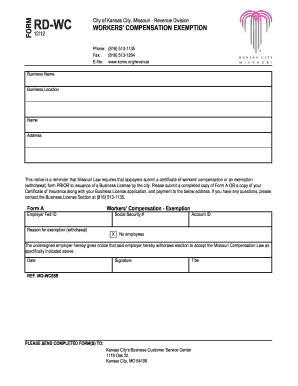
Filling out the MO RD-WC form online is essential for taxpayers in Kansas City seeking a workers' compensation exemption. This guide will provide step-by-step instructions to help users complete the form accurately and efficiently.
Follow the steps to successfully complete the form.
- Press the ‘Get Form’ button to access the form and open it in an editable format.
- Enter the business name and business location in the designated fields. Make sure the information is accurate to avoid delays.
- Fill in your name and address in the provided sections. Ensure all details are correct and clearly legible.
- In the 'Form A' section, input your Employer Federal ID. This number is crucial for identification purposes.
- Specify your reason for requesting the workers' compensation exemption or withdrawal in the designated area.
- Fill in your Social Security number and Account ID where required. Double-check this information for accuracy.
- Indicate whether you have employees by selecting ‘No employees’ if applicable.
- Sign and date the form where indicated. Your signature validates the information provided.
- Once you have completed all sections, save any changes made to the form. You can download, print, or share the completed document as needed.
Complete your documents online today to ensure timely processing.
The non-resident tax form for Kansas City is typically the same form used by residents for the earnings tax. Non-residents must accurately report their income earned within city limits. To navigate this requirement smoothly, consider exploring the resources available on the MO RD-WC - Kansas City platform.