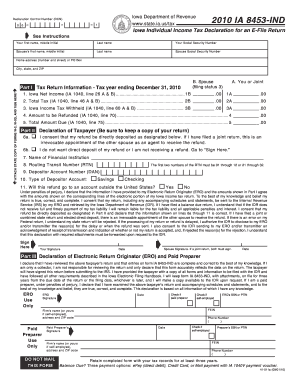
Declaration Control Number (DCN) 0 0 1 Iowa Department of Revenue www.state.ia.us/tax 2010 IA 8453-IND Iowa Individual Income Tax Declaration for an E-File Return See Instructions Your first name,.
Loading
Open form follow the instructions
Easily sign the form with your finger
Send filled & signed form or save
How to fill out the IA DoR 8453-IND online
Filing your Iowa Individual Income Tax Declaration for an E-File Return (IA DoR 8453-IND) online is a crucial step in completing your tax obligations. This guide offers a step-by-step approach to filling out the form effectively, ensuring that you understand each section and field.
Follow the steps to complete the IA DoR 8453-IND accurately.
- Click ‘Get Form’ button to obtain the form and open it in your preferred editor.
- Begin by entering your first name, middle initial, and last name in the designated fields at the top of the form.
- Input your Social Security Number in the specified area following your name.
- If applicable, enter your spouse’s first name, middle initial, last name, and their Social Security Number in the corresponding sections.
- Provide your home address, ensuring to include the number, street, city, state, and ZIP code.
- In Part I, fill in the tax return information using the amounts from your Iowa income tax return (IA 1040). This includes Iowa Net Income, Total Tax, Iowa Income Tax Withheld, Amount to be Refunded, and Total Amount Due.
- In Part II, review the declaration of taxpayer section carefully. Confirm that all information is accurate, and consent to any direct deposit options if applicable.
- Sign and date the form where requested. If filing jointly, ensure your spouse also signs and dates the form.
- If applicable, complete Part III, entering the details of the Electronic Return Originator (ERO) or paid preparer, and ensure their signature is secured as well.
- Finally, save changes to the completed form. You may choose to download, print, or share it as needed, keeping in mind to retain it for at least three years.
Complete your IA DoR 8453-IND online to ensure a smooth tax filing experience.
Experience a faster way to fill out and sign forms on the web. Access the most extensive library of templates available.
Related content
Use approved software for the Iowa electronic filing program. ○ When an IA 8453 is...
IA 1040 Instructions · Common Forms Toggle submenu. Applications and Other · Cigarette &...
A requirement of fault-free operation and fulfillment of any rights to claim under limited...
Get answers to your most pressing questions about US Legal Forms API.
Can ChatGPT make a form?
Yes, tools like ChatGPT can assist in generating forms by providing guidance and structure for your needs. However, for specific documents such as the IA DoR 8453-IND, using dedicated platforms ensures compliance with state regulations. Always verify that the final form meets legal requirements before submission.
How to use form 8453?
To use the IA DoR 8453-IND, start by gathering all necessary tax documentation and information. Follow the instructions included with the form carefully, ensuring all entries are accurate before submission. Utilizing platforms like uslegalforms can further simplify this process with easy-to-follow templates and guidance.
Where is my IA tax refund?
You can track your IA tax refund status through the Iowa Department of Revenue website by using the required information from your IA DoR 8453-IND. Typically, refunds are processed within several weeks after your form is submitted. If delays occur, contacting the department can provide clarity and assistance.
What is an IA form?
An IA form is a tax form used by residents of Iowa for various filing purposes, including income tax. The IA DoR 8453-IND is an example that facilitates the submission of your tax returns, helping ensure compliance with state regulations. Understanding these forms is crucial for accurate filing and timely refunds.
How to get an Iowa state tax ID number?
To obtain an Iowa state tax ID number, visit the Iowa Department of Revenue's website for the application forms, including the IA DoR 8453-IND if applicable. You can fill out the required information online or send in a paper form. Once your application is approved, you'll receive your tax ID number, which is essential for business operations.
What is the AI form?
The AI form usually refers to any form that incorporates artificial intelligence to simplify completion. Specifically, the IA DoR 8453-IND is designed for Iowa taxpayers, and it can leverage AI tools to guide you through the filing process. This technology can enhance user experience and ensure accuracy.
Can AI fill out a form for me?
Yes, AI can assist you in filling out forms, including the IA DoR 8453-IND. By using intelligent software, you can input your information and let the system streamline the process. This can save you time and reduce errors, making tax filing more efficient.
How to file an Iowa state tax extension?
Filing an Iowa state tax extension requires you to complete the appropriate form and submit it to the Iowa Department of Revenue before the original filing deadline. You can typically file for an extension electronically or by mail. Utilizing the IA DoR 8453-IND form can be part of this process as you prepare your tax documents, simplifying your filing experience.
How to suppress form 8453?
Suppressing the form 8453 can be achieved by configuring your e-filing software to exclude it from the submission. Ensure that your software settings align with the IRS guidelines for electronic submissions. Should you need assistance, using the uslegalforms platform can simplify this process and help you manage your tax filings with ease.
How to file for EIN in Iowa?
To file for an Employer Identification Number (EIN) in Iowa, you can apply online through the IRS website. This process is straightforward and typically takes a few minutes to complete. By obtaining an EIN, you can easily handle business taxes, including the requisite forms like IA DoR 8453-IND for your fiduciary responsibilities.
Use professional pre-built templates to fill in and sign documents online faster. Get access to thousands of forms.
If you believe that this page should be taken down, please follow our DMCA take down process here.
This form is available in several versions. Select the version you need from the drop-down list below.